
prabirk46765434
Participant
April 13, 2019
Question

content aware fill not working - waiting

  • April 13, 2019
  • 9 replies
  • 16817 views

Hi team,

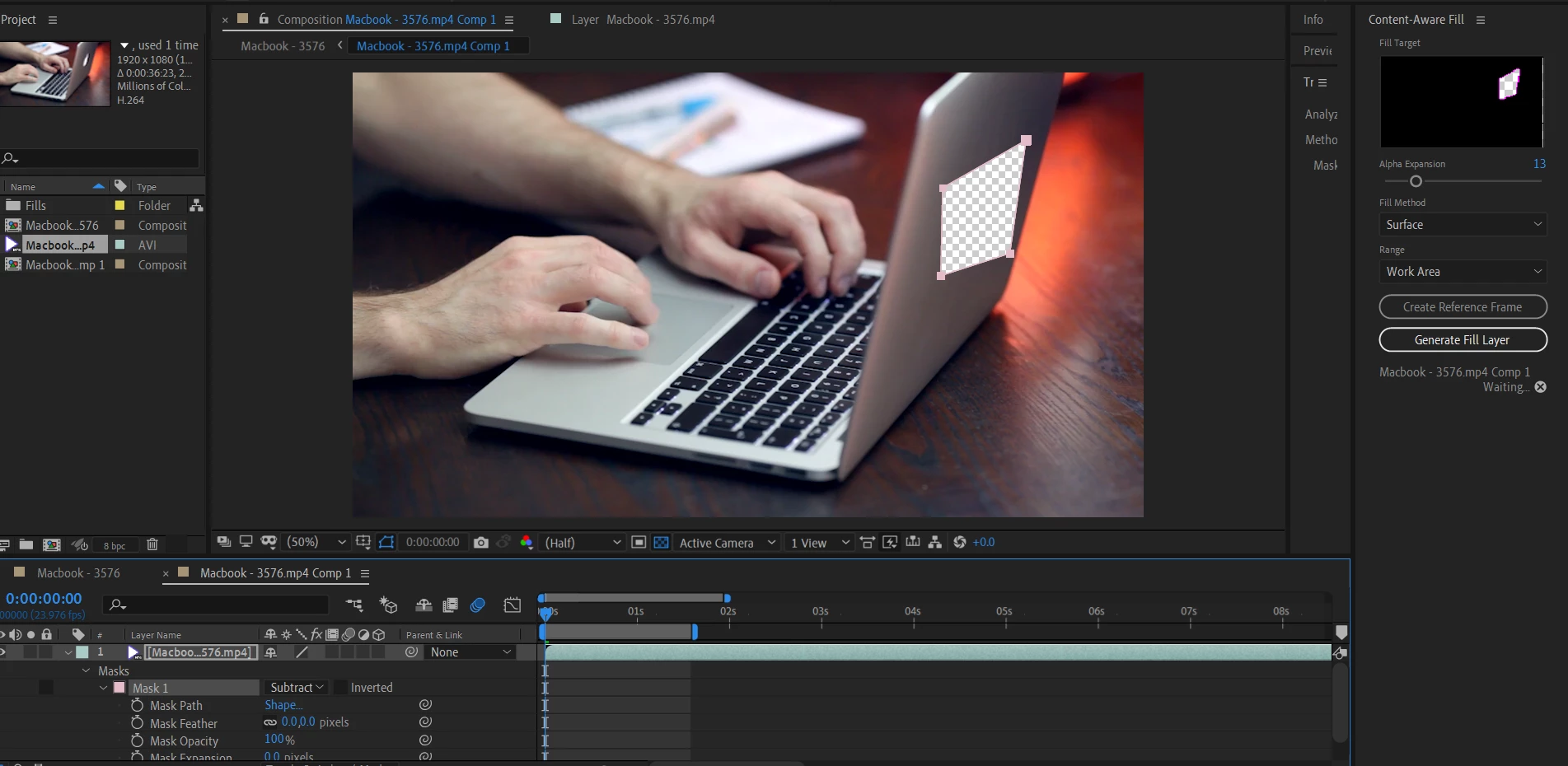
I have no idea why content aware fill not working for me, I have tried all possible way to work it , I have followed many videos in case if I am following wrong method , but still it's not working for me. it just showing WAITING without processing further.
This topic has been closed for replies.

9 replies

Inspiring
February 14, 2023

For me the problem was in the UI - 'Waiting' is just the wrong terminlogy, since Ae was actually working on creating the Fill layer. After 'watining' a while the result appeared.

I should read 'Processing...'.

Community Expert
September 10, 2022

Please make sure that your operating system and video card drivers are up to date.

Participating Frequently
September 10, 2022

Try... REMOVING ALL PRIOR EFFECTS on that section of your clip until after you've done the generate fill layer...


It worked for me after I removed the "REMOVE GRAIN" effect.   I'm guessing it couldn't handle doing the generate fill layer after that effect.  So maybe do the fill layer prior to the other effects added.  If it still doesn't work and is stuck on the "WAITING..." notice then your computer doesn't have enough power to perform the generate fill layer.  

Participant
December 28, 2020

I have blur problem .. then i use content aware fill it replace like blur ?? PLS FIX IT

Participant
September 27, 2022

just happened to me , make sure the fill method is at "object" not "edge Blur"


Participant
July 31, 2019

I just got the solution. Goto to Edit -> Preference->mredia & dis ache ..just clear it . it'll be work fine.:)

Participant
October 15, 2019
+1 - exactly the same for me, thank you!
JD14Z
Participant
June 14, 2019

Hey PrabirK,

I thought I had a similar issue until I noticed that the shot was still being analyzed. Progress percentage should display in the bottom of the Content-Aware Fill window once you hit Generate Fill Layer. After analyzing, the tool began to render individual frames at a time (you'll also see progress status in the tool window). The process took a while for me but it was a relief to see that the tool was in fact doing something.

Participant
May 22, 2022

This right here. 

Inspiring
May 9, 2019

Yeah me too

Community Expert
June 5, 2019

If you are having problems look at the good tutorials Adobe has posted on the tool. Do not be fooled by amateur advice. The workflow is fairly straight forward but if you choose the wrong options or do not prepare properly you are going to have problems. I have been using CAF since it came out without problems but I had to learn the workflow and figure out the right workflow for each type of shot I was working on. Not all shots require the same technique.

Participant
October 8, 2019
Nah, most of us are just testing the feature with simple material... It shouldn't be a problem. Adobe needs to fix this problem.
firatsakar
Participant
April 15, 2019

I have same problem too. Nothing resolve this, I tried to reinstall, but still same...

Kevin-Monahan
Community Manager
Community Manager
April 13, 2019

Hi PrabirK,

Sorry for the frustration.

  • Can you include a screenshot of your Content Aware Fill panel?
  • What is the comp size?
  • Tell us more about your hardware, as well.

Thanks,
Kevin

Kevin Monahan - Sr. Community and Engagement Strategist – Adobe Pro Video and Audio
prabirk46765434
Participant
April 13, 2019

Hi Kevin,

please find the below details,my After Effects working fine apart from Content Aware Fill issue ,I did uninstall and reinstall the software, but still this function is not working.

***screenshot of your Content Aware Fill panel

**comp size

**hardware

2gb nvidia geforce mx150 graphics

and  SSD