Exit
  • Global community
    • Language:
      • Deutsch
      • English
      • Español
      • Français
      • Português
  • 日本語コミュニティ
  • 한국 커뮤니티
0

Effect effect 2020 not responding

Community Beginner ,
Jul 08, 2020 Jul 08, 2020

Hello, just a little help here.. 

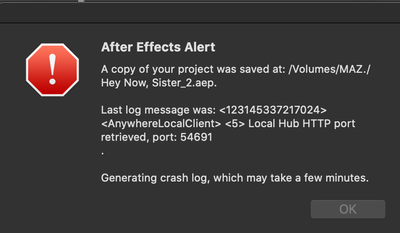
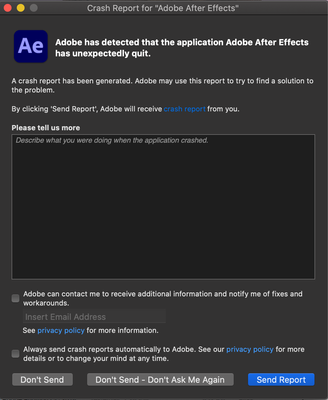
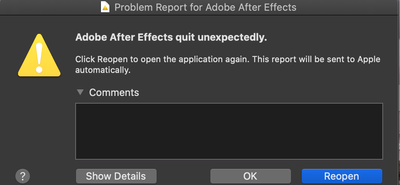
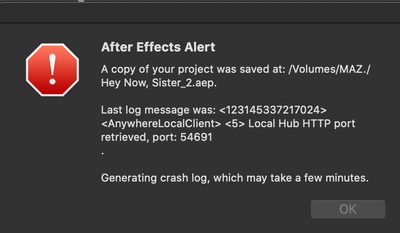
Each time I open up After Effect 2020 it comes up with the screenshot below and crashes. I have tried uninstalling it, refreshing it and tried solving the issue through youtube guidance but nothing realable seems to come up. What should I do?


-Many thanks 


Screenshot 2020-07-08 at 12.27.04.png

System info:

Mac0S Catalina

10.15.5 (19F101)


TOPICS
Error or problem , How to
2.5K
Translate
Report
Community guidelines
Be kind and respectful, give credit to the original source of content, and search for duplicates before posting. Learn more
community guidelines

correct answers 1 Correct answer

Adobe Employee , Jul 15, 2020 Jul 15, 2020

Thanks for getting back. How do you open After Effects - by double-clicking a project file or clicking on its icon? Please try the following steps:

  1. Reset the preferences of After Effects. Here's how: https://community.adobe.com/t5/after-effects/faq-how-to-reset-trash-preferences-in-after-effects/td-p/10634342?page=1
  2. Open After Effects by clicking its icon and see if After Effects works.
  3. If it works, create a new project and import your existing project in it.

Let us know how it goes.


Thanks,

...
Translate
Adobe Employee ,
Jul 08, 2020 Jul 08, 2020

Hi Mazzie,


Sorry for your issue. I see that After Effects is crashing when you try to launch it.

Does it crash every time you launch it or when you try to open a project? Also, does it show any crash report? If so, please share.

Looking forward to your response.


Thanks,

Nishu

Translate
Report
Community guidelines
Be kind and respectful, give credit to the original source of content, and search for duplicates before posting. Learn more
community guidelines
Community Beginner ,
Jul 14, 2020 Jul 14, 2020

Hi Nishu,

Aplogies for the late response. I updated my Mac, restarted my computer and it started working however today it has return to the same erorr. 

It is crashing each time I lanuch the software. and occasionally when i open a project it crashes immediately. 

And yes a crash reports appear everytime..

(Shown below) 

Screenshot 2020-07-14 at 10.35.13.png

Screenshot 2020-07-15 at 00.08.46.png


Screenshot 2020-07-08 at 12.27.04.png

Many thanks 

-Mazzie

Translate
Report
Community guidelines
Be kind and respectful, give credit to the original source of content, and search for duplicates before posting. Learn more
community guidelines
Adobe Employee ,
Jul 15, 2020 Jul 15, 2020

Thanks for getting back. How do you open After Effects - by double-clicking a project file or clicking on its icon? Please try the following steps:

  1. Reset the preferences of After Effects. Here's how: https://community.adobe.com/t5/after-effects/faq-how-to-reset-trash-preferences-in-after-effects/td-...
  2. Open After Effects by clicking its icon and see if After Effects works.
  3. If it works, create a new project and import your existing project in it.

Let us know how it goes.


Thanks,

Nishu

Translate
Report
Community guidelines
Be kind and respectful, give credit to the original source of content, and search for duplicates before posting. Learn more
community guidelines
Community Beginner ,
Jul 16, 2020 Jul 16, 2020
LATEST

Done it and the software seems be running smoothly.

Thank you very much Nishu!

Translate
Report
Community guidelines
Be kind and respectful, give credit to the original source of content, and search for duplicates before posting. Learn more
community guidelines
Community Expert ,
Jul 09, 2020 Jul 09, 2020

Try uninstalling with Creative Cloud Cleaner Tool.


Byron.
Translate
Report
Community guidelines
Be kind and respectful, give credit to the original source of content, and search for duplicates before posting. Learn more
community guidelines