


- Home
- After Effects
- Discussions
- Re: ERROR: Could not read from source. Please chec...
- Re: ERROR: Could not read from source. Please chec...
ERROR: Could not read from source. Please check the settings and try again.

Copy link to clipboard
Copied
Hello,
I get this error message everytime I try to import video footage or save the file. However, I can import images and other kind of footage.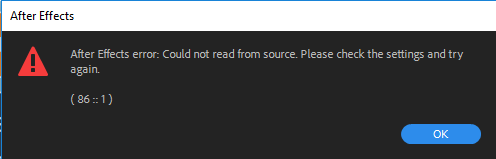
Do you know what's going on?
Thank you!


 7
Replies
7
7
Replies
7


Copy link to clipboard
Copied
Hi Arkliaiyralabaiprotingi,
Sorry for the issue. It may be an unsupported format. Which camera is the footage from? Let us know.
Thanks,
Kevin

Copy link to clipboard
Copied
i have the same question is Gif supported

Copy link to clipboard
Copied
Im getting the same error. in 2020 from a video downloaded from youtube in its high cuality, it downloaded im mp4, didnt work, converted to another mp4 with movavi converter and in mov, and non of those worked really strange. Frist time this happens.

Copy link to clipboard
Copied
same here.. did you figure it out?

Copy link to clipboard
Copied
Hi Arkliaiyralabaiprotingi,
This is a known issue with After Effects 17.0.5. Please refer to the post linked below for the most up-to-date information:
Unable to import H.264/H.265 files after updating to After Effects 17.0.5
The team is currently investigating to find the root cause of this issue. If possible, please follow the instructions in the above post and submit your system specs to help us find what is causing this problem.
Thanks very much,
- John, After Effects Quality Engineering
Copy link to clipboard
Copied
Hi All,
Please update After Effects to version 17.0.6 and re-attempt the import of footage files which were failing in 17.0.5. If this fixes the issue, please let us know.
Thanks very much,
- John, After Effects Engineering

Copy link to clipboard
Copied
Hello I have upgraded to version 17.0.6. I still get the error message. Please advice. thanks. Lia


Get ready! An upgraded Adobe Community experience is coming in January.
Learn more
 AdChoices