


fix a scrollbar

Copy link to clipboard
Copied
Hi guys,
I created a scrollbar and activate him in my script,
but wen i use scrollbar my buttons that down are cat...
what can I do to fix this?

{
var numItemsB=200;
var TheButtons=[];
for (var i=0;i<numItemsB;i++){
TheButtons.push(i);
};
var scriptName = "test";
var btnSize =40;
var scrollbar;
var btnGroup;
var AIBtns;
test1(this);
function test1(thisObj){
var myWin = ctrlMaker_buildUI(thisObj);
if (myWin instanceof Window){
// Center the palette
myWin.center();
// Show the UI
myWin.show();
}
else{
myWin.layout.resize();
};
//==========================================================================================================================
function ctrlMaker_buildUI(thisObj){
var myWin = (thisObj instanceof Panel) ? thisObj : new Window("palette", scriptName, [200, 200, 500, 400], {resizeable: true});
scrollbar = myWin.add("scrollbar");//<<<<<<<<<<<<<<<<<<<<
btnGroup = myWin.add("group", undefined);
//-------------------------------------------------------------------------------------------
AIBtns = [];
for (var i=0; i<TheButtons.length; i++){
AIBtns = btnGroup.add("button", undefined, i);
AIBtns.size = [btnSize, btnSize];
};
myWin.onResize =myWin.onResizing = ctrlMaker_doResizePanel;
myWin.onShow = ctrlMaker_doResizePanel;
return myWin;
}
//==========================================================================================================================
function ctrlMaker_doResizePanel(){
var btnOffset = btnSize + 2;
var maxRightEdge = myWin.size.width - btnOffset;
var maxBattomEdge = myWin.size.height - btnOffset;
var leftEdge = 2;
var topEdge = 2;
// Reset the background group container's bounds
scrollbar.bounds = [ myWin.size.width-22,0, myWin.size.width, myWin.size.height];
btnGroup.bounds = [0, 42, myWin.size.width, myWin.size.height];
// Reset each button's layer bounds
for (var i=0; i<TheButtons.length; i++){
AIBtns.bounds = [leftEdge, topEdge, leftEdge+btnSize, topEdge+btnSize];
AIBtns.size=[btnSize,btnSize];
leftEdge += btnOffset;
// Create a new row if no more columns available in the current row of buttons
if (leftEdge > maxRightEdge){
leftEdge = 2;
topEdge += btnOffset;
};
};
var rpws=Math.ceil(((topEdge+btnSize)-maxBattomEdge)/60);
var SBChingValue=(rpws*(60/rpws));
var AddBtnGroupheight=(topEdge+btnSize);
var SBvlu;
scrollbar.maxvalue=rpws;
scrollbar.onChanging = function () {
var children = btnGroup.children;
for (var n=0; n<children.length; n++){
btnGroup.location.y = (-SBChingValue*this.value);
};
};
btnGroup.bounds = [0, 0, myWin.size.width, myWin.size.height+AddBtnGroupheight];
};
};
}


 17
Replies
17
17
Replies
17


Copy link to clipboard
Copied
Appologies Yehuda for the delay in replying to your message. Life likes to get in the way sometimes.
So I have looked through your code and haven't found any direct cause of the issue yet, but have noticed that you have doubled the myWin variable which both are trying to check for instanceof panel back to back. I am going over your code throughout the day, as my schedule allows.
Side questions for you in the meantime. Which version of After Effects are you getting this issue? This way I can try to test in the same situation as you to narrow down what the cause may be.
So far on Mac I can get this in ESTK, but as we all have seen before just cause it works in ESTK, doesn't mean it will in AE. Annoyingly.

In AE 2014 the code won't launch due to this error at line 32:

Line 32 is:
myWin.layout.resize();
I'll let you know as soon as I find out more, and of course if anyone else finds a solution they will post it too.
Copy link to clipboard
Copied
Ok, so far I found three things...
1) Your scrollbar and btngroup objects are invalid by the time you call them in the ctrlMaker_doResizePanel function. That is preventing that function from running properly. You need to reassign the variables once the elements are created.
function ctrlMaker_doResizePanel(){
var scrollbar = myWin.children[0];
var btnGroup = myWin.children[1];
//...
2) The btnSize variable is defined outside the scope of the ctrlMaker_doResizePanel function and is not being seen. You can either define it in the function
function ctrlMaker_doResizePanel(){
var btnSize = 40;
var scrollbar = myWin.children[0];
var btnGroup = myWin.children[1];
//...
or since you already have it defined, you can pass it into the function.
function ctrlMaker_doResizePanel(btnSize){
var scrollbar = myWin.children[0];
var btnGroup = myWin.children[1];
//...
3) When you call ctrlMaker_doResizePanel, you do so without the "( )", and this basically runs the function immediately upon ExtendScript reading it when loading the script without waiting for the action to take place first (like onShow or resizing the panel) to trigger it. So when your script loads, it actually call that function twice immediately. It's better practice to include the "( )"
myWin.onResize = myWin.onResizing = ctrlMaker_doResizePanel();
myWin.onShow = ctrlMaker_doResizePanel();
If you decide to pass the btnSize variable, then...
myWin.onResize = myWin.onResizing = ctrlMaker_doResizePanel(btnSize);
myWin.onShow = ctrlMaker_doResizePanel(btnSize);
There is still an issue with the layout even with these fixes, so I am still working on it. Hopefully this will give you something to start on though.
Copy link to clipboard
Copied
Tnx for the answer,
I tried your code, but it didn't work at all.
Also it cant fix the scrollbar.
Can u fix my code or help me to find another way that works?
Im apologize for my unappropriated English.
Copy link to clipboard
Copied
Here is a fixed version. I've rearranged some of your code and removed some bits that were ultimately not needed. There are many comments throughout this code, so hopefully it helps explain what is happening, and what I've changed/moved. If there are any questions let me know.
{
function TESTING(thisObj){
//--------------------------------------------------------
var scriptName = "test";
//Button settings
var numButtons = 200;
var btnSize = 40;
//--------------------------------------------------------
function TESTING_buildUI(thisObj){
var pal = (thisObj instanceof Panel) ? thisObj : new Window("palette", "TESTING", undefined, {resizeable:true});
if (pal != null){
///Script GUI
var res = "group{orientation:'row', alignment:['fill', 'fill'], alignChildren:['fill', 'fill'],\
btnGroup: Group{orientation:'row', alignment:['fill', 'fill'], alignChildren:['left', 'top']},\
scrollbar: Scrollbar{preferredSize:[20, -1], alignment:['right', 'fill']},\
}";
///Adds UI to Panel/Window
pal.grp = pal.add(res);
///UI VARIABLES//--------------------------------------------------------
var scrollbar = pal.grp.scrollbar;
var btnGroup = pal.grp.btnGroup;
///DEFAULTS//--------------------------------------------------------
//Create buttons
var AIBtns = [];
for(var i=0; i<numButtons; i++){
AIBtns = btnGroup.add("button", undefined, i);
AIBtns.size = [btnSize, btnSize];
};
///ONCHANGING//--------------------------------------------------------
scrollbar.onChanging = function (){ /* Moved scrollbar.onChanging outside of ctrlMaker_doResizePanel function. No need to constantly reassign the onChanging attribute. This helps keep it's functionality clean and simple.*/
btnGroup.location.y = -scrollbar.value;
};
///FUNCTIONS//--------------------------------------------------------
function ctrlMaker_doResizePanel(pal, btnSize, numButtons){
//Reassign UI variables
var scrollbar = pal.grp.scrollbar;
var btnGroup = pal.grp.btnGroup;
var btnOffset = btnSize + 2;
var maxRightEdge = pal.size.width - btnOffset;
var maxBottomEdge = pal.size.height - btnOffset; /* Corrected maxBattomEdge to maxBottomEdge */
var leftEdge = 2;
var topEdge = 2;
// Reset the background group container's bounds
btnGroup.bounds = [0, 0, maxRightEdge, pal.size.height];
// Reset each button's layer bounds
for (var i=0; i<numButtons; i++){
AIBtns.bounds = [leftEdge, topEdge, leftEdge+btnSize, topEdge+btnSize];
AIBtns.size=[btnSize,btnSize];
leftEdge += btnOffset;
// Create a new row if no more columns available in the current row of buttons
if(leftEdge > (maxRightEdge-btnOffset)){ /* NEEDED btnOffset to shift buttons before scrollbar covered them */
leftEdge = 2;
topEdge += btnOffset;
};
};
var AddBtnGroupheight = (topEdge+btnSize);
//Resets btnGroup bounds to new pal resized size
btnGroup.bounds = [0, 0, maxRightEdge, pal.size.height+AddBtnGroupheight]; /* CHANGED right bound to max right edge */
//Toggles visibility of scrollbar based on height of btnGrp with 10 additional buffer pixels
if((AddBtnGroupheight + 10) <= pal.size.height){
scrollbar.visible = false;
}else{
scrollbar.value = 0;
scrollbar.visible = true;
}
return AddBtnGroupheight; /* Value needed for scrollbar math later */
}
pal.layout.layout(true);
///CONTROLS WHAT HAPPENS DURING PANEL/WINDOW RESIZING//--------------------------------------------------------
pal.onResizing = pal.onResize = function (){
this.layout.resize();
var btnGroupHeight = ctrlMaker_doResizePanel(pal, btnSize, numButtons);
var palHeight = pal.size.height;
var dif = (btnGroupHeight-palHeight+btnSize); /* Determines how far beyound the bounds the btnGroup goes */
scrollbar.minvalue = 0; /* Force reset of the scrollbar min value when we also change the maxvalue in the next step. Prevents - values appearing during the value update. */
scrollbar.maxvalue = dif; /* Set scrollbar maxvalue to just the difference in height */
scrollbar.value = 0; /* Force the scrollbar current value back to 0 since scrolling can only happen downwards. */
}
}
return pal;
}
///LAUNCH UI FUNCTION//--------------------------------------------------------
var TESTINGPAL = TESTING_buildUI(thisObj);
///DETERMINES IF SCRIPT IS PANEL OR FLOATING WINDOW//--------------------------------------------------------
if (TESTINGPAL != null){
if (TESTINGPAL instanceof Window){
TESTINGPAL.center();
TESTINGPAL.show();
}
}
}
///LAUNCH SCRIPT//--------------------------------------------------------
TESTING(this);
}
Copy link to clipboard
Copied
Thank you very much !!!  ,
,
Still buttons are cut when I use a scrollbar (If I resize the panel)  .
.
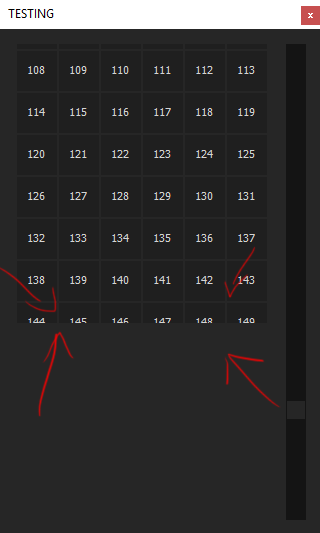
Copy link to clipboard
Copied
Which version of After Effects are you testing the script in? Sometimes this can make a difference when dealing with UI stuff. There have been issues in the past between versions.
From what I can see on my end, is that it all works just fine until the total height of the btnGroup exceeds the height of the monitor screen pixel height. Unless this is a false positive, it appears it does not want to draw beyond that range from what I can tell. If you resize your panel to the right or left you regain the buttons. Not sure if this is a ScriptUI bug, or if there just needs to be different math to compensate for the screen height limitation, or just a built in ScriptUI cap to prevent stuff getting created outside the screens max viewable area. I did a screen capture of this script running in CC 2014, CC 2015, and CC 2015.3 on Mac (OS 10.9.5) which I will post later once it's uploaded. My internet is very slow today.
If I resize the script to be wider, like 6+ buttons wide or more, then all 200 buttons are rendered when scrolling. If I take it less, it gets cropped, like what you are experiencing. This happens in all three versions of AE that I mention above. I can't test CC 2017 as I do not have it on my Mac, but can try it later tonight on my PC.
Copy link to clipboard
Copied
Here's the video I captured:
Copy link to clipboard
Copied
I'm using AE cc 2014/ 2015 on PC

Copy link to clipboard
Copied
David Torno wrote:
Not sure if this is a ScriptUI bug, or ...
All ScriptUI elements have a maximumSize attribute, which is by default the size of the screen.
It can be overwritten to less, but not to more, than that initial max size.
Xavier
Copy link to clipboard
Copied
I figured it out already,
I ask if there is anything that I can do to fix it?

Copy link to clipboard
Copied
If we know that the group or panel can only be drawn to the size of the monitor then a new
callback would have to be written that would delete and re-create the buttons that should be visible depending on the position of the scrollbar.
max can be retrieved from $.screens....
So in the calculation if the height of the button group exceeds - the monitor height (minus buffer), trigger a callback to for example to rebuild from say the 10th button to accommodate seeing the next line of buttons as you scroll down.
or to have a smoother scroll, you could rebuild only full "pages" of buttons when necessary.
Sorry def don't have time to write out the code!
Perhaps someone else has a simpler solution.
Copy link to clipboard
Copied
If someone can write to me Revised Code, I'll be grateful.
(I'm willing to pay if necessary).
Thanks in advance

Copy link to clipboard
Copied
Here is a simple solution.
Hinted by Alan_AEDScripts.
var w_proj_items;
function WIN_Layers_from_Proj ()
{
if (!(w_proj_items instanceof Panel)) w_proj_items = new Window("palette", "SHOW/SELECT LAYERS FROM FOLDER", undefined, {resizeable:true});
w_proj_items.orientation = "column";
w_proj_items.panel_proj_items = w_proj_items.add("panel", {x:0, y:35, width:610, height:850}, "");
//1. Setting vertical size
var max_group_size = $.screens[0].bottom - 100;
//2. Breaking all content into groups
var av_items = 1000;
var columns = 3;
var step_y = 16;
var column_width = 200;
var max_count_y = Math.floor(max_group_size / step_y);
var max_count_in_group = max_count_y * columns;
var count_of_groups = Math.ceil (av_items / max_count_in_group);
var full_column_count = Math.ceil (av_items / columns);
var scroll_gr = w_proj_items.panel_proj_items.add("group", {x:0, y:5, width:600, height: max_group_size+step_y});
scroll_gr.gr = [];
//3. Generating groups of controls in the same place
for (var i= 0; i < count_of_groups; i++)
scroll_gr.gr = scroll_gr.add("group", {x:0, y:0, width:600, height: max_group_size});
//The most difficult part is to correctly divide the content into columns
for (var j = 0, col = 0, i = 0, pos_y = 0, n_y = 0; j < av_items; j++, n_y++)
{
if (n_y == max_count_y) { i++; pos_y = 0; n_y = 0;}
if (j!=0 && j%full_column_count == 0) { i = 0; col++; pos_y = 0; n_y = 0;}
scroll_gr.gr.add("button", {x:col*column_width, y:pos_y, width:150, height:15}, j);
pos_y += step_y;
}
//4. Then moving groups to proper places
for (var i = 0; i < count_of_groups; i++)
scroll_gr.gr.location.y = max_group_size*i;
var scroll_bar = w_proj_items.panel_proj_items.add("scrollbar {jumpdelta:20}", {x:595, y:0, width:20, height:w_proj_items.panel_proj_items.size.height-10});
scroll_bar.maxvalue = max_group_size*count_of_groups - scroll_bar.size.height;
//5. scroll_bar.onChanging must be applied for each group
scroll_bar.onChanging = function ()
{
for (var i = 0; i < count_of_groups; i++) scroll_gr.gr.location.y = -this.value + max_group_size*i;
}
w_proj_items.center();
w_proj_items.show();
}
WIN_Layers_from_Proj();
Copy link to clipboard
Copied
Thanks a lot man,
but I need help to fix this in my code,
I will check later if its help me...
Copy link to clipboard
Copied
Here is my experiment with code of David Torno.
I've set a goal to bypass the existing restriction. I tried to break a one big group of buttons (btnGroups) to subgroups btn_group , placing them one above the other in a stack (orientation='stack'). After that it became possible to move subgroups using scrollbar.
In each subgroup, some buttons are hidden (those which are visible in other subgroups). This consumes fewer resources than adding and removing buttons in onResizing. I think that the number of subgroups can be changed automatically, but I have not tried that. Therefore, if the buttons are still being cut, increase the max_count_of_groups value within the limits of rationality.
It may look clunky, but it actually works.
It's important to begin moving the subgroups only after the algorithm Automatic Layout has done its job.
{
function TESTING(thisObj){
//--------------------------------------------------------
var scriptName = "test";
//Button settings
var numButtons = 200;
var btnSize = 40;
var max_y_size = $.screens[0].bottom; //Determinging the maximum size after which the buttons are being cut
max_y_size -= max_y_size%(btnSize+2); //Size of the subgroups
//--------------------------------------------------------
function TESTING_buildUI(thisObj){
var pal = (thisObj instanceof Panel) ? thisObj : new Window("palette", "TESTING", undefined, {resizeable:true});
if (pal != null){
///Script GUI
var res = "group{orientation:'row', alignment:['fill', 'fill'], alignChildren:['fill', 'fill'],\
btnGroups: Group{orientation:'stack', alignChildren:['left', 'top'],},\
scrollbar: Scrollbar{preferredSize:[20, -1], alignment:['right', 'fill']},\
}";
///Adds UI to Panel/Window
pal.grp = pal.add(res);
///UI VARIABLES//--------------------------------------------------------
var scrollbar = pal.grp.scrollbar;
var btnGroups = pal.grp.btnGroups;
var btn_group = [];//
var max_count_of_groups = 3;// Maximum number of subgroups, select the value within the limits of rationality. I think it's possible to come up with an algorithm.
var AIBtns = [];
///DEFAULTS//--------------------------------------------------------
//Create subgroups and buttons
for (var gr = max_count_of_groups - 1; gr >=0; gr--)
{
btn_group[gr] = btnGroups.add("group {orientation:'row', alignChildren:['left', 'top']}");//Create subgroups
AIBtns[gr] = [];
for (var i=0; i<numButtons; i++)
{
AIBtns[gr] = btn_group[gr].add("button", undefined, i);//Create buttons
AIBtns[gr].size = [btnSize, btnSize];
};
};
///ONCHANGING//--------------------------------------------------------
scrollbar.onChanging = function (){ /* Moved scrollbar.onChanging outside of ctrlMaker_doResizePanel function. No need to constantly reassign the onChanging attribute. This helps keep it's functionality clean and simple.*/
for (var gr = 0; gr < max_count_of_groups; gr++)
{
btn_group[gr].location.y = -scrollbar.value + max_y_size * gr;//Scrolling each subgroup
};
};
///FUNCTIONS//--------------------------------------------------------
function ctrlMaker_doResizePanel(pal, btnSize, numButtons){
//Reassign UI variables
var scrollbar = pal.grp.scrollbar;
var btnGroups = pal.grp.btnGroups;
var btnOffset = btnSize + 2;
var maxRightEdge = pal.size.width - btnOffset;
var maxBottomEdge = pal.size.height - btnOffset; /* Corrected maxBattomEdge to maxBottomEdge */
var leftEdge = 2;
var topEdge = 2;
// Reset the background group container's bounds
btnGroups.bounds = [0, 0, maxRightEdge, pal.size.height];
// Reset each button's layer bounds
var count_x = Math.floor(maxRightEdge/(btnSize + leftEdge));//Count of buttons in row
var count_y = Math.floor(max_y_size/(btnSize + topEdge));//Count of buttons in column
var buttons_in_group = count_x*count_y;
for (var gr = 0; gr < max_count_of_groups; gr++)
{
topEdge = 2;
leftEdge = 2;
for (var i=0; i<numButtons; i++)
{
if (i < buttons_in_group*gr+buttons_in_group && i >= buttons_in_group*gr)//Selecting buttons for which we will be calculating bounds and setting visibility to 'true'
{
AIBtns[gr].bounds = [leftEdge, topEdge, leftEdge+btnSize, topEdge+btnSize];
leftEdge += btnOffset;
// Create a new row if no more columns available in the current row of buttons
if(leftEdge > (maxRightEdge-btnOffset)){ /* NEEDED btnOffset to shift buttons before scrollbar covered them */
leftEdge = 2;
topEdge += btnOffset;
};
AIBtns[gr].visible = true;
}
else//Setting visibility to 'false' for the rest of the buttons. Each subgroup will have its range of buttons
{
AIBtns[gr].visible = false;
topEdge = 2;
leftEdge = 2;
};
};
btn_group[gr].bounds = [0, 0, maxRightEdge, max_y_size];//Starting position and size of the subgroups
};
var AddBtnGroupheight = (max_y_size*max_count_of_groups); //This is a primitive setting for a scrollbar depending on the number of subgroups
/*Toggles visibility of scrollbar based on height of btnGrp with 10 additional buffer pixels
if((AddBtnGroupheight + 10) <= pal.size.height){
scrollbar.visible = false;
}else{
scrollbar.value = 0;
scrollbar.visible = true;
} */
return AddBtnGroupheight; /* Value needed for scrollbar math later */
}
pal.layout.layout(false);
///CONTROLS WHAT HAPPENS DURING PANEL/WINDOW RESIZING//--------------------------------------------------------
pal.onResizing = pal.onResize = function (){
this.layout.resize();
var btnGroupsHeight = ctrlMaker_doResizePanel(pal, btnSize, numButtons);
//var palHeight = pal.size.height;
//var dif = (btnGroupsHeight-palHeight+btnSize); /* Determines how far beyound the bounds the btnGroups goes */
scrollbar.minvalue = 0; /* Force reset of the scrollbar min value when we also change the maxvalue in the next step. Prevents - values appearing during the value update. */
scrollbar.maxvalue = btnGroupsHeight; /* Set scrollbar maxvalue to just the difference in height */
scrollbar.value = 0; /* Force the scrollbar current value back to 0 since scrolling can only happen downwards. */
}
}
return pal;
}
///LAUNCH UI FUNCTION//--------------------------------------------------------
var TESTINGPAL = TESTING_buildUI(thisObj);
///DETERMINES IF SCRIPT IS PANEL OR FLOATING WINDOW//--------------------------------------------------------
if (TESTINGPAL != null){
if (TESTINGPAL instanceof Window){
TESTINGPAL.center();
TESTINGPAL.show();
}
}
}
///LAUNCH SCRIPT//--------------------------------------------------------
TESTING(this);
}
Copy link to clipboard
Copied
Tnx for the answer,
but the problem not fix.

Copy link to clipboard
Copied
Here is simple solution.
Devide all buttons in groups, all buttons exept first group set invisible
In event onChanging all buttons scroll, but not groups.
{
function TESTING(thisObj){
//--------------------------------------------------------
var scriptName = "test";
//Button settings
var numButtons = 200;
var btnSize = 40;
var max_y_size = $.screens[0].bottom; //Determinging the maximum size after which the buttons are being cut
max_y_size -= max_y_size%(btnSize+2); //Size of the subgroups
//--------------------------------------------------------
function TESTING_buildUI(thisObj){
var pal = (thisObj instanceof Panel) ? thisObj : new Window("palette", "TESTING", undefined, {resizeable:true});
if (pal != null){
///Script GUI
var res = "group{orientation:'row', alignment:['fill', 'fill'], alignChildren:['fill', 'fill'],\
btnGroup: Group{orientation:'stack', alignment:['fill', 'fill'], alignChildren:['left', 'top']},\
scrollbar: Scrollbar{preferredSize:[20, -1], alignment:['right', 'fill']},\
}";
///Adds UI to Panel/Window
pal.grp = pal.add(res);
///UI VARIABLES//--------------------------------------------------------
var scrollbar = pal.grp.scrollbar;
var btnGroup = pal.grp.btnGroup;
///DEFAULTS//--------------------------------------------------------
//Create buttons
var AIBtns = [];
for(var i=0; i<numButtons; i++){
AIBtns = btnGroup.add("button", undefined, i);
AIBtns.size = [btnSize, btnSize];
};
///ONCHANGING//--------------------------------------------------------
scrollbar.onChanging = function (){ /* Moved scrollbar.onChanging outside of ctrlMaker_doResizePanel function. No need to constantly reassign the onChanging attribute. This helps keep it's functionality clean and simple.*/
for (var i=0; i<numButtons; i++)
{
AIBtns.location.y = AIBtns.top_edge + max_y_size * AIBtns.group - scrollbar.value;
AIBtns.visible = true;
}
};
///FUNCTIONS//--------------------------------------------------------
function ctrlMaker_doResizePanel(pal, btnSize, numButtons){
//Reassign UI variables
var scrollbar = pal.grp.scrollbar;
var btnGroup = pal.grp.btnGroup;
var btnOffset = btnSize + 2;
var maxRightEdge = pal.size.width - btnOffset;
var maxBottomEdge = pal.size.height - btnOffset; /* Corrected maxBattomEdge to maxBottomEdge */
var leftEdge = 2;
var topEdge = 2;
var visibility = true;
var n_groups = 0;
max_top_edge = topEdge;
// Reset the background group container's bounds
btnGroup.bounds = [0, 0, maxRightEdge, pal.size.height];
// Reset each button's layer bounds
for (var i=0; i<numButtons; i++){
AIBtns.bounds = [leftEdge, topEdge, leftEdge+btnSize, topEdge+btnSize];
//AIBtns.size=[btnSize,btnSize];
AIBtns.top_edge = topEdge;
AIBtns.group = n_groups;
AIBtns.visible = visibility;
leftEdge += btnOffset;
// Create a new row if no more columns available in the current row of buttons
if(leftEdge > (maxRightEdge-btnOffset)){ /* NEEDED btnOffset to shift buttons before scrollbar covered them */
leftEdge = 2;
topEdge += btnOffset;
max_top_edge += btnOffset;
};
if (topEdge > max_y_size)
{
topEdge = leftEdge = 2;
visibility = false;
n_groups ++;
}
};
var AddBtnGroupheight = (max_top_edge+btnSize);
//Resets btnGroup bounds to new pal resized size
btnGroup.bounds = [0, 0, maxRightEdge, pal.size.height+AddBtnGroupheight]; /* CHANGED right bound to max right edge */
//Toggles visibility of scrollbar based on height of btnGrp with 10 additional buffer pixels
if((AddBtnGroupheight + 10) <= pal.size.height){
scrollbar.visible = false;
}else{
scrollbar.value = 0;
scrollbar.visible = true;
}
return AddBtnGroupheight; /* Value needed for scrollbar math later */
}
pal.layout.layout(true);
///CONTROLS WHAT HAPPENS DURING PANEL/WINDOW RESIZING//--------------------------------------------------------
pal.onResizing = pal.onResize = function (){
this.layout.resize();
var btnGroupHeight = ctrlMaker_doResizePanel(pal, btnSize, numButtons);
var palHeight = pal.size.height;
var dif = (btnGroupHeight-palHeight+btnSize); /* Determines how far beyound the bounds the btnGroup goes */
scrollbar.minvalue = 0; /* Force reset of the scrollbar min value when we also change the maxvalue in the next step. Prevents - values appearing during the value update. */
scrollbar.maxvalue = dif; /* Set scrollbar maxvalue to just the difference in height */
scrollbar.value = 0; /* Force the scrollbar current value back to 0 since scrolling can only happen downwards. */
}
}
return pal;
}
///LAUNCH UI FUNCTION//--------------------------------------------------------
var TESTINGPAL = TESTING_buildUI(thisObj);
///DETERMINES IF SCRIPT IS PANEL OR FLOATING WINDOW//--------------------------------------------------------
if (TESTINGPAL != null){
if (TESTINGPAL instanceof Window){
TESTINGPAL.center();
TESTINGPAL.show();
}
}
}
///LAUNCH SCRIPT//--------------------------------------------------------
TESTING(this);
}


Get ready! An upgraded Adobe Community experience is coming in January.
Learn more
 AdChoices