Exit
  • Global community
    • Language:
      • Deutsch
      • English
      • Español
      • Français
      • Português
  • 日本語コミュニティ
  • 한국 커뮤니티
0

Glow rendering issue

New Here ,
Feb 14, 2017 Feb 14, 2017

Hello guys,

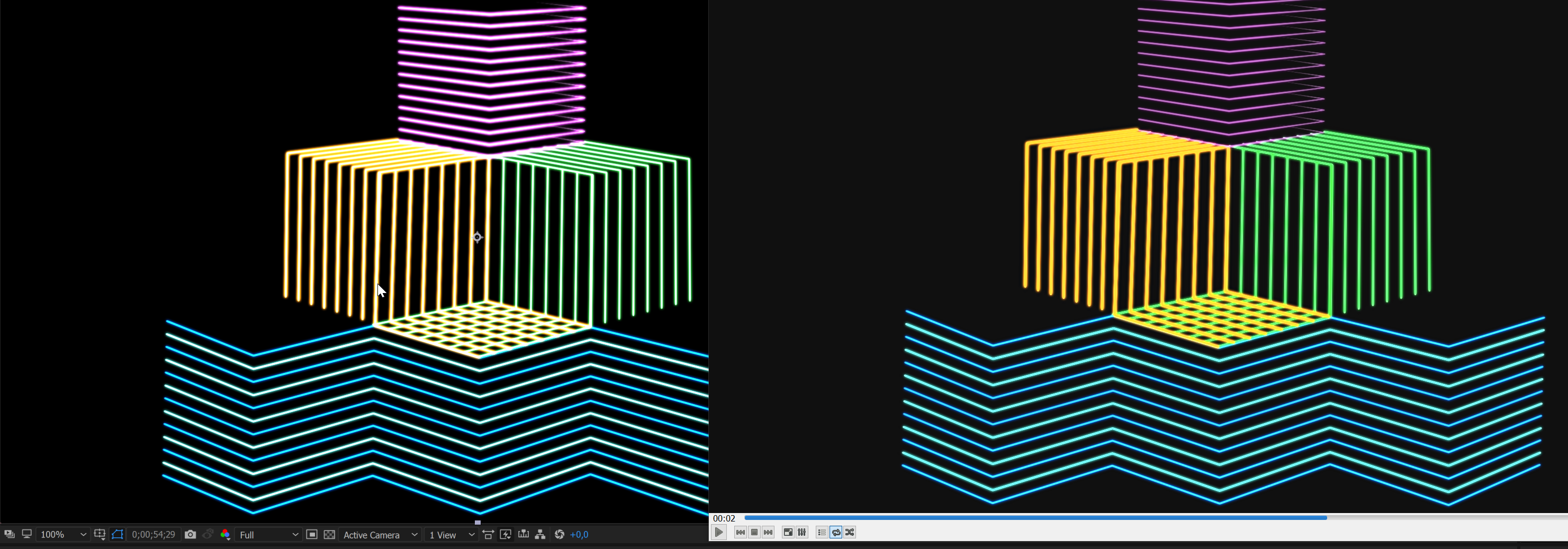
I have this issue with the glow effect: after rendering my project it looks way diffrent than in the viewport.
I guess it's because of the color depth? I rendered with the H.264 codec.
Maybe someone had this problem before and could help me with that?

Best regards
Adrian

Glow problem.png

3.5K
Translate
Report
Community guidelines
Be kind and respectful, give credit to the original source of content, and search for duplicates before posting. Learn more
community guidelines

correct answers 1 Correct answer

Community Expert , Feb 14, 2017 Feb 14, 2017

adrians82457920  wrote

Currently my solutions is to render it as a PNG sequence and use them to render the 264 file. That works fine but seems a little awkwardly

Great solution! That's what I was going to suggest.

It's not all that awkward. In fact, that was the normal process for over a decade before they let you send it directly to AME and, in some cases, is still the thing to do.

Translate
Community Expert ,
Feb 14, 2017 Feb 14, 2017

What version of AE? How did you do the render? Was it through the Adobe Media Encoder or did you do the QuickTime H.264 way (If the QuickTime way, that's the problem...)

Translate
Report
Community guidelines
Be kind and respectful, give credit to the original source of content, and search for duplicates before posting. Learn more
community guidelines
New Here ,
Feb 14, 2017 Feb 14, 2017

Hey Szalam,

thank you very much for the quick reply! I am using CC 2017 and I rendered via File>Export>Media Encoder Queue. I tried different settings with the H.264 but nothing seems to solve it. Currently my solutions is to render it as a PNG sequence and use them to render the 264 file. That works fine but seems a little awkwardly

Translate
Report
Community guidelines
Be kind and respectful, give credit to the original source of content, and search for duplicates before posting. Learn more
community guidelines
Community Expert ,
Feb 14, 2017 Feb 14, 2017

adrians82457920  wrote

Currently my solutions is to render it as a PNG sequence and use them to render the 264 file. That works fine but seems a little awkwardly

Great solution! That's what I was going to suggest.

It's not all that awkward. In fact, that was the normal process for over a decade before they let you send it directly to AME and, in some cases, is still the thing to do.

Translate
Report
Community guidelines
Be kind and respectful, give credit to the original source of content, and search for duplicates before posting. Learn more
community guidelines
New Here ,
Feb 14, 2017 Feb 14, 2017
LATEST

Okay, thanks man then that's what I'll will do.

Translate
Report
Community guidelines
Be kind and respectful, give credit to the original source of content, and search for duplicates before posting. Learn more
community guidelines