


- Home
- After Effects
- Discussions
- GPU and CPU really low usage wile rendering when w...
- GPU and CPU really low usage wile rendering when w...

Copy link to clipboard
Copied
Why did Adobe removed multi frame rendering and moved to GPU options?
This happened years ago now and we are still waiting for a faster render! GPU is hardly touched in AfterEffects 2018 when rendering?.
At least give us an option to maybe cary on working in another instance of after-effects? Rather than lock out AfterEffects to such tinny CPU and GPU usage?
The introduction over the last few years of M.2 SSD's and crazy speed GPU's and Multi CPU cores, but after-effects still is chug...chug..one frame at a time! Its madness!?
My new 32 core thread ripper. with 64gb 2T M.2 ssd, 2080ti is as slow to render as my 8 year old 12 core xeon 32gb, with a 4mb GPU
What is the solution Adobe? Is it time to leave and look else where? We have been creating together for 15 years!? : (
Some one give me some good news the code is being updated!



 1 Correct answer


Yes Professional Renders are more powerful if you have big data better way is render in parts but all depends on your need...Thanks

 8
Replies
8
8
Replies
8

Copy link to clipboard
Copied
Hi avi is very time taking use mov file type with mp4 or h264 codec for better results and speed...Thanks
Copy link to clipboard
Copied
Erm, makes no difference tried single frames, mov, mp4 its using 9-10% of my machines power!! Different projects and setup.
Found several companies that create multi thread rendering solutions that half the render time by using more of the CPU and GPU, but really Adobe should be addressing this issue not 3rd parties!
Don't want to pay more money for something that should be standard, best solution I can see is Renderboss, but why Adobe don't solve this lack off utilising a machines true potential in such a popular bit of software is beyond me!
Copy link to clipboard
Copied
yes you can do set by step renders to reduce time if you want ...Thanks
Copy link to clipboard
Copied
My only other workaround is render to the Adobe Media Encoder renderQue. Then at least you can cary on working and as it uses still only 10% of the machines power you still have a responsive Afterefects to carry on working.
But if your in a hurry for the render and you need to get paid for being fast and efficient! its not useful still being so slow.
Copy link to clipboard
Copied
Yes Professional Renders are more powerful if you have big data better way is render in parts but all depends on your need...Thanks

Copy link to clipboard
Copied
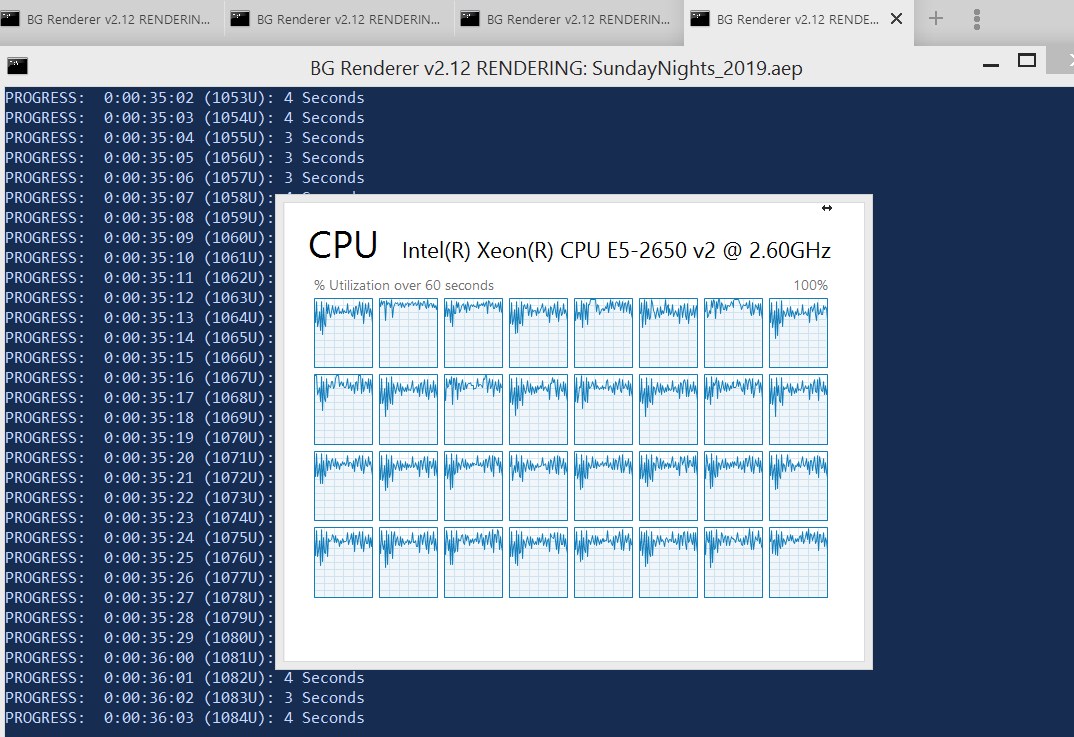
Tim, one way to get CPU usage up, as you may know, is to send multiple comps to render with aerender via command prompt or way easier via BG Renderer. I have been using AME render often also, but today I sent 4 comps in a row (simultaneous rendering) to BG Renderer and I am getting nearly 95 percent CPU usage across 32 cores. I have never seen it that highly, evenly distributed before. I think in CC 2018 they tweaked the code finally.

Copy link to clipboard
Copied
"After Effects has the ability to use 100% of your CPU power, so you can choose to reserve some of the CPU power that can be used by other applications on your machine. Use the % CPU reserved for other applications slider to adjust the value from 0%-70% (default is 10%)."
The real answer is that the software creators are incompetent and rewrite modules that end up performing worse time and time again. I'm going back to CS6 because of all the headaches working with CC has been - and sorry Adobe, it's not me it's you. At least there I'll get real time playback of CACHED RAM PREVIEW instead of being told that my processor isn't fast enough by people who like subjecting themselves to being tortured. How come my laptop from 2013 could play footage in real time and my 2019 gaming laptop struggles to maintain 30fps and audio sync DURING A PRERENDERED PREVIEW - with CUDA accelleration doing absolutely nothing to help.
I love that the official answer is that you are SOL and need to use an overly complicated solution when this should not be an issue in a program that takes money from people monthly. Especially marking own answers as "correct" when blaming a customer is hilarious. If any stragglers on the internet see my answer - you've seen enough questions like this one and "answers" to prove my point. Hopefully you find peace at the end of your travels, I still have not found mine.

Copy link to clipboard
Copied
You're asking the real questions. I've built a work pc with high specs and now I wonder why even bother when the software I use, Adobe CC , doesn't scale well across HEDT systems. I've been exploring other options like Final Cut Pro and Resolve to see if I can ditch Adobe. You'd think with all of our subscription money they would polish their software well.


Get ready! An upgraded Adobe Community experience is coming in January.
Learn more
 AdChoices