
Participant
March 22, 2022
Question

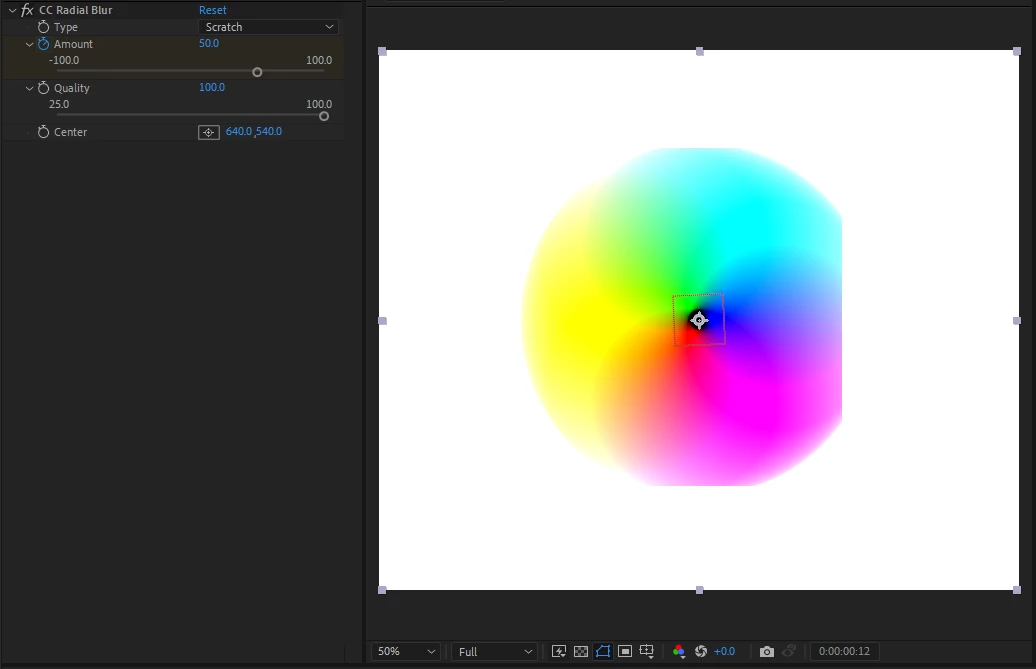
guassian and radial blur create edges on layers

  • March 22, 2022
  • 1 reply
  • 636 views

Hi community,

When I apply guassian or radial blur to shape a layer, the blur will cut off at random edges. I've attached an example image of a Ben Marriott tutorial project I've been working on which demonstrates what I mean. 

I have tried expanding the scale of the effect itself using the bounding box, I have also tried maxing the effects quality. Neither have appeared to help.

Any suggestions would be greatly appreciated. cheers. 
This topic has been closed for replies.

1 reply

Asha5CC7Author
Participant
March 22, 2022

I forgot to mention I have also applied these effects through an adjustment layer which is then placed above the shape layers, if that information helps.

Community Manager
March 24, 2022

Hi Asha5CC7,


Try turning off Repeat Edge Pixels on Gaussian Blur. You can also use Fast Box Blur instead which has fewer visual artifacts overall. It is a different Gaussian approximation.


Cheers,

Jason

Asha5CC7Author
Participant
March 29, 2022

this worked! and it was right there infront of me, thanks jason, appreciate it.