


- Home
- After Effects
- Discussions
- Re: How to change default settings for shape layer...
- Re: How to change default settings for shape layer...
How to change default settings for shape layers.

Copy link to clipboard
Copied
Hello
When I create a shape layer, I can't see it, because by some reasons by default the Fill opacity is 0. How can I change this so the default opacity is 100. Thank you for any help.



 6
Replies
6
6
Replies
6




Copy link to clipboard
Copied
You can edit the preference settings (Prefs*.txt). The location is as follows. It takes time to find the exact parameter. You would need to change it by trial and error.
(Windows) \Users\[user_name]\AppData\Roaming\Adobe\After Effects\[version]
(Mac OS) /Users/[user_name]/Library/Preferences/Adobe/After Effects/[version]

Copy link to clipboard
Copied
No need to trash your prefs. The Shape Layer Mini Docked Panel at the top has 'sticky' properties - it remembers your last setting. To change the setting, click on the Label/Word Fill (mini docked panel) to change the values.
FWIW, AE's Comp Settings and Render Queue are other panels that have this 'sticky' feature. HTH

Copy link to clipboard
Copied
Hi Roland, I'm not seeing any "Shape Layer Mini Docked Panel" therefore I can't change the settings for "Label/Word Fill" How do you reveal this panel? Is this a new feature? (I'm on AE 2019).
What's frustrating is that AE selectively rememebrs your old settings, I guess.
My problem is with the star tool.
I can't make a star (because I made some funky shape last time I used it, messing with inner and outer radius settings)
I can manually change the settings to what *I believe* are the standard base settings (inner radius 40, outer radius 100). Then I create a new star...no luck...still a mess. Then I tried to restart AE, hoping AE would "remember" my last used settings....no luck.
Any thoughts?
Copy link to clipboard
Copied
Shape Layer Fill and Stroke properties - Docked Panel (highlighted area). The docked panel appears only when one of the Shape Layer Tools is selected.
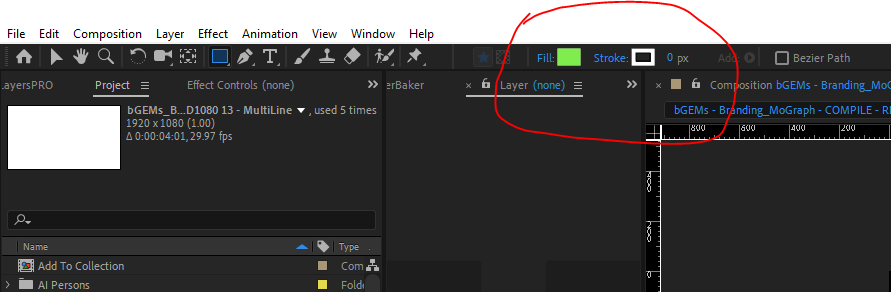
The screengrab below shows the floating window for the Shape Layer's Fill Property. This floating window appears when you click on the label name Fill in the docked panel.


Copy link to clipboard
Copied
Hi everybody,
I'm having the same issues here. Any time before in the near past I've created a shape layer, where I've changed the Opacity for fill, to have a different opacity with the stroke. Now eveytime I create a new shape layer, its fill is set to 23% opacity and I don't know how to change this, because it cannot be changed in the upper panel @Roland Kahlenberg is mentioning.
Does anybody have an idea how to reset shape layer properties to default settings without having to reset all the other preferences?
I would really appreciate your help! 🙂
Copy link to clipboard
Copied
Ok, peeps, I found the solution right now. But I can't delete my post. 😉 So, yes, there is the option to change default opacity for fill in the upper panel, just like seen in @Roland Kahlenberg 's screenshot. I just missed this one. Thanks again ans cheers! 🙂


Get ready! An upgraded Adobe Community experience is coming in January.
Learn more
 AdChoices