Exit
  • Global community
    • Language:
      • Deutsch
      • English
      • Español
      • Français
      • Português
  • 日本語コミュニティ
  • 한국 커뮤니티
0

how to get elastic effect or slight shaky effect when sidebar fully open? like in this tutorial.

Explorer ,
Jan 04, 2019 Jan 04, 2019

like in this tutorial

I am quite 20 days new to after effect. I have been trying myself to learn this jelly opening sidebar but i am unable to get the sleek finishing. Any suggestion would be welcome.

like -> i have reached the level to learn how jelly effect opening sidebar work but not satisfied with the finishing.

2.4K
Translate
Report
Community guidelines
Be kind and respectful, give credit to the original source of content, and search for duplicates before posting. Learn more
community guidelines

correct answers 1 Correct answer

Advisor , Jan 04, 2019 Jan 04, 2019

As Rick and Szalam say - there is no 'easy button' for things like this. To keyframe it manually takes know-how, time and an understanding of the principles of animation.

One tip that might help is to draw your mask using Rotobezier curves - rather than conventional Bezier cuves with handles, and use the vertex tension control as you animate the points. Rotobezier will calculate the point (vertex) curvature automatically and will probably help you get a smoother curve and animation. Search the he

...
Translate
Community Expert ,
Jan 04, 2019 Jan 04, 2019

You could do that by animating a mask path (likely what this person did).

Translate
Report
Community guidelines
Be kind and respectful, give credit to the original source of content, and search for duplicates before posting. Learn more
community guidelines
Explorer ,
Jan 04, 2019 Jan 04, 2019

I have made this but i am unable to get the shaky effect.

https://drive.google.com/open?id=1WrDcZyXORQ5dyjmigaJb_uMHMPgi5Fvr

Translate
Report
Community guidelines
Be kind and respectful, give credit to the original source of content, and search for duplicates before posting. Learn more
community guidelines
Community Expert ,
Jan 04, 2019 Jan 04, 2019

It takes a lot of time to learn how to animate realistic squash and stretch. Digging into the graph editor and watching some good tutorials is the first place to start. Type Graph Editor in the Search Help field at the top right corner of AE and start with the User Guide. Those kinds of dynamic animations are not automatic or easy to do until you have a lot of practice.

Translate
Report
Community guidelines
Be kind and respectful, give credit to the original source of content, and search for duplicates before posting. Learn more
community guidelines
Community Expert ,
Jan 04, 2019 Jan 04, 2019

I just had a thought of a more automatic way to do something like this. You could have a bunch of nulls, tie them to each other via some sort of expressions with springy-ness, and then use them to define mask points.

Newton is a third-party solution for creating dynamics that would also do well at making the nulls move in a springy way.

Translate
Report
Community guidelines
Be kind and respectful, give credit to the original source of content, and search for duplicates before posting. Learn more
community guidelines
Advisor ,
Jan 04, 2019 Jan 04, 2019
LATEST

As Rick and Szalam say - there is no 'easy button' for things like this. To keyframe it manually takes know-how, time and an understanding of the principles of animation.

One tip that might help is to draw your mask using Rotobezier curves - rather than conventional Bezier cuves with handles, and use the vertex tension control as you animate the points. Rotobezier will calculate the point (vertex) curvature automatically and will probably help you get a smoother curve and animation. Search the help for 'Rotobezier' to get started.

Adobe After Effects Learn & Support

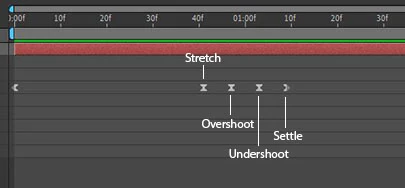
Here's a quick and dirty example - to get the 'bounce' set a keyframe (kf) so your points overshoot the intended position, anther kf for the points undershooting the position and a final kf for the intended position- so the timeline looks something like this:

Comp 1.gif

elastic.jpg

Translate
Report
Community guidelines
Be kind and respectful, give credit to the original source of content, and search for duplicates before posting. Learn more
community guidelines
