Exit
  • Global community
    • Language:
      • Deutsch
      • English
      • Español
      • Français
      • Português
  • 日本語コミュニティ
  • 한국 커뮤니티
0

How to move another shape layer with SourceReactAtTime expression

Community Beginner ,
Aug 06, 2019 Aug 06, 2019

Hi there!

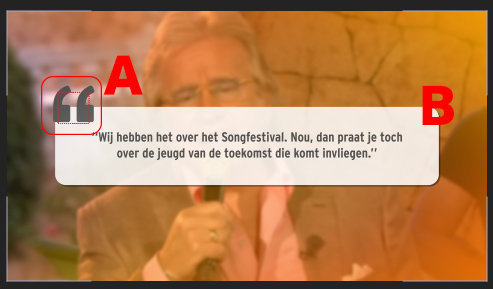
I am having a bit of an issue with expression in After Effects. I have added a image attachment to make my explanation more clear.

I made an shape layer (B in the image attachment) with a sourceReactAtTime expression. So that the shape will react to the input of the text. Now I want the quotations (A in the image attachment) always moves to the upperleft corner of the shape layer. What is the easiest way to do this?

Thanks!

Cheers,
Paul

Help.jpg

TOPICS
Expressions
2.4K
Translate
Report
Community guidelines
Be kind and respectful, give credit to the original source of content, and search for duplicates before posting. Learn more
community guidelines

correct answers 1 Correct answer

Community Expert , Aug 06, 2019 Aug 06, 2019

You can write an expression that uses sourceRectAtTime on the shape layer to measure its upper left corner and place the quotes layer there.

A much easier solution is using my (paid) extension Pins & Boxes

https://aescripts.com/pins-and-boxes/

With it you can simply create a pin for the upper left corner of the box and then parent the quotes layer to it.

In this tutorial I use the same method to place the "by mamoworld" text at the bottom center of the box (the only thing you need to change is to c

...
Translate
Community Expert ,
Aug 06, 2019 Aug 06, 2019

You can write an expression that uses sourceRectAtTime on the shape layer to measure its upper left corner and place the quotes layer there.

A much easier solution is using my (paid) extension Pins & Boxes

https://aescripts.com/pins-and-boxes/

With it you can simply create a pin for the upper left corner of the box and then parent the quotes layer to it.

In this tutorial I use the same method to place the "by mamoworld" text at the bottom center of the box (the only thing you need to change is to create the pin for the top left corner instead of the bottom center)

Mathias Möhl - Developer of tools like BeatEdit and Automation Blocks for Premiere Pro and After Effects
Translate
Report
Community guidelines
Be kind and respectful, give credit to the original source of content, and search for duplicates before posting. Learn more
community guidelines
Community Beginner ,
Aug 08, 2019 Aug 08, 2019

Thank you! This helped me alot!

Translate
Report
Community guidelines
Be kind and respectful, give credit to the original source of content, and search for duplicates before posting. Learn more
community guidelines
Community Expert ,
Sep 13, 2019 Sep 13, 2019
LATEST

If you want to do it by hand you just add values to the current position of the layer. sourceRecAtTime.width will give deliver the x size of a shape layer rectangle. You already figured that out. If you want to figure out the position of the shape layer you can just take a look at the position property. If the Transform Rectangle 1 position and anchor point are at the default 0,0 then the math is a lot easier.


All you have to do to figure out where the upper left corner of Rectangle 1 is is take half the size and width of Rectangle 1 and subtract it from the Shape layer's position. Then all you have to do is adjust the anchor point of the graphic layer to get it to end up exactly where you want it. 


The expression for the Position of the Graphic layer is this simple. 

s = thisComp.layer("Text Box").content("Rectangle 1").content("Rectangle Path 1").size/2;
p = thisComp.layer("Text Box").position;
p - s

I am assuming the name of the layer is Text Box. There's nothing to it.

Translate
Report
Community guidelines
Be kind and respectful, give credit to the original source of content, and search for duplicates before posting. Learn more
community guidelines