Exit
  • Global community
    • Language:
      • Deutsch
      • English
      • Español
      • Français
      • Português
  • 日本語コミュニティ
  • 한국 커뮤니티
0

media encoder dynamic link doesnt work

New Here ,
Nov 27, 2018 Nov 27, 2018

Since the new update of after effects, whenever I export to media encoder nothing appears in the waiting list of media encoder. If I import it directly into media encoder is stays on the screen that its trying to connect to the dynamic links server.


6.0K
Translate
Report
Community guidelines
Be kind and respectful, give credit to the original source of content, and search for duplicates before posting. Learn more
community guidelines

correct answers 1 Correct answer

New Here , Dec 07, 2018 Dec 07, 2018

You will have to wait until Adobe fixes this with an update.

Meanwhile you can go back and install the 2018 version of AE and AME in your Creative Cloud app.

This version works flawlessly.

/Nicolai

Translate
Community Expert ,
Nov 27, 2018 Nov 27, 2018

Discussion successfully moved from Adobe Creative Cloud to After Effects

ABAMBO | Hard- and Software Engineer | Photographer
Translate
Report
Community guidelines
Be kind and respectful, give credit to the original source of content, and search for duplicates before posting. Learn more
community guidelines
Guide ,
Nov 27, 2018 Nov 27, 2018

Hi Catrina

Try this. Have both ME and AE open (side by side)

Drag and drop the composition you want to render into the ME window

Let me know if this works. In most cases it should

Mo

Translate
Report
Community guidelines
Be kind and respectful, give credit to the original source of content, and search for duplicates before posting. Learn more
community guidelines
New Here ,
Nov 27, 2018 Nov 27, 2018

Hi,

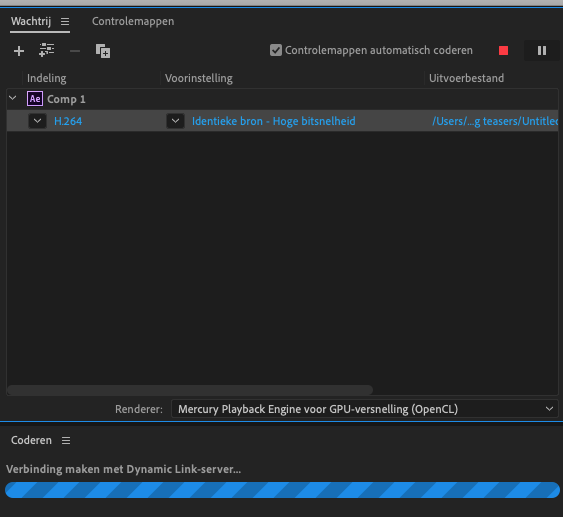
If I do that, I am able to get the comp in the waiting list. However it still stays stuk on the "dynamic link"

Schermafbeelding 2018-11-27 om 13.28.06.png

Translate
Report
Community guidelines
Be kind and respectful, give credit to the original source of content, and search for duplicates before posting. Learn more
community guidelines
Guide ,
Nov 27, 2018 Nov 27, 2018

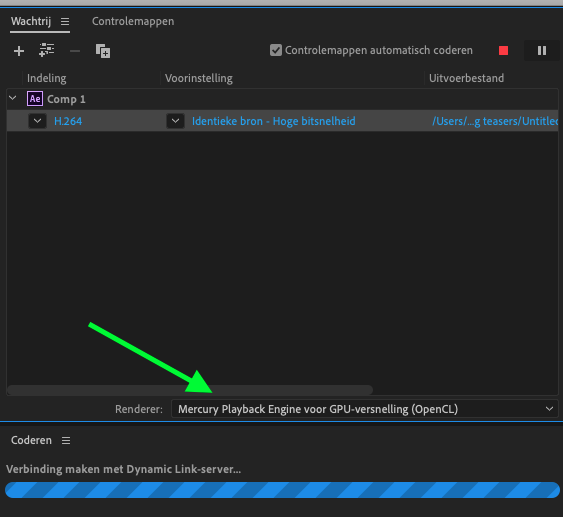
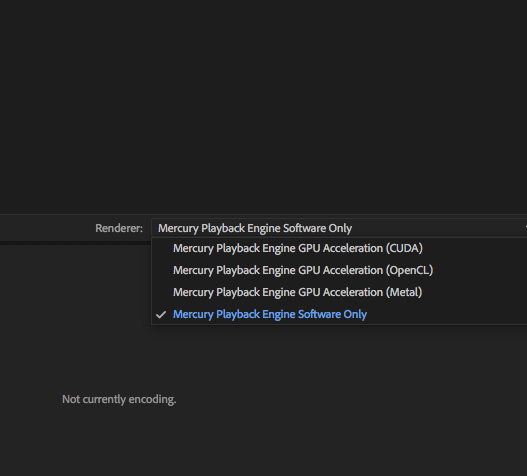
Hi Catrina change this setting from this

Schermafbeelding+2018-11-27+om+13.28.06.png

To this

Screen Shot 2018-11-27 at 2.51.54 PM.png

Should solve your problem

Mo

Translate
Report
Community guidelines
Be kind and respectful, give credit to the original source of content, and search for duplicates before posting. Learn more
community guidelines
New Here ,
Nov 27, 2018 Nov 27, 2018

It still doens't work

Schermafbeelding 2018-11-27 om 14.15.49.png

Translate
Report
Community guidelines
Be kind and respectful, give credit to the original source of content, and search for duplicates before posting. Learn more
community guidelines
Valorous Hero ,
Nov 27, 2018 Nov 27, 2018

Are both AE and AME running the latest version? Dynamic Link gets updated every version, so you need to be running 2019 (and even then, the latest update of each is recommended) of both applications.

Translate
Report
Community guidelines
Be kind and respectful, give credit to the original source of content, and search for duplicates before posting. Learn more
community guidelines
Community Expert ,
Nov 27, 2018 Nov 27, 2018

If you use CC2019, yes its a bug and many user report this to adobe and it must be fixed in the next release, so your only solution is to export from AE directly than converted you output to h.264 on AME

Translate
Report
Community guidelines
Be kind and respectful, give credit to the original source of content, and search for duplicates before posting. Learn more
community guidelines
Guide ,
Nov 27, 2018 Nov 27, 2018

Agreed on this. Render out of AE until this bug is fixed

Translate
Report
Community guidelines
Be kind and respectful, give credit to the original source of content, and search for duplicates before posting. Learn more
community guidelines
New Here ,
Dec 07, 2018 Dec 07, 2018

You will have to wait until Adobe fixes this with an update.

Meanwhile you can go back and install the 2018 version of AE and AME in your Creative Cloud app.

This version works flawlessly.

/Nicolai

Translate
Report
Community guidelines
Be kind and respectful, give credit to the original source of content, and search for duplicates before posting. Learn more
community guidelines
New Here ,
Dec 07, 2018 Dec 07, 2018

This solution fixed the problem for me, thanks!

This answer should be marked as the solution, until Adobe fixes the bug in an upcoming update.

Translate
Report
Community guidelines
Be kind and respectful, give credit to the original source of content, and search for duplicates before posting. Learn more
community guidelines
Jan 02, 2019 Jan 02, 2019

Hi all,

After Effects CC 2019 (16.0.1) and Adobe Media Encoder CC 2019 (13.0.2) include a fix for a dynamic link bug. Can you update both the apps and let us know if the issue has been resolved for you?

Thanks,

Rameez

Translate
Report
Community guidelines
Be kind and respectful, give credit to the original source of content, and search for duplicates before posting. Learn more
community guidelines
Participant ,
Jan 15, 2019 Jan 15, 2019

No, it doesn't. I have the newest versions of both and still have this problem.

Translate
Report
Community guidelines
Be kind and respectful, give credit to the original source of content, and search for duplicates before posting. Learn more
community guidelines
Community Expert ,
Jan 15, 2019 Jan 15, 2019

What is the exact version number? "The latest" may be misleading.

ABAMBO | Hard- and Software Engineer | Photographer
Translate
Report
Community guidelines
Be kind and respectful, give credit to the original source of content, and search for duplicates before posting. Learn more
community guidelines
Participant ,
Jan 15, 2019 Jan 15, 2019

AE is 16.0.1, and AME 13.0.2.39. "The newest" refers to there not being any available updates in the CC app.

Translate
Report
Community guidelines
Be kind and respectful, give credit to the original source of content, and search for duplicates before posting. Learn more
community guidelines
New Here ,
Dec 27, 2019 Dec 27, 2019

I am using Media Encoder 2020 and After Effects 2020, and my Watch Folder in Media Encoder won't recognize .aep files to begin to render them. I am told this is a Dynamic Link issue by Adobe Support. Is that correct? So this problem still hasn't been fixed with 2020??

Translate
Report
Community guidelines
Be kind and respectful, give credit to the original source of content, and search for duplicates before posting. Learn more
community guidelines
Community Beginner ,
Nov 25, 2022 Nov 25, 2022
LATEST

Or in 2022. Still broken for Macs with M1. 😞

Translate
Report
Community guidelines
Be kind and respectful, give credit to the original source of content, and search for duplicates before posting. Learn more
community guidelines