/t5/after-effects-discussions/need-help-with-keyframes/td-p/8773918Jan 05, 2017
Jan 05, 2017
Copy link to clipboard
Copied
This is the output 2 of some sound keys. The sound keys only react up to this much, (grey timeline) of the song. Was wondering how to lengthen this gray bar/timeline in order for output 2 to react ALL of the music, not just that period of time. Please help.
I can manually add more till the bar gets long enough
why would you add them manually when it is supposed to add them for you? there is something wrong with how this is working for you. try this:
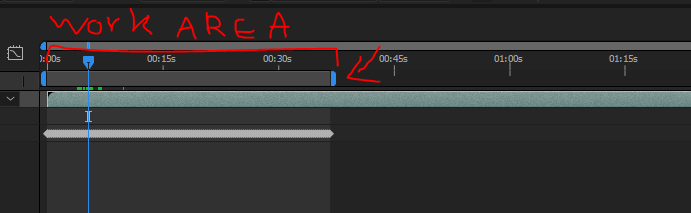
although I see your work area is extended, try hitting apply again when it is. meaning you should extend your work area to get it to analyze more of your audio layer and then hit apply:
EDIT: Sorry, turned out those were actually keyframes. I can manually add more till the bar gets long enough. The real question now, is there any other quicker way to add keyframes? Cause that would mean I wouldn't have to manually add keyframes.
I can manually add more till the bar gets long enough
why would you add them manually when it is supposed to add them for you? there is something wrong with how this is working for you. try this:
although I see your work area is extended, try hitting apply again when it is. meaning you should extend your work area to get it to analyze more of your audio layer and then hit apply:







 3
Replies
3
Replies





 AdChoices