Exit
  • Global community
    • Language:
      • Deutsch
      • English
      • Español
      • Français
      • Português
  • 日本語コミュニティ
  • 한국 커뮤니티
0

Object reveal problem

Community Beginner ,
May 03, 2020 May 03, 2020

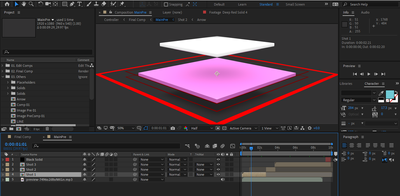
I have a problem, that I cant see the purple and white color objects in this image in after effects layer panel. The template have downloaded from motionarray.

https://motionarray.com/after-effects-templates/free-after-effects-intro-8379

Screenshot_1.png


TOPICS
FAQ
663
Translate
Report
Community guidelines
Be kind and respectful, give credit to the original source of content, and search for duplicates before posting. Learn more
community guidelines

correct answers 1 Correct answer

Community Expert , May 04, 2020 May 04, 2020

The selected layer (Shot 1) is a composition. In order to view that composition in the Layer Panel, you have to right-click or use the Layer>Open Layer menu to see a nested comp in the Layer Panel. If e you have any effects applied to that layer the Render checkbox in the lower right corner of the Layer Panel must be activated.


If you are trying to find something that is located inside the Layer 1 comp then the easiest thing to do is to take a look at the Flow Chart, expand it, and then double

...
Translate
LEGEND ,
May 03, 2020 May 03, 2020

Have you actually dug into the tons of sub-folders, sub-comps or used the search function in the panels? There's nothing actually hidden, it may just be deeply buried. You may want to actually start reading the help to understand these basic concepts. No offense, but this is way too obviously a newbie question where it's clear that you've spent only five minutes with the program. AE is nearly impossible to understand intuitively and templates such as these that involve 3D layers and collapsed transformations are structurally complex to achieve what they do. You can't avoid learning AE at least a tiny bit.


Mylenium

Translate
Report
Community guidelines
Be kind and respectful, give credit to the original source of content, and search for duplicates before posting. Learn more
community guidelines
Community Beginner ,
May 04, 2020 May 04, 2020

Thank you very much for the help dear friend. I'm new to this. I have searched each and every single file in the panel. But I couldnt find it. I think I have to learn furthermore.

Translate
Report
Community guidelines
Be kind and respectful, give credit to the original source of content, and search for duplicates before posting. Learn more
community guidelines
Community Expert ,
May 04, 2020 May 04, 2020

The selected layer (Shot 1) is a composition. In order to view that composition in the Layer Panel, you have to right-click or use the Layer>Open Layer menu to see a nested comp in the Layer Panel. If e you have any effects applied to that layer the Render checkbox in the lower right corner of the Layer Panel must be activated.


If you are trying to find something that is located inside the Layer 1 comp then the easiest thing to do is to take a look at the Flow Chart, expand it, and then double click the layer you want to see.

Translate
Report
Community guidelines
Be kind and respectful, give credit to the original source of content, and search for duplicates before posting. Learn more
community guidelines
Community Beginner ,
May 10, 2020 May 10, 2020
LATEST

Thank you very much @Rick_Gerard.


Translate
Report
Community guidelines
Be kind and respectful, give credit to the original source of content, and search for duplicates before posting. Learn more
community guidelines