Copy link to clipboard
Copied
Hey all,
I've put together a 3 minutes long Product/Explainer video for a company website, using a lot of video clips, music, text animations and other graphical stuff. This is my first time doing this kind of work. It all ended up with 200 layers of videos, text and elements. A lot of layers, for me personally, to manage with timing etc.
Now - when the clients wants to make changes (ofcourse); like delete an unnecessary scene, or change the order of some scenes - I got a huge challange in front of me, changing the order of scenes with very precise animations keyframed. I thought about pre-compose all the individual scenes during this work, but working in pre-compositions made it sometimes hard to match the timing of other animations/videos (which is outside this current pre-composition) - so i just kept working without pre-compose all scenes, which would have been easier to handle if the clients wants to make changes afterwards (I guess?).
So here is my question:
How do you, more experienced AE -users, organize your AE timelines and compositions of text animations videos etc, when putting together a longer explainer video or similar - to make it easier to adjuste the content during the project when clients change their mind?
*I've attached a video of my project timeline, which includes a lot of individual layers + compositions of scenes. There are also a lof of layers hidding, most of them videos which i've tested out but not used in the final result. I'm currently working with grouping all the individual layers from the scenes into compositions, to make it easier making adjustments and of scene, scene order and so on.
- Is this the smartest / best way to go when putting together this kind of work together with a client?
Thanks in advance,
Br,
Niklaz
Dynamic Link is an excellent way to pull a shot into After Effects so you can do the compositing and animation, but there are some limitations. As long as the AE comp is fairly simple and will render quickly, you can maintain an efficient workflow, but when things get complicated and render times go up, keeping the Dynamic Link live can cause real problems. Suppose the render time gets higher than about one frame per second. In that case, I always Render a production master (High Quality or High
...Copy link to clipboard
Copied
Yes, you pre-compose. There's no magic answer here. You just have to learn the ins and outs and when to use what.
Mylenium
Copy link to clipboard
Copied
I see,
Thanks for your respons Mylenium!
Copy link to clipboard
Copied
After Effects is not a video editing app; it is a motion graphics, animation, and visual effects app designed to make shots. Do the editing in Premiere Pro.
I have done thousands of explainer videos and always break the script (audio track) into sentences or phrases that need to be animated. Each one of those becomes a separate comp. Sometimes, I'll want a transition between two phrases, but a cut is usually a better choice. How many fancy transitions have you ever seen in a movie? I render the comps to a production master using the High-Quality option in the Render Queue/Output module, import the rendered clips into Premiere Pro, and then edit the clips together like Disney animated cartoons or Marvel cuts feature films. Sound effects, final color grading, and pacing are much easier to polish in an NLE than in After Effects.
Because you already have the basic film, select the layers that comprise a phrase or sentence in your narration, pre-compose them into shorter comps, then open the shot or segment that needs revisions and make the changes. Then, render all the shots individually, load them up in Premiere Pro, and do the final edit. I have had single text layer or audio track changes requested by a client in half-hour training videos where most shots were created in After Effects. It only takes a few minutes to open the AE Comp of the problem shot, make the changes, render the update, and render a new video from Premiere Pro. On my current system, a simple 4K edit that is 30 minutes long will take a little less than 20 minutes to render an H.264 video for distribution. Most of my AE comps take several seconds a frame to render. If I had to render the whole video in AE, I could easily be looking at most of the day to render a new master.
I hope these suggestions help. Creating an entire three or four-minute video in After Effects is never a good idea. Create the shots in your animation and effects app, then edit your shots in an NLE like the big studios do.
Copy link to clipboard
Copied
Thanks a lot Rick....!!
So if I get this right.... : You recommend me to collect all individual layers for a seperate scene and make a pre-comp of out that. That will results in several pre-comps, one for each scene/sentence/phrase. Then render and export each pre-comp, individually, and put these output videos (from all comps) into Pr in correct order and for final color-editing etc.
You are saying: "It only takes a few minutes to open the AE Comp of the problem shot, make the changes, render the update, and render a new video from Premiere Pro." ---> Just to make sure: You're fixing new changes/adjustments from the clients (within the specific comp) in AE and then export a new edited comp from AE and then import it into a Pr -project/timeline - together with all the other clips from (AE comps/scenes) AND THEN export the whole new (3min video, in this case) from Premiere Pro, since rendering a new video in Pr is not that time consuming?:D
I ended up in AE when working with this Explainer Video, since I found it find it much easier to manually animate text (and vector graphics ofc) in AE - which was necessary for this Explainer Video. And was asking myself, why not just continue in the same software, adding up new layers for next scene - instand of jumping from AE to Pr, back and forth, as you recommend - but I get it now, I guess;) Thanks you!
Copy link to clipboard
Copied
You have got it. I've created so many explainer videos (dynamic text animations, Ken Burns style videos (he did not come up with the style that bears his name., it was created about 100 years ago), and training videos that rely on charts, animated text, old photographs, and about anything you have ever seen. They were all edited in an editing app like Premiere Pro, but the visual effects, animations, and animated graphics were all done in a different app. I've been producing videos since 1970, before we had computers capable of editing videos or photos. I built a machine that let me repeat camera moves to make animated text in 1975. I shot the animations on film, made a workprint, and then edited the movie on a Moviola. I have even hand-painted animation cells.
The workflow is still the same. Do your effects and animation shots, and edit them on a movie editing machine.
Copy link to clipboard
Copied
Excellent Rick, thank you.!
I'll try to practice your recommended workflow AE/PR onto my next project later this month, which will be another explaination video for another software company.
Until next time, take care.
Br,
Niklaz
Sweden
Copy link to clipboard
Copied
Hi again Rick,
Have you tried Dynamic Link when working back and forth with Pr and Ae? With DL... it seems to be possible to make changes in scenes in Pr in real time, using an DL from Pr into AE. For me, DL might sound like a better option/workflow when using Pr <-> AE, in terms of less exporting (from AE), saving files and importing into Pr again? But i dont know? I havnt tried any of these workflow, either your suggested workflow discussed above nor using DL.
Any input? 😄
I saw this tutorial and was interested in your opinion about this, since you havnt mentioned DL as an option when working with an Explainer Video with both video clips from Pr and Ae.
Copy link to clipboard
Copied
Dynamic Link is an excellent way to pull a shot into After Effects so you can do the compositing and animation, but there are some limitations. As long as the AE comp is fairly simple and will render quickly, you can maintain an efficient workflow, but when things get complicated and render times go up, keeping the Dynamic Link live can cause real problems. Suppose the render time gets higher than about one frame per second. In that case, I always Render a production master (High Quality or High Quality With Alpha) video and replace it in Premiere Pro. I do that because rendering a Dynamic Link in Premiere Pro opens a background copy of After Effects on your system to render the file. Rendering is always slower. The likelihood that a complex project with GPU-accelerated effects will hang or fail is higher, and the Previews in Premiere Pro are always compromised when you try to preview Complex comps.
Here's my standard workflow for moving a shot that will take a lot of resources into After Effects. First, I always change the label color and rename effects shots in the Premiere Pro timeline so they are a different color, duplicate the shot in the timeline, and stack the duplicate on top of the original to a track that is dedicated to effects shots, so I have a copy of the original shot in the timeline. I then select the labeled, renamed, and moved shot, and sometimes add a few frames to the head and tail of the shot as handles if there is a chance that I'll need to fine-tune a cut or transition by a few frames and create the Dynamic Link. If the shot is complex, I return to Premiere Pro and undo the Dynamic Link as soon as the new comp is created. I often create comps with a hundred or more elements that can take several seconds to render. I start redesigning the shot when render times approach three minutes a frame. When the shot is complete, I use the Render Queue, not the Media Encoder, to render the high-quality production master (10-bit or better). The render is imported into Premiere Pro and replaces the shot in the timeline. If I need to redo something later, the effects shots are easy to find in the Premiere Pro timeline, the original footage is still there, and the workflow is efficient.
So yes, I use Dynamic Link all the time, but for my projects, because of the complexity of the shots, I almost always Render the shots in After Effects/Render Queue instead of keeping Dynamic Link active. Here's a flowchart of a recent project that will give you an idea of how complex those projects can become:
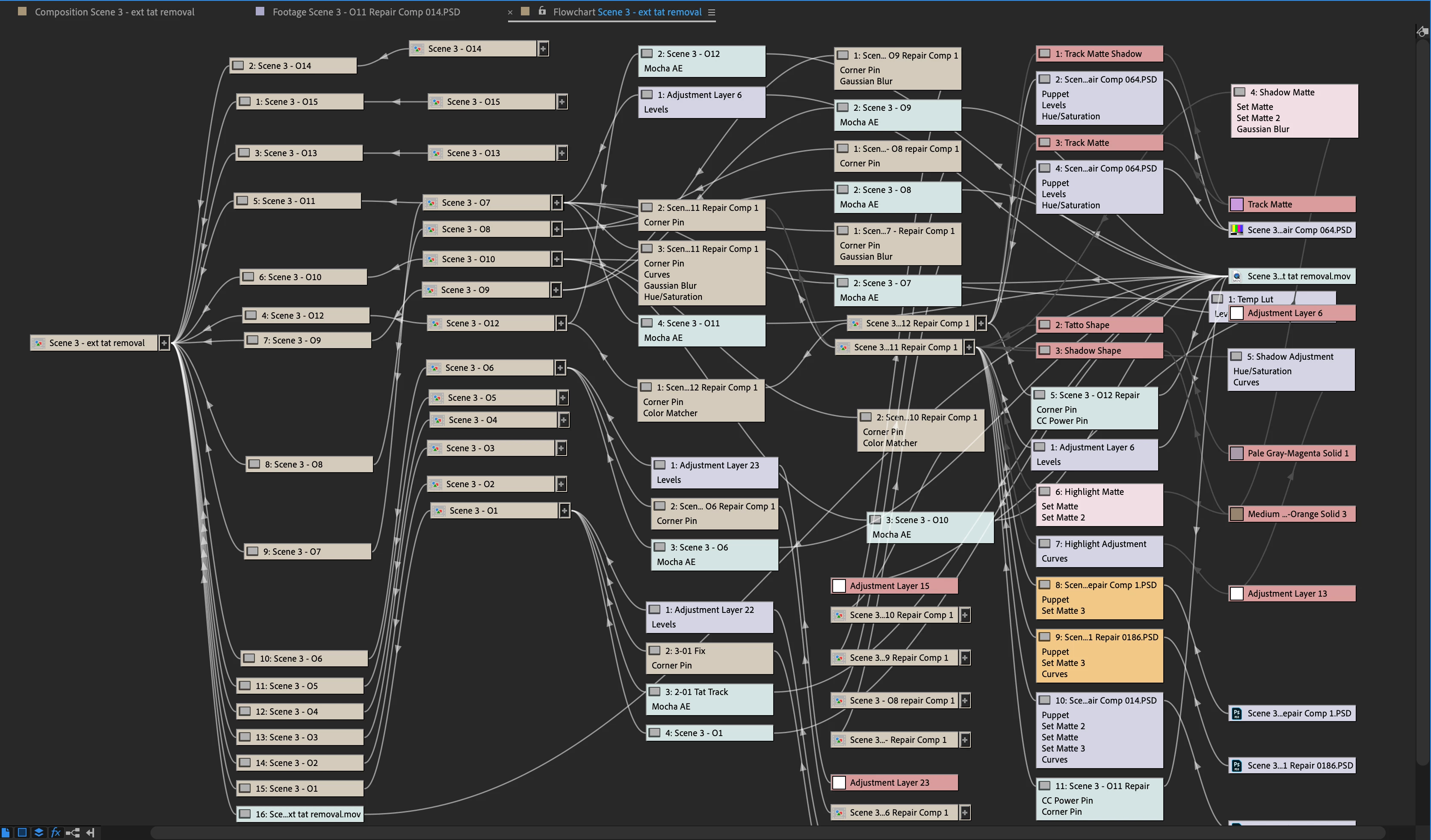
The first column shows 16 shots from the first act of a 6-act feature I worked on with relatively simple comps that took a long time to create. Leaving all that work to render In Premiere Pro using Dynamic Link would have slowed the process and been much less efficient. That flow chart represents about three weeks of work on that project. It would have been a bad idea to keep all those shots as active Dynamic Linked comps.
So yes, Dynamic Link is a good way to link a shot in Premiere Pro to a comp in After Effects, and as long as the comp is simple and will render quickly, you can keep it live and work efficiently. On the other hand, when render times start climbing, you will save time in the long run by rendering the AE comp in After Effects and replacing the DL Clip in Premiere Pro with the rendered clip. Dynamically linked comps in Premiere Pro always take longer to render than in the Render Queue. Sometimes four or five times longer. It all depends on the complexity of the comp. If all you are looking at is render time, rendering your effects in After Effects is always going to save time.

Copy link to clipboard
Copied
I got it... Thanks a lot Rick!
Get ready! An upgraded Adobe Community experience is coming in January.
Learn more