Exit
  • Global community
    • Language:
      • Deutsch
      • English
      • Español
      • Français
      • Português
  • 日本語コミュニティ
  • 한국 커뮤니티
0

Problem with Track Matte

New Here ,
Apr 20, 2023 Apr 20, 2023

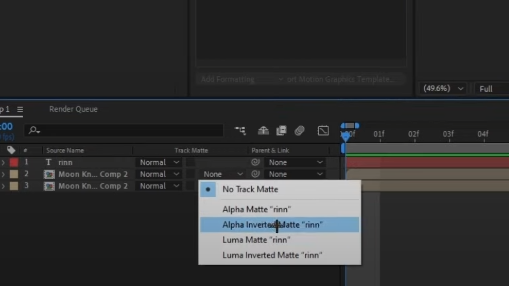
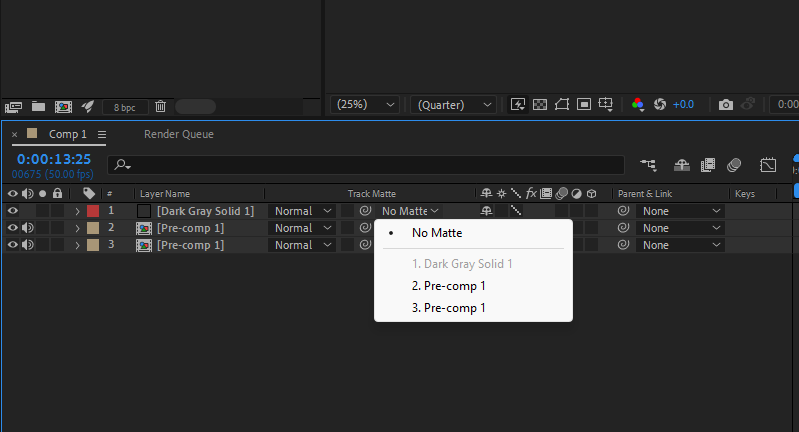
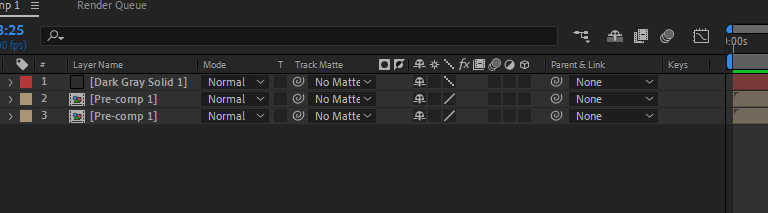
I do not understand why it always says no matte with me and tutorial on youtube always says none and it does not have the same functions? can someone heScreenshot 2023-04-20 225508.pngScreenshot 2023-04-20 225436.pngScreenshot 2023-04-20 225423.pnglp me please?

TOPICS
Audio , Crash , Dynamic link , Error or problem , Expressions , FAQ , Freeze or hang , How to , Import and export , Performance , Preview , Resources , User interface or workspaces
511
Translate
Report
Community guidelines
Be kind and respectful, give credit to the original source of content, and search for duplicates before posting. Learn more
community guidelines
Community Expert ,
Apr 20, 2023 Apr 20, 2023

Just different versions of After Effects. The new UI allows you to use a track matte layer as a matte for multiple layers, and it does not need to be above the layer anymore. The Alpha/Luma and Invert switches are now icons to the right of the layer name. 

Translate
Report
Community guidelines
Be kind and respectful, give credit to the original source of content, and search for duplicates before posting. Learn more
community guidelines
LEGEND ,
Apr 20, 2023 Apr 20, 2023
LATEST

It helps to actually read the online help and not just blindly follow tutorials:


https://helpx.adobe.com/after-effects/using/track-mattes-and-traveling-mattes.html


Mylenium 

Translate
Report
Community guidelines
Be kind and respectful, give credit to the original source of content, and search for duplicates before posting. Learn more
community guidelines