


- Home
- After Effects
- Discussions
- Re: Remove tracking points after effects
- Re: Remove tracking points after effects

Copy link to clipboard
Copied
I can't seem to remove the motion tracking points on the PSD polaroids. I turn off layer controls and they won't disappear.



 1 Correct answer
Ironically, I figured out on another thread by you..
for future users: turn grain effect to final output

 14
Replies
14
14
Replies
14


Copy link to clipboard
Copied
I don't see Ae's tracking points on your screenshot.
Copy link to clipboard
Copied
If you zoom in there are squares in the polaroids

Copy link to clipboard
Copied
This sounds like an error in preparing the effect. Unless you shot those polaroids with a video camera, there was no need for tracking points.
Copy link to clipboard
Copied
There is no tracking on the polaroids? There is on the base footage
Copy link to clipboard
Copied
tyroneerose617 It's a little hard to tell from the screen shot, but those look like Null layers, not tracking points. Even so, Null layer's should become invisible when disabling "Show Layer Controls" in the View menu.
Copy link to clipboard
Copied
That's what I thought but when I press show layer controls they don't go away?
Copy link to clipboard
Copied
show a full screenshot of your Ae interface with the view category open so we can examine you are seeing the nulls while the view layer controls is not active.
Copy link to clipboard
Copied


Copy link to clipboard
Copied
I don't think they are nulls. And if they are tracking points they have been set up very oddly...
Can you isolate the layer on which they are?
What is inside your 'polaroid blank...' precomps?
You've checked it's not something on the footage  ?
?


Copy link to clipboard
Copied
The first step in diagnosing a problem is to isolate the layer you are having problems with and then review all modified properties by pressing the U key twice. Then hold the shift key and press the E key to reveal any effects that have not been modified.
If the layer you are having problems with is a nested comp then you have to drill down by opening that nested comp and explore the modified properties inside that comp.
Screenshots that do not show modified properties and specify the layers you are having trouble with are basically useless.
I do not see anything in any of your screenshots that looks like a tracking marker. The only thing I see on any of the Polaroid photographs in the shot is a small white square which looks exactly like the frame of a null. If that is what it is then it will not render. You can check that by simply saving a frame as a Photoshop file using the composition menu.

This is what a null looks like:
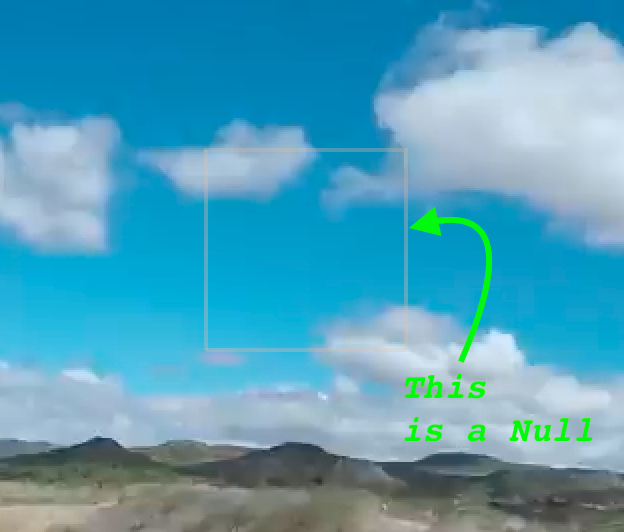
I suggest you drill down and look for modified properties, start turning things off or use the solo button until you figure out what is going on. If the marks are on the original footage you need to ask the question "How do I remove marks on some original footage?" We can give you a solution to that problem in a separate thread.
Copy link to clipboard
Copied
It is a Null, except I do not know how to remove it.
Copy link to clipboard
Copied
Nulls don't render. If you don't want to see it then just turn off the layer. It will not affect the project.
I suggest you spend some time with the help files. This is some pretty basic stuff.
Copy link to clipboard
Copied
What do you mean "turn off the layer.?" How does that solve the problem, I want the layer in the project I just don't want the "null" on the polaroid.
Here is the specifics from the layer, turned things on and off. I also "looked in the help files" and there wasn't much on nulls.

Copy link to clipboard
Copied
Ironically, I figured out on another thread by you..
for future users: turn grain effect to final output


Get ready! An upgraded Adobe Community experience is coming in January.
Learn more
 AdChoices