Exit
  • Global community
    • Language:
      • Deutsch
      • English
      • Español
      • Français
      • Português
  • 日本語コミュニティ
  • 한국 커뮤니티
0

Render proxies with Adobe Media Encoder

Contributor ,
Aug 13, 2018 Aug 13, 2018

I'd like to incorporate proxies into a current project I'm working on.

If I just do a standard Create Proxy from AE's Project Panel and render through AE's Render Queue, that ties up the program for a while.

Is there a simple workflow that lets you render those through Adobe media Encoder instead?

Thanks

2.0K
Translate
Report
Community guidelines
Be kind and respectful, give credit to the original source of content, and search for duplicates before posting. Learn more
community guidelines

correct answers 1 Correct answer

Explorer , Aug 13, 2018 Aug 13, 2018

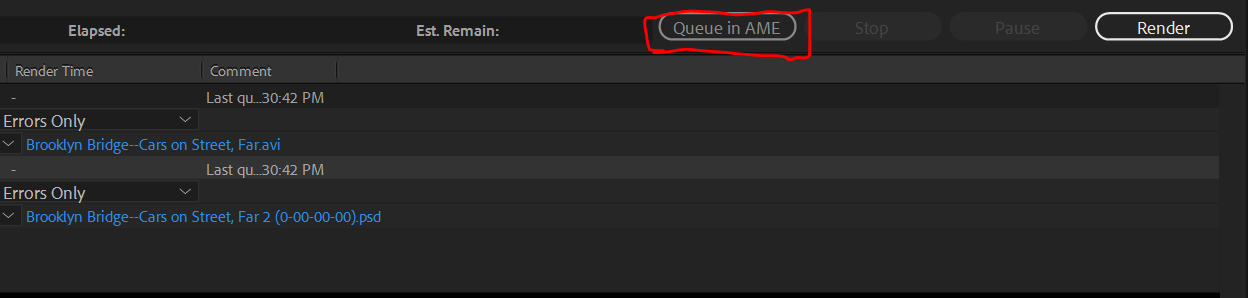
Once you create the proxy and it opens up After Effects' render queue, look for the Queue in AME button (a bit to the left of the Render button), and click that to open the proxy in Media Encoder.

AME Render Queue.PNG

Translate
Explorer ,
Aug 13, 2018 Aug 13, 2018

Once you create the proxy and it opens up After Effects' render queue, look for the Queue in AME button (a bit to the left of the Render button), and click that to open the proxy in Media Encoder.

AME Render Queue.PNG

Translate
Report
Community guidelines
Be kind and respectful, give credit to the original source of content, and search for duplicates before posting. Learn more
community guidelines
New Here ,
Nov 12, 2021 Nov 12, 2021
LATEST

Hi, 
I'm able to easly render on AME after setting the proxyes, but unlike rendering it directly on AE,  they do not automaticaly toggle the proxyes on after its rendered, and i have to manually turn it on for each composition.  Is there a way to make it work faster?  

Translate
Report
Community guidelines
Be kind and respectful, give credit to the original source of content, and search for duplicates before posting. Learn more
community guidelines