


- Home
- After Effects
- Discussions
- Re: Scrollable group problem: Not all content in g...
- Re: Scrollable group problem: Not all content in g...

Copy link to clipboard
Copied
Helloooow wise scripting peoplez.
I've been gnawing my fingernails over this problem the past couple of days, and still haven't found a solution. Here goes:
I've tried to make a window(or actually panel, because in the end it should be run from AE>Window>scriptname.jsx ), with a scrollbar, that can scroll through content in a group next to it. I can get the group to scroll and all that, but the problem, right now is, that after x items in the group, the last ones get clipped off. Like this (there's supposed to be 500 buttons):
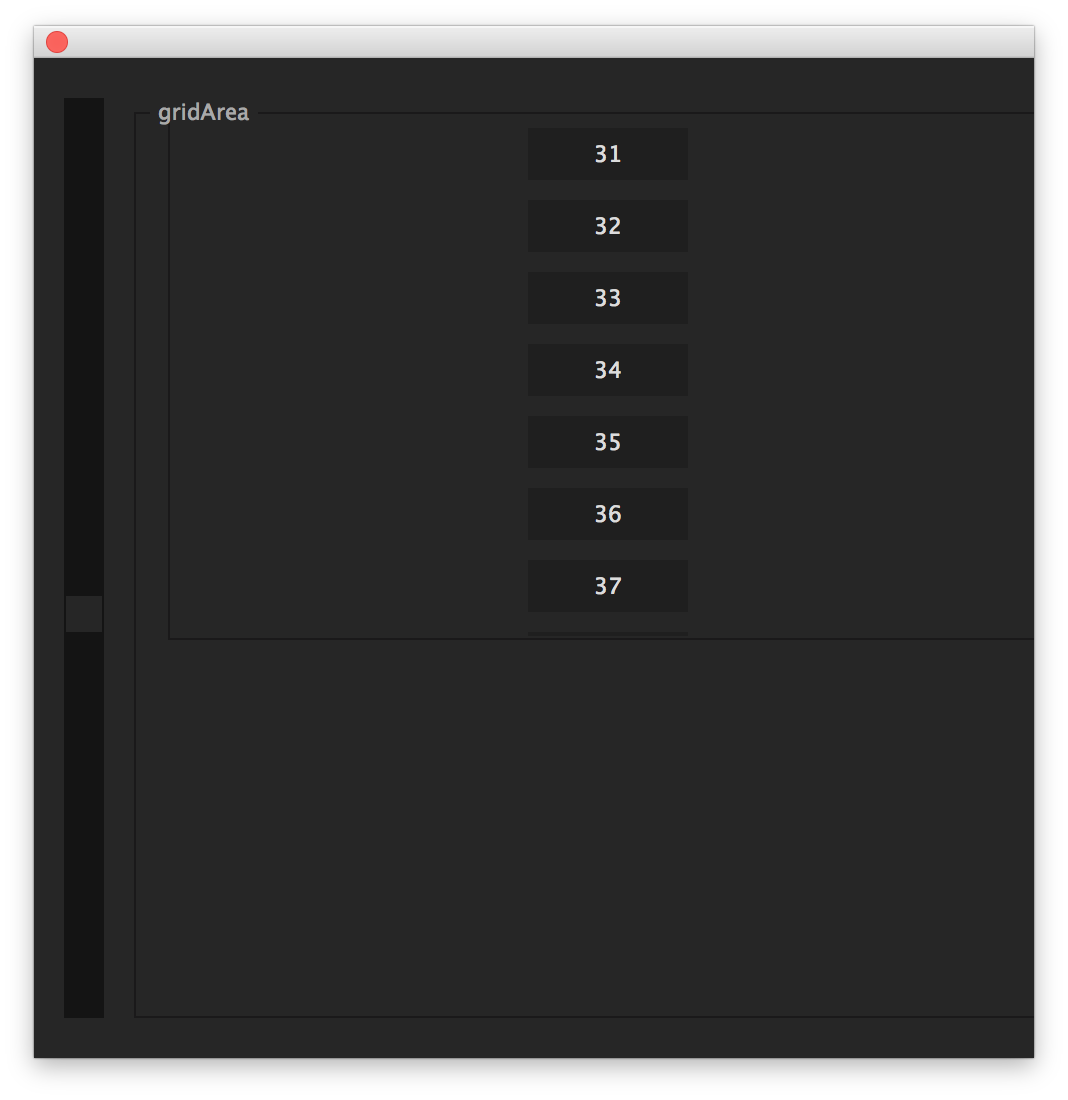
The only way I've been able to get the "inner" group to get bigger is by not using any of the align properties and set the .size manually. I know the content is there because the last item shows up, when I'm moving the last items location[1] upwards until it reaches the top of the group. I tried making the layout refresh (layout.layout(true);layout.resize()) at every call of the onChanging() function of the slider, but w/o success. Reading lots of lovely forum posts and discussion by @Marc Autret and other long time scriptUI/extendscript users has this far been without luck.
TL;DR: I'm trying to make a group with lots of content that I can scroll through with a scrollbar.
here's the code snippet, hopefully well enough commented :
{
//scroller test
// uncomment the temp path (replace with some image file path) and the lines inside the populateGrid() function to reproduce my problem better
// I'm ussing an image 512x288 pixels


//var tempPath = "/Volumes/Verbinski/02_SCRIPTING/After_Effects/stockholm/ROOT/EXPLOSIONS/Fireball_side_01/Thumbs/Fireball_Side_01_024.jpg";


// create window
var mWin = new Window('palette');
  mWin.size = [500,500];
  mWin.orientation = 'row';


// If you like it, then you better put a scroller on it.
var scroller = mWin.add('ScrollBar');
  scroller.size = [20,mWin.size[1]-40]
  scroller.minvalue = -5;
  scroller.value = scroller.minvalue;
  scroller.maxvalue = 10000; // tried changing this to all sorts of interesting numbers.


//This should move the group, created further down.
scroller.onChanging = function(){
  grid.location = [grid.location[0],-scroller.value];
}


// "Boundary" for grid (see below)
var gridArea = mWin.add('panel',undefined,'gridArea');
  gridArea.size = [mWin.size[0]-40,mWin.size[1]-40];


// The grid... a digital fronteer... and also container of stuff
var grid = gridArea.add('panel',undefined,'grid');
  grid.size = [gridArea.size[0]-20,9000000000] // no matter how high I put this, it doesn't change a thing


// Just an array for all the images to go
var clips = [];
// Total height gets calculated in the populateGrid function.
var totalHeight = 0;


function populateGrid(rows){
  var img;
  for(i=0;i<rows;i++){
  // img = grid.add('image',undefined,tempPath);
  // clips.push(img);
  grid.add('button',undefined,i);
  }
  for(i in clips){
  clips.location = [0,(clips.image.size[1]*i)]
  }
  // totalHeight = (img.image.size[1]+grid.spacing)*rows;
  // grid.size = [grid.size[0],totalHeight]
  // scroller.maxvalue = totalHeight/2;


}


// put x number of buttons/images into the grid
populateGrid(500);


// shwo to window
mWin.show();
mWin.center();
}
Reaally hope someone in here sees this and can help me out.
Cheers, Fynn.
//my system settings:
iMac 5K retina, 4 GHz Intel Core i7
32GB RAM, 512GB solid state HDD
OSX Yosemite: 10.10.4
AE: CS6 || CC 2014: 13.1.1.3


 1 Correct answer
Aaalrighty, guys. I seem to have cracked it.. Sort of..
David, your version worked pretty well, I just modified it a little to have the right math.
The scroller is working as expected now and the scroller.maxvalue is calculated by ((number of items)*height of first item).
Everything works really well until I start using the auto layout manager. The 'fill' option at least makes it really hard to figure out the final height of the inner objects. So they should be set consequently.
anyways, here is my
...
 17
Replies
17
17
Replies
17


Copy link to clipboard
Copied
I'm not noticing any clamp on UI size that might be choking the height. It appears there may be a draw size limit to containers. I changed your panel to a group and squeezed an extra half button after 33, but nothing more. I'll keep looking into this. Your script build style is different then what I am use to, so I am translating in my head what's doing what. 

Copy link to clipboard
Copied
Hey David,
thanks for ultra fast response. I'll wait in tense silence while you work your magic. I'll keep trying as well. Good to hear that there shouldn't be a "physical" limit.
Thanks again.
sent from my toaster
Copy link to clipboard
Copied
I just finished replicating your code in a more familiar way to my mind, and I am getting the same exact results, but only in column orientation. When I flip it to row, I can get up to 41 buttons showing before hitting the size limit.
This unfortunately seems to be a container size limitation of some kind. Perhaps Todd or another developer could expand on this.
Max width I could get:

Max height:

Here is my version of your code...
{
  function fireball(thisObj){
  function fireball_buildUI(thisObj){
  var pal = (thisObj instanceof Panel) ? thisObj : new Window("palette", "Fireball", undefined, {resizeable:true});
  if (pal != null){
  var res ="group{orientation:'row', alignment:['fill','fill'], alignChildren:['fill','fill'],\
  scroller: Scrollbar{alignment:['left','fill']},\
  gridArea: Panel{orientation:'column', text:'gridArea',\
  grid: Panel{orientation:'column', text:'grid', alignment:['left','fill']},\
  },\
  }";
  pal.grp = pal.add(res);

  //Variables
  var scroller = pal.grp.scroller;
  var gridArea = pal.grp.gridArea;
  var grid = pal.grp.gridArea.grid;

  var clips = [];
  var totalHeight = 0;

  //Defaults
  scroller.size = [20, -1];
  scroller.value = scroller.minvalue;
  scroller.maxvalue = 10000;
  populateGrid(500);

  //OnChanging
  scroller.onChanging = function(){
  grid.location = [grid.location[0],-scroller.value];
  }

  //Functions
  function populateGrid(rows){
  for(i=0;i<rows;i++){
  grid.add('button',undefined,i);
  }
  }


  pal.layout.layout(true);
  pal.grp.minimumSize = pal.grp.size;
  pal.layout.resize();
  pal.onResizing = pal.onResize = function() {this.layout.resize();}
  }
  return pal;

  }


  var fbPAL = fireball_buildUI(thisObj);
  if (fbPAL != null){
  if (fbPAL instanceof Window){
  fbPAL.center();
  fbPAL.show();
  }
  }
  }


  fireball(this);
}
Copy link to clipboard
Copied
I also just had a thought too. Are you just loading images for review? Like thumbnails? You can use a listbox and pipe images in as items and get a lot more in your list viewable. I actually made a thumbnail list like this one for a feature I worked on last year.

Copy link to clipboard
Copied
Yes, nice idea. If there is a possibility to put everything in a listbox, that would solve everything.
Copy link to clipboard
Copied
thanks for the effort!
Yeah I tried flipping it as well..
Didn't do much... Maybe one could tell the container to grow at each onChanging() of the scroller, so the size doesn't get cut off at initial draw time?!
Copy link to clipboard
Copied
All containers and widgets have a maximumSize, which is at most the screen bounds, and maybe a bit less.
So you can't have a panel 9000000000 pixels high. The height will stay stuck near the thousands.
So, since you have no chance to make a panel big enough to carry those 500+ buttons, the panel height should be same as the scroll height, i think, and not move. Only the buttons would move.
One way would be to add 500 buttons to your panels and play with visibility.
Buttons that are assumed to be outside, turn them off, and position only the other ones.
Or you can play with periodicity: if there are at most 20 buttons visible at a time, make a panel with 20 buttons, and modify their text/position according to the scrollbar.
I think i'd go for the second one. Lighter. But if you have other things to show on the sides that have to slide too but can't be swapped, it won't work.
Copy link to clipboard
Copied
Ah, that's good to know and explains some of my problem..
I found this old thread while researching on this, with a looong script entry by Marc Autret, who mostly does InDesign scripting, but has made a lot of useful posts, that apply to AE scripting as well.
Anyways, I tried running his script in extendscript and it seems that I can add infinite Items and still scroll all the way back up again through the items. I tried decoding the (imho) cryptic script and found that he somehow uses custom events and the dispatchEvent() function to take care of the scrolling.
I guess, he is doing that, and probably, like you said, UQg, only displaying x items at a time, at loading the others when the scrollbar reaches their location.
Just guessing though and hoping it might light a spark in somebody's head.
Any ideas?
Oh and unfortunately a listbox is in this case not an option. I'm listing groups with images, static text, buttons and lists. So it would be lovely to get this group scrolling thing to work.
Copy link to clipboard
Copied
alright got another idea: Move the children.
I made a for loop that moves each item, inside the grid, the amount that the scrollbar has traveled since the last onChanging() event.
- If the new .value of the scrollbar is higher, subtract the value of the child object's position[1]
- if lower, the opposite.
Kind of like this:
var scrollDiary = 0;
scroller.onChanging = function(){
    for(i in clips){
        if(scroller.value>scrollDiary){
            clips.location = [clips.location[0],clips.location[1]=-scroller.value]
            scrollDiary = scroller.value;
        }else if(scroller.value<scrollDiary){
        clips.location = [clips.location[0],clips.location[1]=+scroller.value]
            scrollDiary = scroller.value;
        }
    }
}
But it seems like the response time is not quite right: It either doesn't register when to change direction or only after wiggling the scrollbar back an forth a few times.
Am I making sense?
Copy link to clipboard
Copied
Ok, so I think I may be onto something with this setup. My math is just not working fully for the scroller.onChanging. So the idea is that you create group containers in your gridArea panel. These group containers house the image, text, listbox, etc... you need. The scroller then shifts the groups individually, instead of shifting an entire container with 500 items. This way you get around the container size cap. I did only 60 for this test to speed things up in the UI.
This is what I have so far... Now we know that the groups are getting created because if you run this and try to scroll, you will see button 50+ show. It's just a math game now for the scroller function to shift the group locations equally. See if this helps.
{
function fireball(thisObj){
var tempPath = "YOUR IMAGE PATH HERE";
function fireball_buildUI(thisObj){
var pal = (thisObj instanceof Panel) ? thisObj : new Window("palette", "Fireball", [0, 0, 500, 500], {resizeable:true});
if (pal != null){
var res ="group{orientation:'row', alignment:['fill','fill'], alignChildren:['fill','fill'],\
scroller: Scrollbar{alignment:['left','fill']},\
gridArea: Group{orientation:'column', text:'gridArea',\
},\
}";
pal.grp = pal.add(res);
//Variables
var scroller = pal.grp.scroller;
var gridArea = pal.grp.gridArea;
//Defaults
scroller.size = [20, -1];
scroller.value = scroller.minvalue;
scroller.maxvalue = 10000;
populateGrid(40);
//OnChanging
scroller.onChanging = function(){
var kids = gridArea.children;
var kidsLen = kids.length;
for(var k=0; k<kidsLen; k++){
kids
.location = [kids .location[0], -scroller.value]; }
}
//Functions
function populateGrid(rows){
var newGrp, yourList;
for(i=0;i<rows;i++){
newGrp = gridArea.add('group',undefined,i);
newGrp.orientation = "row";
newGrp.add('image', undefined, tempPath);
newGrp.add('button', undefined, i);
yourList = newGrp.add('listbox', undefined);
for(var l=0; l<4; l++){
yourList.add('item', l);
}
}
}
pal.layout.layout(true);
pal.grp.minimumSize = pal.grp.size;
pal.layout.resize();
pal.onResizing = pal.onResize = function() {this.layout.resize();}
}
return pal;
}
var fbPAL = fireball_buildUI(thisObj);
if (fbPAL != null){
if (fbPAL instanceof Window){
fbPAL.center();
fbPAL.show();
}
}
}
fireball(this);
}
Copy link to clipboard
Copied
David, i tried your code with an image of size 520x288 (like in the thread).
The palette displays well upon launch, but all groups except the first one disappear after i start scrolling.
Copy link to clipboard
Copied
David, i tried your code with an image of size 520x288 (like in the thread).
The palette displays well upon launch, but all groups except the first one disappear after i start scrolling.
Correct, that is where the Math game starts. I am trying to figure that part out. I was able to get something more working/less broken later in the day. Still not right though, but I think it's getting closer to what Fynnay wants.
This test setup starts to get it solved sorta. For me when I launch it, only the first item moves, but only because I've placed the "10" value on lines #35 and #39. That value needs to be something similar to the linear expression linear(sliderVal, sliderMin, sliderMax, groupMaxY, groupMinY). I'm just not figuring out the math correctly though. Always been a week spot for me.
{
function fireball(thisObj){
var tempPath = "YOUR IMAGE PATH HERE";
function fireball_buildUI(thisObj){
var pal = (thisObj instanceof Panel) ? thisObj : new Window("palette", "Fireball", [0, 0, 500, 500], {resizeable:true});
if (pal != null){
var res ="group{orientation:'row', alignment:['fill','fill'], alignChildren:['fill','fill'],\
scroller: Scrollbar{alignment:['left','fill']},\
gridArea: Group{orientation:'column', text:'gridArea',\
},\
scrollVal: StaticText{text:'Scroll value', properties:{multiline:true}},\
}";
pal.grp = pal.add(res);
//Variables
var scroller = pal.grp.scroller;
var gridArea = pal.grp.gridArea;
var scrollDiary = 0;
//Defaults
scroller.size = [20, -1];
scroller.value = scroller.minvalue;
//~ scroller.maxvalue = 10000;
populateGrid(5);
//OnChanging
scroller.onChanging = function(){
var kids = gridArea.children;
var kidsLen = kids.length;
var oldYloc;
for(var k=0; k<kidsLen; k++){
oldYloc = kids
.location[1]; if(scroller.value>scrollDiary){
pal.grp.scrollVal.text = "Negative "+scroller.value + "\nScrollDiary" + scrollDiary; //TEMP Readout of values
kids
.location = [kids .location[0], oldYloc-10]; //10 needs to be a linear style calc scrollDiary = scroller.value;
}else if(scroller.value<scrollDiary){
pal.grp.scrollVal.text = "Positive "+scroller.value + "\nScrollDiary" + scrollDiary; //TEMP Readout of values
kids
.location = [kids .location[0], oldYloc+10]; //10 needs to be a linear style calc scrollDiary = scroller.value;
}
}
}
//Functions
function populateGrid(rows){
var newGrp, yourList;
for(i=0;i<rows;i++){
newGrp = gridArea.add('group',undefined,i);
newGrp.orientation = "row";
newGrp.add('image', undefined, tempPath);
newGrp.add('button', undefined, i);
yourList = newGrp.add('listbox', undefined);
for(var l=0; l<4; l++){
yourList.add('item', l);
}
}
}
pal.layout.layout(true);
pal.grp.minimumSize = pal.grp.size;
pal.layout.resize();
pal.onResizing = pal.onResize = function() {this.layout.resize();}
}
return pal;
}
var fbPAL = fireball_buildUI(thisObj);
if (fbPAL != null){
if (fbPAL instanceof Window){
fbPAL.center();
fbPAL.show();
}
}
}
fireball(this);
}
Copy link to clipboard
Copied
Ok, this has just become a personal challenge or something now. I am so close to getting it to work. If you swap out the scroller onchanging for the below version. Things all move, but get progressively faster as you scroll down. Also there is a lag causing the UI to not always update and the locations tend to remain offset if you scroll too fast.
scroller.onChanging = function(){
var kids = gridArea.children;
var kidsLen = kids.length;
var ySize = kids[0].size[1];
var fullHeight = (ySize*kidsLen);
var shiftVal;
for(var k=0; k<kidsLen; k++){
shiftVal = -Math.abs(scroller.value, kids
.location[1]+scroller.value); if(scroller.value > scrollDiary){
kids
.location = [kids .location[0], kids .location[1]+shiftVal]; }else if(scroller.value < scrollDiary){
kids
.location = [kids .location[0], kids .location[1]-shiftVal]; }
}
scrollDiary = scroller.value;
}
Copy link to clipboard
Copied
haha, that's awesome!
Looked at your newest version and it seems to work alright. Your scroller has kind of the same problem I had when trying to move the children individually.
I'm at it again as well. Keep me posted on your progress.
Correct answer by
Fynnay
AUTHOR
Copy link to clipboard
Copied
Aaalrighty, guys. I seem to have cracked it.. Sort of..
David, your version worked pretty well, I just modified it a little to have the right math.
The scroller is working as expected now and the scroller.maxvalue is calculated by ((number of items)*height of first item).
Everything works really well until I start using the auto layout manager. The 'fill' option at least makes it really hard to figure out the final height of the inner objects. So they should be set consequently.
anyways, here is my modified code (sorry, @David for the non-resource string based version, you can maybe just copy the scroller.onChanging() and populateGrid() parts x) )
{
//scroller test
// I'm using an image of around 512x288 pixels


var tempPath = "YOUR IMAGE HERE";


// create window
var mWin = new Window('palette');
  mWin.size = [500,500];
  mWin.orientation = 'row';


// If you like it, then you better put a scroller on it.
var scroller = mWin.add('ScrollBar');
  scroller.size = [20,mWin.size[1]-40]
  scroller.minvalue = 0;
  scroller.value = scroller.minvalue;
  scroller.maxvalue = 3000; // tried changing this to all sorts of interesting numbers.


//This should move the group, created further down.
var scrollDiary = 0;
scroller.onChanging = function(){
  var scrollVal = Math.abs(scroller.value)-scrollDiary;
  for(i=0;i<grid.children.length;i++){
  clips.location = [clips.location[0],clips.location[1]-(scrollVal)];


  }
  scrollDiary = Math.abs(scroller.value);
}


// "Boundary" for grid (see below)
var gridArea = mWin.add('panel',undefined,'gridArea');
  gridArea.size = [mWin.size[0]-40,mWin.size[1]-40];
  gridArea.margins [0,0,0,0]


// The grid... a digital fronteer... and also container of stuff
var grid = gridArea.add('panel',undefined,'grid');
  grid.size = [gridArea.size[0],gridArea.size[1]-20]
  grid.spacing = 0;


// Just an array for all the images to go
var clips = [];
// Total height gets calculated in the populateGrid function.
var totalHeight = 0;


function populateGrid(rows){
  var img;
  for(i=0;i<=rows;i++){
  img = grid.add('image',undefined,tempPath);
  clips.push(img);
  }
  // sum up all spacing and size data and set the max Scroller value
  var imgHeight = img.image.size[1]
  var firstClipHeight = clips[0].image.size[1]
  var gAreaHeight = gridArea.size[1]
  var gAreaSpaces = gridArea.spacing*2
  var gSpaces = grid.spacing*rows.length;
  var gMargin = (grid.margins[1]+grid.margins[3])*1
  var gHeight = grid.size[1];
  var spaaace = 10; // room to leave at bottom of item list when scrolling all the way down
  //scroller.maxvalue = ((1+rows)*imgHeight)-gAreaHeight+firstClipHeight+gAreaSpaces+spaaace;
  scroller.maxvalue = (1+rows)*imgHeight+gMargin-gHeight+spaaace
}


// put x number of buttons/images into the grid
populateGrid(100);


// show the window
mWin.show();
mWin.center();
}
Copy link to clipboard
Copied
Nicely done Fynnay. As a heads up I did notice some slight bunching of the 3-4 images towards the last three quarter mark on my end, but may be just me. I am trying to port your solution over to my build now.
Copy link to clipboard
Copied
Thanks. And thanks a bunch for the enthusiasm and inspiration! Have a good one.


Get ready! An upgraded Adobe Community experience is coming in January.
Learn more
 AdChoices