If your camera just orbits and moves back from the earth then there are not really any foreground, middle ground and background elements in the shot that would benefit from a focus change. I would just turn depth of field off. If you want the background stars slightly out of focus I would just animate a little blur and make the background stars and haze 2D layers. I think you are making the comp much too complicated.
If there were things in the shot that you actually wanted out of focus or you wanted to shift focus then the easiest way to do that is to tie the focus distance to the distance between the camera and the target layer. Dan Ebberts Motionscript.com website has an example of the expression you should use. You can find the explanation here: auto-focus
The easiest way to create a spiral move with the camera is to animate the camera's position and tie the camera to a null. There is an automated shortcut to create the orbit null in the menu. Go to Layer>Camera>Create Orbit Null. Then animate the rotation of the null and the z position of the camera.
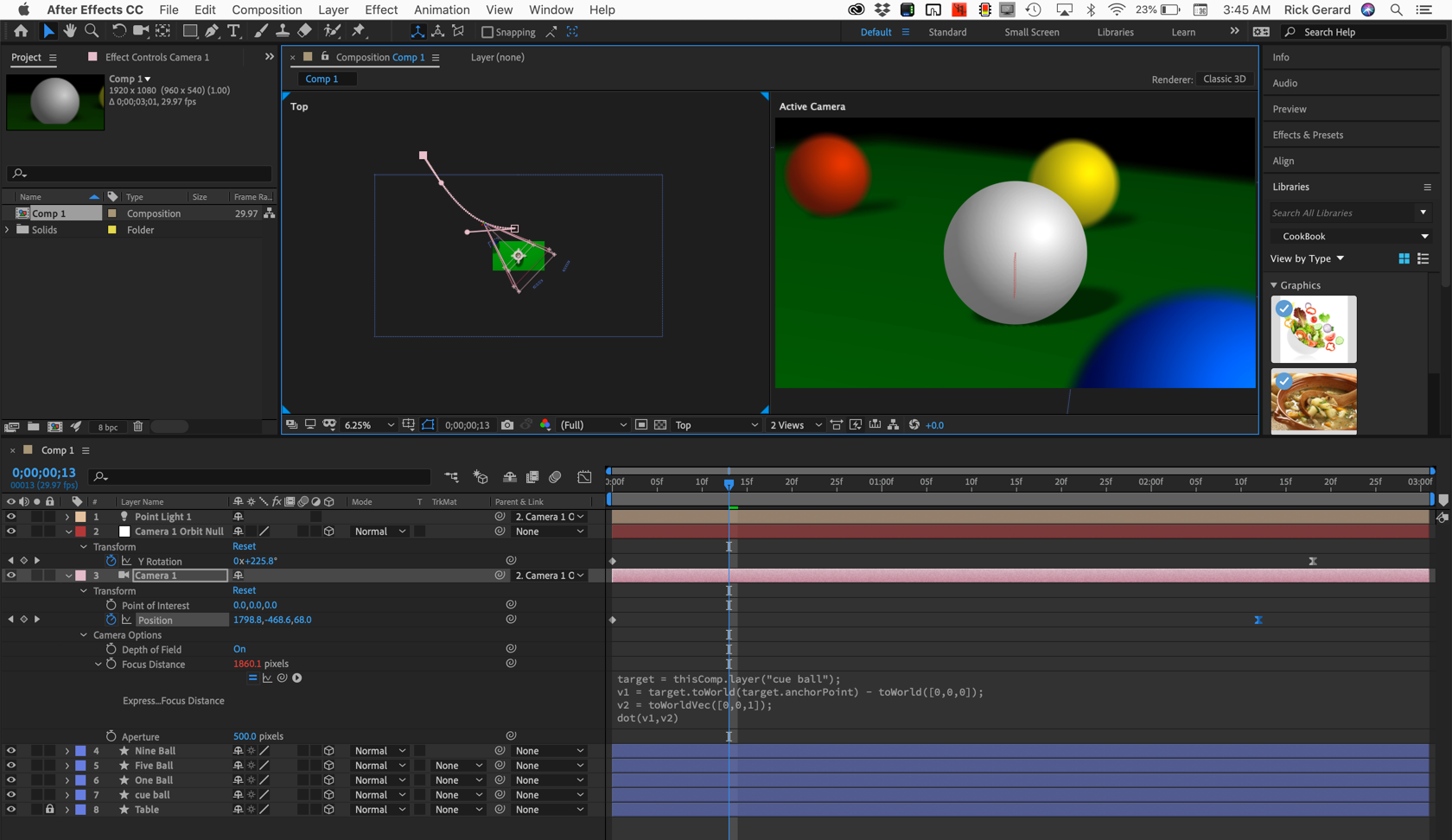
It is true that there is an automated way to tie the focus point of the camera to a layer using the Layer menu, but that doesn't work when the camera is parented to a null. I use Dan Ebberts expression with a slight modification. I put the layer I want to be in focus just below the camera and apply this expression:
target = thisComp.layer(index + 1);
v1 = target.toWorld(target.anchorPoint) - toWorld([0,0,0]);
v2 = toWorldVec([0,0,1]);
dot(v1,v2)
Now any layer that is just below the camera will be the focus point and it works whether or not the camera or the layers are parented to another layer.
This is what the comp would look like:
I'll even provide the animation preset that I use for autofocus. I've had it in my custom presets for many years.
Dropbox - Auto Focus layer below.ffx
By the way, thanks for the screenshot but if would have been a lot more useful if you had shown us the modified properties of the layers that were giving you problems. If you had selected the camera layer and the earth layer and pressed the U key twice so we could tell what you were doing it would be very easy to figure out how you set up your composition.






 2
Replies
2
Replies


 AdChoices