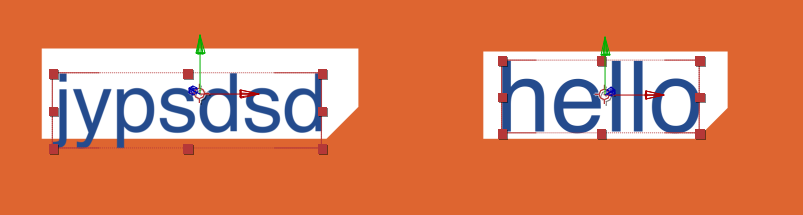
I just looked into this, and it turns out there is no issue with the expression or how it's calculating the size of the rectangle. The issue is the original value of the anchor point is not affected by descender characters. I am assuming the full expression you're using to get the new anchor point value is this:
x = value[0]+this.sourceRectAtTime(time).width/2;
y = value[1]-this.sourceRectAtTime(time).height/2;
[x, y]
If you type any word in After Effects that has a descender, you will notice that they descend below the original anchor point. As a result, your new anchor point is being calculated from the original anchor point value which does not lie at the bottom of your text box.
The problem with this expression is that sometimes the original anchor point lies at the bottom of the rectangle, and sometimes it lies about 15px above the bottom of the rectangle, which puts your new anchor point 15px above where it should be.
The fix is to base the new anchor point off of the text box, not the original anchor point. Use this expression for the anchor point:
x = this.sourceRectAtTime(time).left+this.sourceRectAtTime(time).width/2;
y = this.sourceRectAtTime(time).top+this.sourceRectAtTime(time).height/2;
[x, y]
and this for the position (if you want to keep the text at its original position):
x = value[0]+transform.anchorPoint[0];
y = value[1]+transform.anchorPoint[1];
[x, y]
This is, of course, thanks to Dan Ebberts' post:
Finding the edges of text and shape layers just got a lot easier : Adobe After Effects Expressions





 1
Reply
1
Reply


 AdChoices