Exit
  • Global community
    • Language:
      • Deutsch
      • English
      • Español
      • Français
      • Português
  • 日本語コミュニティ
  • 한국 커뮤니티
0

why am I getting a square composition?

Enthusiast ,
Jul 10, 2019 Jul 10, 2019

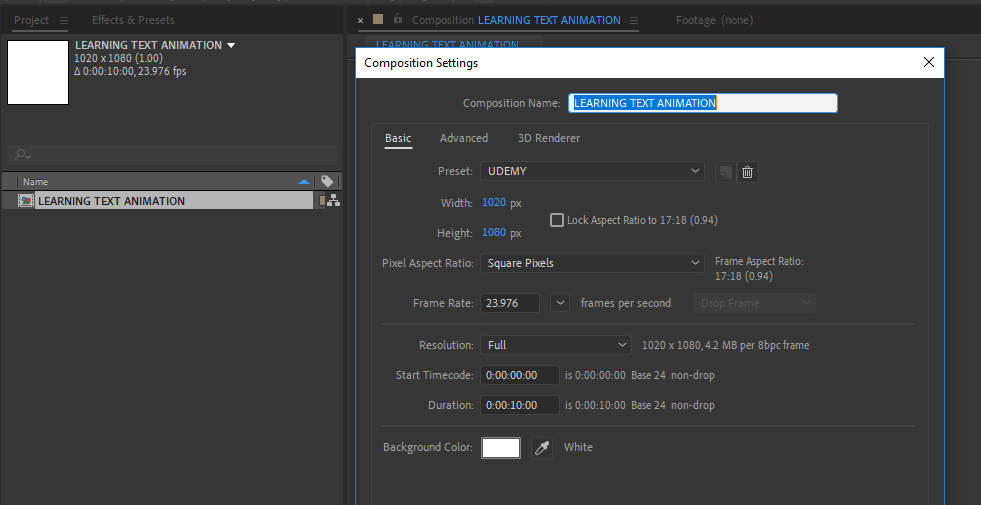
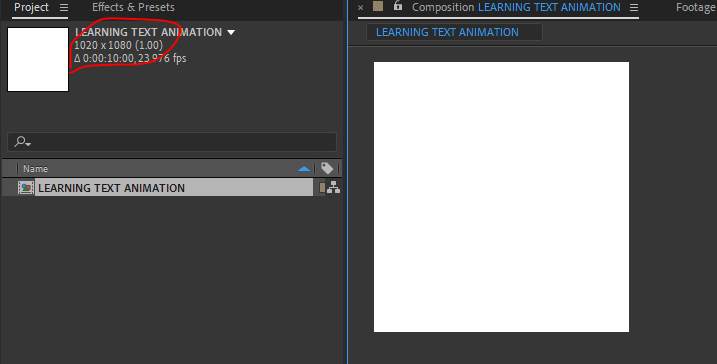
Ive created a custom comp, at 1020 x 1080 but I get a square result, same if I choose a preset like hvc 1080.

AE preset.PNG

square format.PNG

3.9K
Translate
Report
Community guidelines
Be kind and respectful, give credit to the original source of content, and search for duplicates before posting. Learn more
community guidelines

correct answers 1 Correct answer

Community Expert , Jul 10, 2019 Jul 10, 2019

Your comp is 1020 x 1080.

It should be 1920 x 1080

Translate
Participant ,
Jul 10, 2019 Jul 10, 2019

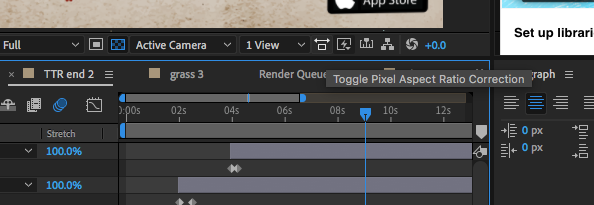
you can modify the pixel aspect ratio from , composition then composition settings ,

also you can toggle pixel aspect ratio from the composition window lower options like the image bellow

good luck

Ayman

aspects AE.png

Translate
Report
Community guidelines
Be kind and respectful, give credit to the original source of content, and search for duplicates before posting. Learn more
community guidelines
Community Expert ,
Jul 10, 2019 Jul 10, 2019

Your comp is 1020 x 1080.

It should be 1920 x 1080

Translate
Report
Community guidelines
Be kind and respectful, give credit to the original source of content, and search for duplicates before posting. Learn more
community guidelines
Community Expert ,
Jul 10, 2019 Jul 10, 2019

The truth is that I do not see it square, you are getting what you are setting up. Your composition is higher (1080) than wide (1020), only 60px are not easy to differentiate if you do not have your eye very well tuned. I do not see any issue here.


Byron.
Translate
Report
Community guidelines
Be kind and respectful, give credit to the original source of content, and search for duplicates before posting. Learn more
community guidelines
Community Expert ,
Jul 10, 2019 Jul 10, 2019

I agree with byroncortez, there is no problem other than you MUST study and understand and follow the rules for the format you choose to distribute your video. Only some visually lossless formats are capable of rendering video with any frame size and frame rate. Almost all compressed formats require at least an even number of pixels high and wide. No streaming media player I know of will playback odd frame sizes without adding black bars on the sides (vertical video on YouTube or Facebook) or at the top and bottom (2:35 - Cinemascope frame ratio), You have to understand and follow these rules or you will be back on the forums asking why your video is distorted or has black bars. 1020 X 1080 is a non-standard frame size that will not perfectly fit in any standard media player I know of so you better know what you are doing.

Translate
Report
Community guidelines
Be kind and respectful, give credit to the original source of content, and search for duplicates before posting. Learn more
community guidelines
Enthusiast ,
Jul 10, 2019 Jul 10, 2019
LATEST

Thanks guys, that was it, I typed in the wrong ratio, should have been 1920

Thanks for the advice Rick!. Have copied it to my learning notes.

Translate
Report
Community guidelines
Be kind and respectful, give credit to the original source of content, and search for duplicates before posting. Learn more
community guidelines