Exit
  • Global community
    • Language:
      • Deutsch
      • English
      • Español
      • Français
      • Português
  • 日本語コミュニティ
  • 한국 커뮤니티
0

Workflow with Audacity (or any audio-editing software)

Explorer ,
Feb 20, 2018 Feb 20, 2018

I need to put markers in After Effects. My settings in AAE - 29,97 drop frames, in Audacity (screenshot)

Безымянный.png

I've change to NTSC drop frames because in my project (AAE) - drop frames (or maybe I'm doing something wrong?)

By scrubbing audio In AAE 1st word starts at, for example, in 1 minute but in Audacity in 1m3s. Why? Why in both programs not the same time?

987
Translate
Report
Community guidelines
Be kind and respectful, give credit to the original source of content, and search for duplicates before posting. Learn more
community guidelines

correct answers 1 Correct answer

LEGEND , Feb 21, 2018 Feb 21, 2018

Well, then, check Audacity again.  Maybe you need to assign a different frame are.

Or you could use Adobe Audition, which is part of Creative Cloud.

Translate
LEGEND ,
Feb 20, 2018 Feb 20, 2018

Check your footage interpretation and sample rates.

Mylenium

Translate
Report
Community guidelines
Be kind and respectful, give credit to the original source of content, and search for duplicates before posting. Learn more
community guidelines
Explorer ,
Feb 21, 2018 Feb 21, 2018

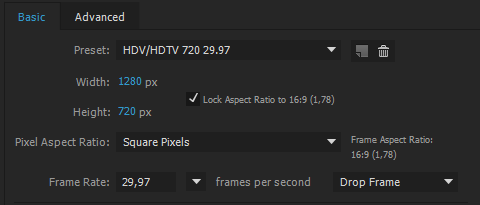
Снимок.PNG

Here is settings of project. NTSC - 29,97 so I chose in AAE too.

Translate
Report
Community guidelines
Be kind and respectful, give credit to the original source of content, and search for duplicates before posting. Learn more
community guidelines
LEGEND ,
Feb 21, 2018 Feb 21, 2018

Well, then, check Audacity again.  Maybe you need to assign a different frame are.

Or you could use Adobe Audition, which is part of Creative Cloud.

Translate
Report
Community guidelines
Be kind and respectful, give credit to the original source of content, and search for duplicates before posting. Learn more
community guidelines
Valorous Hero ,
Feb 21, 2018 Feb 21, 2018
LATEST

Just use Audition and place your markers there. You can do it in PPro too. I'm not sure about Audition but with PPro, after creating your markers, you can simply copy; switch over to AE, and paste into a Timeline and your markers will be there - no need to save the clip in PPro and import etc.

Very Advanced After Effects Training | Adaptive & Responsive Toolkits | Intelligent Design Assets (IDAs) | MoGraph Design System DEV
Translate
Report
Community guidelines
Be kind and respectful, give credit to the original source of content, and search for duplicates before posting. Learn more
community guidelines