Barb Binder
Community Expert
Community Expert
January 26, 2022
解決済み

Adobe Bridge 2022 on Monterey — Can't access my desktop

  • January 26, 2022
  • 返信数 8.
  • 2345 ビュー

Hi All:


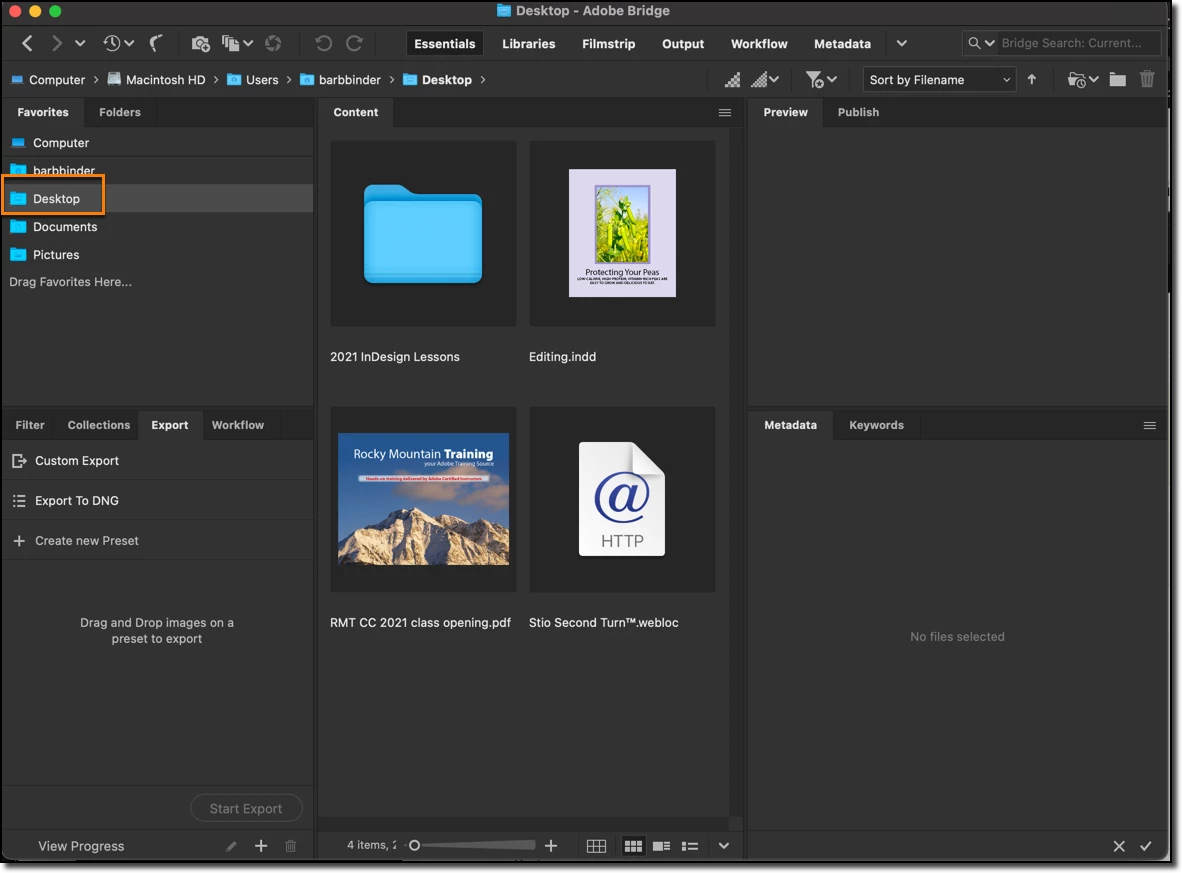
I can't figure out how to access my desktop through Bridge:

  • MacBook Pro M1
  • macOS Monterey 12.1
  • Bridge 2022 12.0.1 246


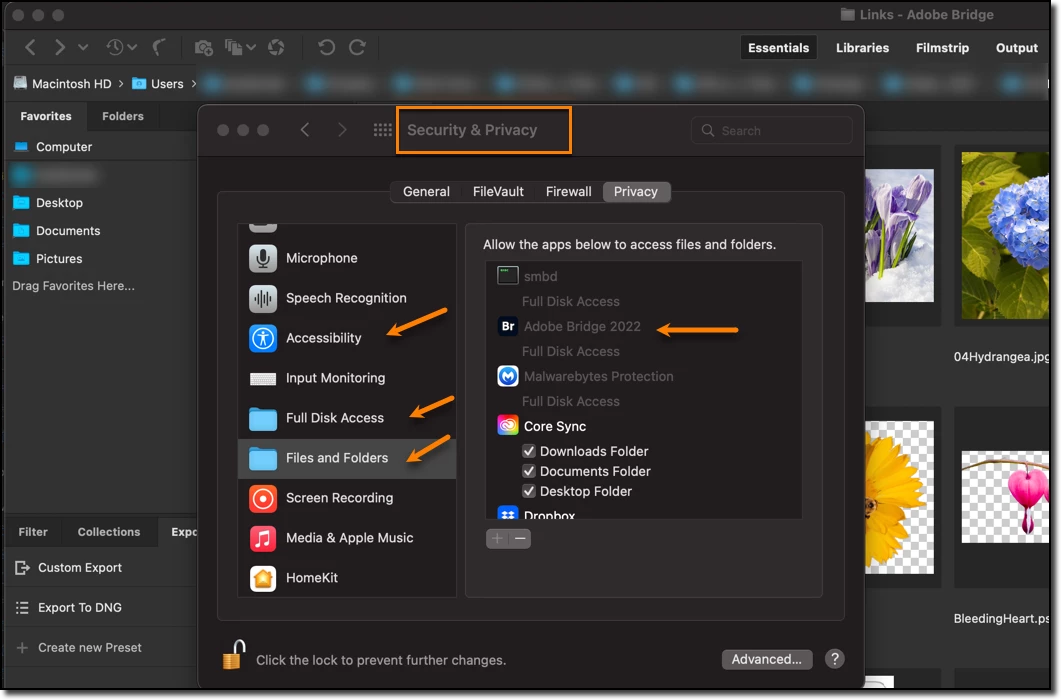
 >  System Prefs > Security and Privacy:

  • Have added Bridge 2022 to Accessibility (according to one post), and
  • Full Disk Access and Files and Folders (another post).
  • Have restarted Bridge and rebooted my MacBook.


What am I still missing?


~Barb


このトピックへの返信は締め切られました。
解決に役立った回答 Barb Binder

Thank you, Gary!!!


Here's what worked:

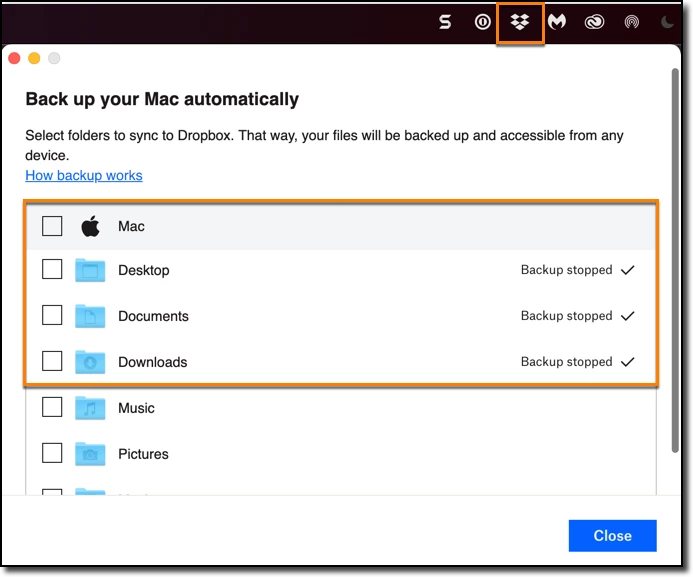
  • Clicked the Dropbox icon on Menu Bar to open the desktop app
  • Clicked on my avatar > Preferences > Backups > Set up > Unchecked  Mac (which included desktop, documents and download)


Result—desktop visible.


Phew!! 😊


~Barb

返信数 8

Barb Binder
Community Expert
Barb BinderCommunity Expert作成者解決!
Community Expert
January 31, 2022

Thank you, Gary!!!


Here's what worked:

  • Clicked the Dropbox icon on Menu Bar to open the desktop app
  • Clicked on my avatar > Preferences > Backups > Set up > Unchecked  Mac (which included desktop, documents and download)


Result—desktop visible.


Phew!! 😊


~Barb

~Barb at Rocky Mountain Training
Participant
February 6, 2022

You lucky. I can't get Dropbox to show up in the system tray. I even downloaded and reinstalled Dropbox, but it doesn't show up either on my MacBook Pro or on my iMac. 

Hence, I can't even change the permissions. Anybody have any idea what I could be doing wrong? It has always been in the system tray until I recently upgraded to a full paid version of Dropbox. 

Barb Binder
Community Expert
Barb BinderCommunity Expert作成者
Community Expert
January 31, 2022

@gary_sc:


Dropbox!! I have already run up against dropbox issues with the new online-only storage defaults. I will look into that.


~Barb

~Barb at Rocky Mountain Training
Barb Binder
Community Expert
Barb BinderCommunity Expert作成者
Community Expert
January 31, 2022

Hi @ankursingh10:


It was already off. Any other ideas?


~Barb

~Barb at Rocky Mountain Training
Adobe Employee
January 31, 2022

Hi @Barb Binder ,


This could happen with icloud syncing your desktop/documents. Apple has introduced this option while ago by default. You have to turn those off to access these folders. You can google it to disable it or here is a link https://discussions.apple.com/thread/7836605

Barb Binder
Community Expert
Barb BinderCommunity Expert作成者
Community Expert
January 27, 2022

😂

~Barb at Rocky Mountain Training
gary_sc
Community Expert
Community Expert
January 28, 2022
Barb Binder
Community Expert
Barb BinderCommunity Expert作成者
Community Expert
January 27, 2022

Good morning, Gary!


It just ignores me. 😕😕


~Barb


P.S. This is a brand new computer and yesterday was my first time using Bridge. I'm still thinking it's a permission issue—Macs are so protective.

~Barb at Rocky Mountain Training
gary_sc
Community Expert
Community Expert
January 27, 2022

The AUDACITY! HOW DARE IT!!

Barb Binder
Community Expert
Barb BinderCommunity Expert作成者
Community Expert
January 26, 2022

Hi Gary!


I hope you are doing well. I missed that post, evidently. I'll give it a shot at the end of the week. I'm teaching this week and don't want to do anything until the class is over. 


Thanks,


~Barb

~Barb at Rocky Mountain Training
gary_sc
Community Expert
Community Expert
January 26, 2022

Hi Barb,


Doin' well, hope you are too.


One more question for you: what happens if you take an image from a folder on the desktop (while in the Finder) and drag it onto Bridge in the Dock?


Have a GREAT class!

gary_sc
Community Expert
Community Expert
January 26, 2022

Hi Barb,


Gosh, you're the 2nd person today describing this problem. What I told the previous person was to get ~Cash Cleaner (from NorthernSW.com) (the "~" is because they do a big update of their software after every release.)


I told him to run the full maintenance option from Cache Cleaner (10 free days), restart, and see if that solved the problem. I never did learn what OS he was on.


Let me know if that does anything to help.