









Connect with our global Camera Raw Community.
Recently active
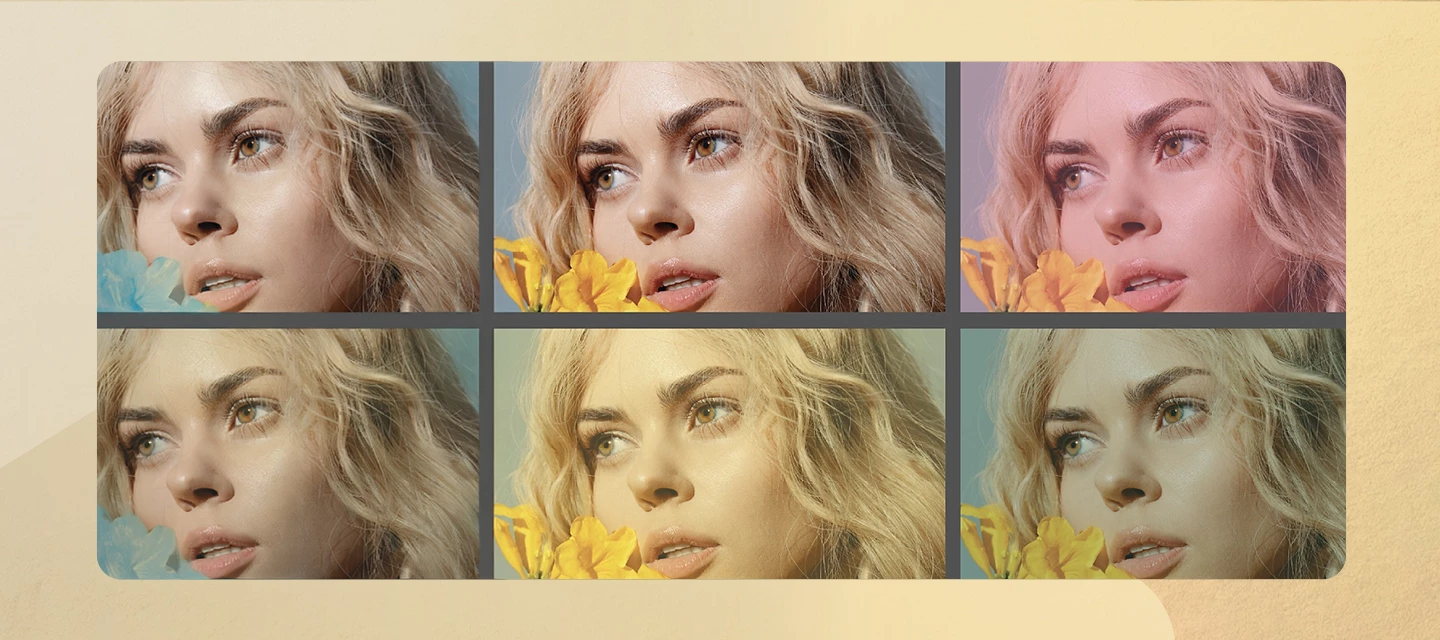
Camera Raw v18.6 introduces new ways to enhance your images and simplify your workflow. Create dreamy, light-filled looks with Glow, turn crops into transparent cutouts with Trim, and access essential photo information instantly with the new Metadata Info Panel, all without leaving the Camera Raw workspace. What’s NewThe August 2026 release of Camera Raw v18.6 introduces new ways to enhance, refine, and understand your images without leaving your editing workflow. The headline addition is Glow, a new effect that creates a soft, luminous atmosphere by spreading light from the brightest areas of your photo into surrounding tones. Whether you're aiming for subtle diffusion, ethereal bloom, or retro-inspired halation, Glow makes it easy to add cinematic character directly within Camera Raw.This release also introduces Trim in the Crop & Expand panel, allowing you to convert a crop into a clean transparent cutout by removing everything outside the selected area. For photographers and de
Camera-matching Profiles are applicable to Camera Raw, Lightroom Classic, and the Lightroom Ecosystem products (Desktop, Mobile, and Web).Note: Not all cameras will receive camera-matching profiles. This thread is a place to request missing camera-matching profiles for specific models. Please include a complete camera model designation and a list of the specific camera-matching profiles you are requesting in your request. If your camera is already listed in this thread, please reply to the specific camera’s post rather than just posting in-line. Camera-matching profiles are provided for some camera manufacturers and models. As raw support is added for individual camera models, camera-matching profiles for some cameras may be added when raw support is initially offered. Other cameras may see camera-matching profiles added at a later date. It is also possible that a specific camera may see a long delay or perhaps not ever receive a specific camera-matching p
Lens Profiles apply to Camera Raw, Lightroom Classic, and the Lightroom Ecosystem products (Desktop, Mobile, and Web). Lens Profiles are available for a wide array of lenses. Not every lens is currently profiled, and of those profiled, not all are profiled for all camera and file types. For example, there may be a profile for a particular lens and camera mount for the raw file but not for the JPEG. Normally, profiles for JPEG are not supplied unless the camera does not apply a correction (e.g. iPhone, GoPro). A complete list of profiled lenses can be found here: https://helpx.adobe.com/camera-raw/kb/supported-lenses.html other helpful info: https://helpx.adobe.com/x-productkb/multi/lens-profile-support.html#Supported_lenses Lens correction for all Micro 4/3 (MFT) lenses and many newer cameras, including Panasonic and Olympus cameras, and other cameras (including Fuji X, Leica Q, and Nikon Z series)plus many point-and-shoot models from Ca
For a complete overview of camera support in Photoshop and Lightroom, visit the following article:Why doesn't my version of Photoshop or Lightroom support my camera? Make sure your version of Photoshop or Lightroom is updated for the latest camera support. If you own an older version of Photoshop or Lightroom, Adobe provides backward compatibility for the latest cameras through the FREE Adobe DNG Converter. Note: ETAs for specific cameras are not available.
When presented with a New Post screen in the Adobe Community, you are given three options for Conversation Type: Discussion, Bug, and Idea. If you were searching in Discussions, the New Post window will default to Discussions. If you are searching in Bugs, the New Post window will default to Bugs and likewise for Ideas. Many customers instinctually report problems they are experiencing as “Bugs”. It is natural to think that a problem you are having might be a bug. A bug is defined, for our purposes, as “something in the software that is not functioning as it was designed to function”. Interpreting whether a behavior is a bug or not is not always easy, however. Here are some reasons why you might want to consider posting first to Discussions rather than jumping straight to reporting in Bugs: Most items reported as Bugs are not actual bugs. In a typical group of reported bugs, only about 3 out of 25* bugs reported turn out to be actual bugs. Of those, typically 2 ou
Adobe is excited to receive requests for additional features you need to enhance your workflow. What can you do to increase the chances of being heard? Don't use the words "Feature Request" in your post's title. Search for and add to existing feature requests rather than creating duplicates. There is no advantage to creating a second request for any existing feature request. One request per thread!When creating an Idea or Feature Request thread, please keep requests for features to ONE request per thread. Doing this will allow others to vote on a single, specific feature and not confuse Upvotes amongst a list of feature requests. If an Idea thread has multiple requests in it, a moderator may ask you to split the multiple requests up into multiple threads so others can vote. In the event there remain multiple requests on a thread, the first item requested will be the arbiter of where the thread will be cross-referenced or merged. Describe how the featu
Bugs should only be reported for the latest or current version of Camera Raw. If you believe you have a bug it must be verified on the latest version of Camera Raw. New bug reports will not be accepted for older versions of the software. If you believe you have encountered a bug, it is important to first search the existing bugs to see if your issue and a possible solution or workaround have already been reported. If so, please add to that thread. If not, it may be prudent to start a new thread.Greater than 90% of the bugs reported are not actually bugs. Before starting a new thread, please read:P: Do I post in Discussions or Bugs? When logging a new bug report, it's required by the Camera Raw team for the information in the report to include steps to reproduce the bug experience. Once we can reproduce an issue, then we can start to investigate a fix. Bug reports without reproduction steps will be moved to discussions.If, after some troubleshooting, we find
The August 2026 release of Camera Raw (v18.5) introduces powerful new retouching capabilities, expanded control over AI-powered features, and enhanced Vectorscope. Whether you're refining portraits, managing AI-assisted workflows, or performing precise color grading, this release gives you greater flexibility and control throughout your editing process. What’s NewOne of the headline additions in Camera Raw v18.5 is the new AI-powered Remove Blemishes from a Photo feature, which automatically detects and removes skin blemishes, moles, freckles, and other facial marks. You remain in control with adjustable Amount and Fade sliders, and can fine-tune individual corrections by removing or restoring specific spots as needed.For users who prefer a more traditional editing experience, Camera Raw now lets you manage generative AI features directly from the Preferences dialog. Features such as Generative Remove, Generative Expand, and Distraction People Removal can be enabled or disabled based o
Nikon cameras stores the focus point that was in focus and the exposure was taken. This would be extremely valuable to see for a sports/action/wildlife photographer.
I see solutions for prior versions. I’m trying to uninstall the latest Camera Raw (18.2) because it is supposedly a workaround-fix to allow the prior version of Photoshop to open WEBP images like it did just few days ago. Every solution I have found suggests to click the 3 dots next to Camera Raw in the Creative Cloud desktop app, but those dots do not appear next to Camera Raw. I also could not find the file within the Adobe CC Suite in Finder. I do not have “Bridge” installed either.I went through the trouble of completely uninstalling Photoshop to try and remove Camera Raw, but no luck. Appreciate anyone who can provide factual information with clear steps.Thanks.
I locally integrated Adobe DNG SDK into the open source SW Darktable(see https://github.com/darktable-org/darktable).It is done via the Adobe DNG SDK intergation of libraw(see https://www.libraw.org/).Before I publish I like to get an official confirmation from Adobe that this is covered by the Adobe DNG SDK license.Who and how can I ask to get this approval?
Merci de prendre connaisance du fichier pdf joint que je vous ai envoyé il y a 6 ans
Recent Camera RAW update… when I access the Geometry panel Shift T, the default is collapsed, I always have to click it to expand. Used to not be this way… any fix?
Description of IssueAdobe Camera Raw repeatedly encounters a GPU out-of-memory error during normal GPU-accelerated image editing, particularly when working with masks.The error displayed is:“The graphics processor has encountered an out-of-memory error. Due to a run-time error, GPU acceleration has been reverted to Limited for the remainder of the session.”This occurs on a very high-end workstation with an NVIDIA RTX PRO 6000 Blackwell Workstation Edition with approximately 96 GB of dedicated VRAM.Importantly, the Camera Raw diagnostic log shows that GPU initialization completes successfully and that approximately 100 GB of GPU memory budget is detected. The actual failure occurs later when Camera Raw attempts to allocate/render an image mask texture.The relevant Camera Raw log entries are:Determined GPU3 hard status: success*** GL Error: E_OUTOFMEMORY (hr=0x8007000e): imageMaskTex ****** GL Error: imageMaskTex ****** Error: dng_exception (200025) in cr_gpu_tile_render_task ***TrimFoot
J'ai un problème. Toutes les versions depuis Camera RAW 18.4.1 à la dernière échoue de fonctionner sur ma machine. J'ai une RTX 3070 Ventus, Je suis sur Windows 10 22h2 entièrement à jour. J'ai 32 Go de Ram. J'ai la dernière mise à jour du driver NVIDIA. C'est à dire la 610.88. Mais à partir de la 18.4.1 de Camera RAW, il ne reconnait plus mon GPU. Impossible de l'ouvrir dans Photoshop. Un message indiquant que "Camera Raw nécessite l'accélération du processeur graphique pour retoucher les photos". Donc pour lui, c'est comme ci je n'avais pas de GPU. Dans les paramètres de Photoshop pour aller dans les propriétés de Camera Raw, au niveau performance, je vois ce message "L'accélération graphique Camera Raw n'est pas prise en charge par votre système". J'ai déjà cliqué sur "Réinitialiser la prise en charge GPU", "Purger la mémoire cache". Redémarrer Photoshop. Mais sans résultat positif. Pourtant Photoshop lui-même détecte bien mon GPU et il est bien utilisé. Pour le moment, je suis obli
In order to optimize storage space I convert pictures from NEF to DNG. Unfortunately the Adobe DNG Converter is almost unusable. The software works fine on older PCs with four core processors. On my newer PC with 8 cores and 16 threads it is impossible to use. It seems like a memory problem. Sometimes it works but most of the time it renders the whole PC unusable, often crashes Windoes Explorer. Even restarts won’t solve the tangled up DNG Converter. Frustrating.
Announcing a new feature now in Adobe Camera Raw (17.2) – Removal of Distracting PeopleUnder the Remove dialog, under Distraction Removal, we have added an item called “People”. This feature supports faster and easier detection and removal of distracting people in an image. It is offered as a Tech Preview in the Adobe Camera Raw Plugin-only and is available now. Please try it out and let us know what works well, what doesn’t work well, and anything that might improve the experience. Thank you! Peter Baust - Dir, Product Management Posted by Rikk Flohr
Hello Adobe Team,In a series of identical tripod shots, a manually created mask does not synchronize correctly.When I copy the mask to a single image, it is positioned correctly. When I synchronize it to multiple images simultaneously, the mask appears shifted—even though the camera, subject, framing, and image dimensions remain unchanged. Is this a known issue?Thanks - Michael
The updates for the versions I mentioned in the title don't work. Camera Raw keeps claiming my RTX 3070 GPU isn't supported. So, I can't use it. Only version 18.4.0.0 works.Here are screenshots of the messages I receive with the latest versions. And here with version 18.6.0.0Apart from Photoshop itself, which does support my GPU:Therefore, I cannot take advantage of the latest Camera RAW features. This is unacceptable.I already submitted a bug report for versions 18.4.1 to 18.5, but without success. You haven't fixed the problem in this version.Here are the logs for version 18.6.0.0As well as those of the version that works for comparison.I also upload my dxdiag file for analysis.I even got another NVIDIA GeForce Studio driver update today, version 616.56. But it didn't fix the Camera RAW issue. So I'm still stuck on the working version 18.4. It's really frustrating 😤 knowing that I'm paying for the software.
If I double, click of a jpg. That I’ve already edited, it will open camera raw. But not a new jpg. I have the box clicked where it says double click opens camera raw. There is no error message.
I am a professional wedding photographer and I edit between 30,000 and 50,000 RAW files every year using Photo Mechanic, Adobe Bridge and Camera Raw.For many years, after confirming a crop in Camera Raw, the image automatically returned to 100% zoom. This behavior became an essential part of my editing workflow and muscle memory.Since updating to Camera Raw 18.4.1, this behavior has changed. The image now remains at the previous zoom level, forcing me to manually press Command + 1 after almost every crop.This may seem like a minor interface change, but for professionals editing tens of thousands of images every year, it adds thousands of unnecessary keystrokes and noticeably slows down the editing process.Please consider restoring the previous behavior or, even better, adding a preference that allows users to choose what happens after confirming a crop:• Return to 100% zoom• Keep current zoom• Fit on screenCamera Raw is an exceptional tool, and this request is simply about preserving t
After updated my Mac OS versions of Photoshop and ACR this past week I have encountered a problem when attempting to open edited ACR files in Photoshop using the “Open Object” button. (Same issue if I choose “Open” instead of “Open Object” in ACR.The problem only affects files that have been edited in ACR. An unedited file will open correctly in Photoshop.When I click the button, ACR simply closes and takes me back to Bridge. My ACR edits are not lost, but I still cannot open the file. Double-clicking the image in Bridge re-opens in in ACR with the previous ACR edits intact, but clicking the Open Object button still will not open in into Photoshop.If I instead go back to Bridge, click to select the image in the slideshow, it opens a camera raw edit window like the one that I had seen in ACR, though with a different layout form my default ACR layout. If I click DONE or Open Object, the window simply closes and I’m in Photoshop by my file has not opened. Photoshop version is 27.10.0Bridg
Hoping for some type of solution. I have an R5 MK2. I shoot raw and convert to tiff with pro photo rbg 16 bit, then further edit the tif. What I see in ACR during the edit and the later saved result in Bridge are not the same. I like what I see in ACR and not so much the saved result in Bridge. Any light shed on this would be much appreciated.
In the last 4 days, it has happened at least 4 times where I have made significant adjustments to an image in Camera Raw - on the Edit panel, a bunch of masks, cropping, created snapshots - the works... and the image just spontaneously resets itself to previous settings. I cannot say 100% but I think it has reset them to the settings that were there when it was last opened. The snapshots even disappeared. It is definitely not user error - I am not hitting anything that is causing this to happen and I cannot Command+Z to undo it. I haven't yet pinpointed exactly what tab I am on when it happens. Has anyone else experienced this?CameraRaw 18.6.0.26982024 MacBook Air M3 16GB
Use Profile Corrections (Camera Raw, Optics, Profile) used to be automatic. Now every RAW file I open (I only shoot in RAW), I have to tell it to use profile corrections. It becomes really annoying when opening 20-30 images a day.I work on images from Nikon D-300 (not so much anymore), D-810 (the most for now) and Nikon Z8 (newly purchased) and all lenses I use appear on the Adobe list as being supported. The Z8 is not a problem as it has a built-in correction.I found instructions for a Camera Raw Preset (Stephen Marsh, 6 years ago) but it doesn’t work with the current version of Camera Raw (I’m on the prescription plan and updated).Does anyone have a way to make Use Profile Corrections permanent or automatic? Thanks for the help.
Remix with Firefly Community Gallery
Thousands of free creations to fall in love with and remix in Firefly.
Already have an account? Login
No account yet? Create an account
Enter your E-mail address. We'll send you an e-mail with instructions to reset your password.