


Participant
June 16, 2016
解決済み

How to resolve ADE DRM error on a kobo?

  • June 16, 2016
  • 返信数 6.
  • 5504 ビュー

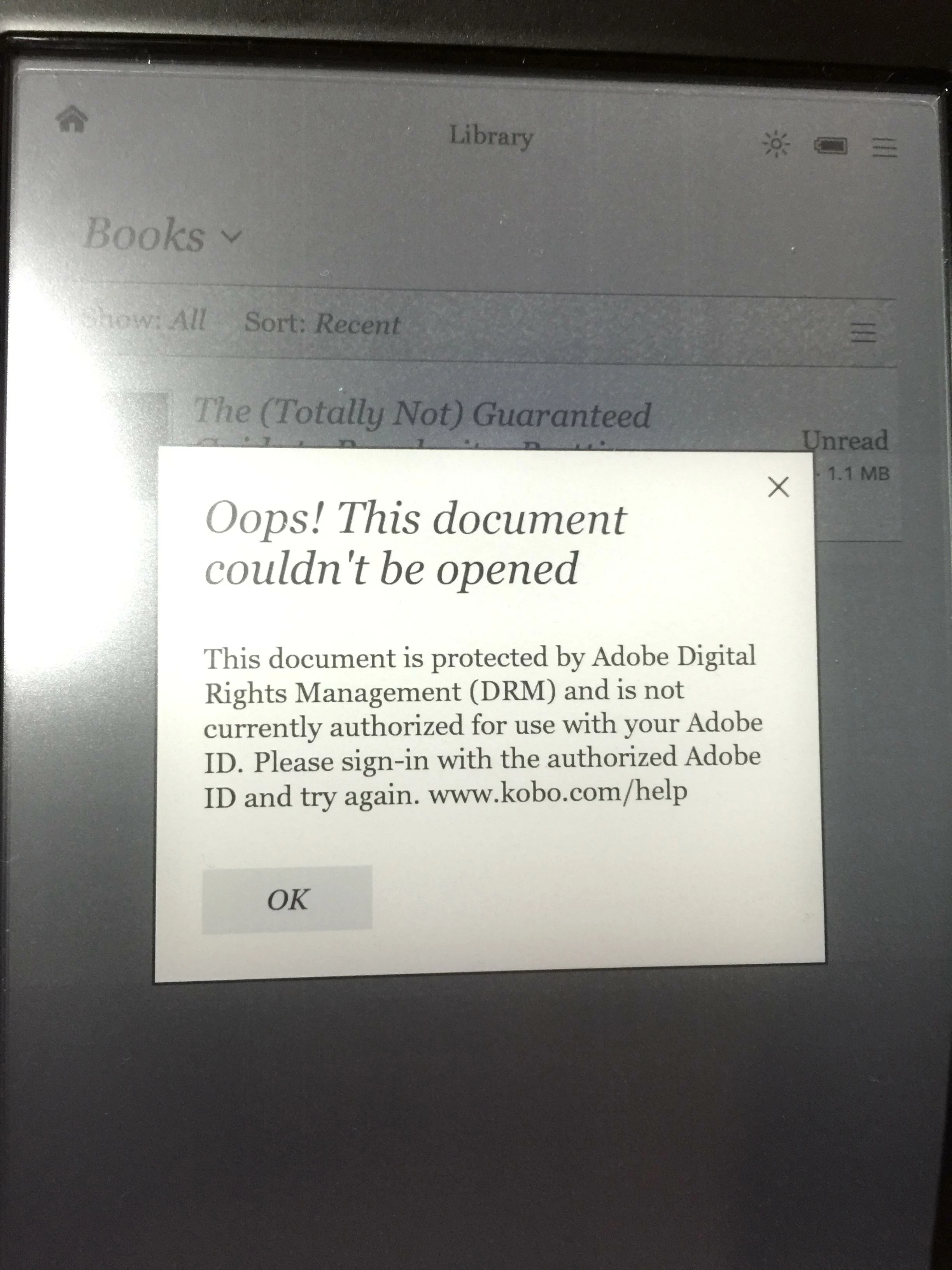
I have a new "KOBO Glo HD" and I have properly auth my computer and device and can copy without error books from my library to the device, however it stops there, and I get the following error on the device. I have removed the software (not done the registry thing) I have deauth and reauth my computer and device, getting close to the limit I am sure, and have yet to READ 1 book on my kobo. Protected by DRM? no this is not protection...

BTW only support for ADE is chat and forums, and the person at the end of chat referred me to the forums, I think they should disable the CHAT support if your response will only be to refer to forums.

Anyone encountered this and solved it? Is really annoying...
このトピックへの返信は締め切られました。
解決に役立った回答 Sun_shine_8888

After about a week of fighting with this issue, I have figured out the solution myself,

Contacting KOBO ... no help

Chat with Adobe... referred to here...

Solution, use ADE 3.0 and do not use ADE 4.x

返信数 6

franceb3796491
Participant
July 21, 2022

Hello !


Here is the solution when your Kobo (with library) does not seam to open on the kobo. Plus, with windows 11, the ADE do not show your book but say they are in the library. 

I search and finaly my problem is ok now.

The solution is simple.  You have to change the orignal directory. Here a exemple because i.m not so good with english and what i want to say.


1) In your computer your have the directory:   My document / digital edition / .... and you see all your document (book)

2) you have to reWrite this directory buy creating another one.

My document / BAD digital edition

CLOSE ADE BEFORE DOING THAT.

After, open ADE and i will create anothor directory and BINGO ! all there.

Participating Frequently
July 22, 2022

Thanks for your reply! I've taken a different track... Got a new cell recently, and I decided to try the Libby app on it. This works neatly, no muss no fuss, and I'm done with my Kobo.
- Jeff

Participating Frequently
July 20, 2022

Me and the Clara HD are fighting this same battle; Adobe laid to waste a smooth, simple process. The hours spent on this! Still not working right!

Participant
July 21, 2022

Hey Jeffrey, did you try the OP's suggested solution of using ADE version 3.0 in order to solve the authorization issue on your Clara HD? It appears that version 4.x is "broken", but like the OP and other users who posted here I managed to finally solve the problem using version 3.0. Once you have version 3.0 installed on your computer, the process to authorize books is the same of version 4.x, except that with 3.0 your eareader should be finally able to properly access books.

Unfortunately, to complicate things, it looks like that over the past year the link to download version 3.0 has been removed from the Adobe download page. However, in the above exchange of posts with artrosch, we mention a reddit thread (which should be easy to locate with a quick google search) that links to a working DL for ADE 3.0. Hopefully, this will help solve the problem!

Participating Frequently
July 27, 2022

Is there a similar link for Mac? This issue is driving me nuts, I just want to read 😞

Participant
August 12, 2021

Tested on W10 computer with two ACSM files for books I borrowed on a public library in France.

After a lot of testing I removed ADE 4.5.11 and installed ADE 3.0 and that still works in 2021!

Yet to test on a MacBook

Thanks Sun_shine for the solution

Participant
July 12, 2022

I have been totally unable to find a version 3.0 for ADE.  Search and search but everywhere I go it simply defers to v4.5.11.  Frustrating!


Participant
July 13, 2022

Looks like the Adobe download page link for ADE 3.0 now simply takes to the ADE support page where no links to download version 3.0 seem to be available. Looking for alternatives, I found a user on reddit who mentioned having the same issue and reported finding a (apparently safe) mirror download for ADE 3.0 from a third party website. Can't remember what the guidelines here say about posting links to third party websites, but you should be able to easily find that link in the discussion on reddit (the discussion is titled "Can't download ADE 3.0" and it was one of the first hits when I googled for "ADE 3.0 download"). Hope this is helpful.

Participant
January 19, 2021

In 2020, on windows 10, the adobe digital edition, didn't work. It didn't even start on my setup.

Participant
January 19, 2021

In 2020, on windows 10, the adobe digital edition version 3.0, didn't work It install, but, it didn't even start on my setup.

Participant
November 20, 2020

I had the same issue on 4.5.10 on Mac. 4.5.11 solved the issue and I was able to read Adobe DRM books again.

Sun_shine_8888作成者解決!
Participant
June 16, 2016

After about a week of fighting with this issue, I have figured out the solution myself,

Contacting KOBO ... no help

Chat with Adobe... referred to here...

Solution, use ADE 3.0 and do not use ADE 4.x

Participant
March 3, 2021

Hey, thank you so much for sharing this. I was having the same issue with a Kobo Touch eReader using ADE 4.x: after losing hours trying to authorize, deauthorize, download, re-download, etc. to no avail I read your solution, installed ADE 3.0 and now it works fine!


BTW, I was able  to install ADE 3.0 on the latest Windows 10 version without issue. A little more in detail, this is what I did:

- deauthorized the eReader from ADE 4.x;

- deauthorized my computer from ADE 4.x;

- uninstalled ADE 4.x;

- installed ADE 3.0;

- authorized my computer, then the eReader, downloaded again the book to add it to Library, then copied book to eReader;

- disconnected eReader and the book was there ready for use.