


Participant
January 24, 2021
質問

Cannot install anything (very frustrated)

  • January 24, 2021
  • 返信数 1.
  • 315 ビュー

Hello,


Please can anyone help


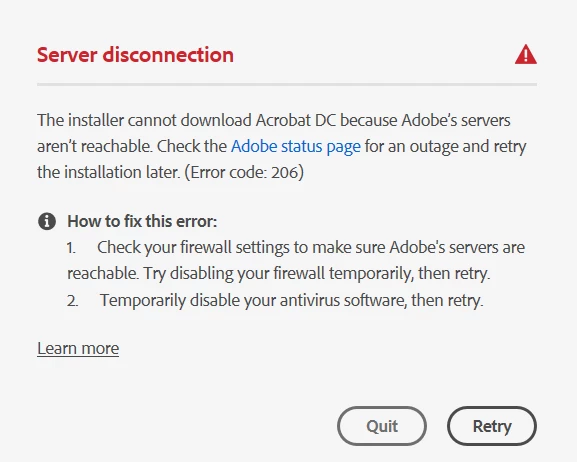
Stuck in a loop of being unable to install any Creative Cloud Applications on Windows 10. Previously had Photoshop installed, but was stuck in a loop of login page appearing then disappearing, so uninstalled everything to start again. But now just keep getting 206 error


So far i have tried


- Disabling all anti-virus and firewalls

- Removing credentials from Windows Credential Manager

- Removing Certificates from Certificate manager

- UsingAdobeCreativeCloudCleanerTool.exe to remove any reference.

- Rolled back Windows to a previous restore point from Windows Update dated 20/01/2021

- Used the alternative installer ACCCx5_3_1_470.zip, this did work once, but still couldn't get logged into Creative Cloud suite, same Error 206. Now when i try installing that again gets to 5% and hangs even after an hour.

- Tried "creative_cloud_uninstallerwin.zip"


Logs are attached (rename to .zip)


このトピックへの返信は締め切られました。

返信数 1

Nancy OShea
Community Expert
Community Expert
January 24, 2021

Hi @default5g7f02h0q4vr,

Sorry for your difficulty with installing.  Please see the correct answer below.

https://community.adobe.com/t5/download-install/error-code-206-installation-is-stuck/td-p/11341160?page=1


Post back if you still need help.


Nancy O'Shea— Product User & Community Expert
Participant
January 24, 2021

I have tried everything suggested on that post and still does not work

Nancy OShea
Community Expert
Community Expert
January 24, 2021
  • You mean you wiped everything off your system with Adobe Cleaner tool?
  • And you used the alternate download link to get Creative Cloud desktop app?
  • And you still can't connect?


Adobe online chat is available in English 24/7.  Adobe phone support is M-F during normal business hours.


Or just re-install Windows 10.


Nancy O'Shea— Product User & Community Expert