


Participant
December 3, 2022
解決済み

[How To] Fresco on iPad - layers and sizing of brush

  • December 3, 2022
  • 返信数 2.
  • 1785 ビュー

I am totally new to Fresco, and to my i pad. I am just trying to draw a picture and to make it easier to draw really small I zoom in, and then zoom out to carry on with my picture.  But, do I need to change the brush size to compensate for this?  Even if I do the small drawing on a different layer, I still zoom in to get the detail. The way I am doing it is making the smaller parts look different in their line thickness. Please cn someone advise?


[Renamed by Mod]
このトピックへの返信は締め切られました。
解決に役立った回答 Imaginerie

The brush is atthat size irrespective of the zoom ratio you're in...

If your brush is 5 pixels, it will appear bigger when you zoom in, because your pixels will be shown bigger on the screen. 5 pixels will be still 5 pixels, but the size of the pixels will vary on your screen.
So, to really get a sense of what your brush size is like, you'll have to set that at 100%, and then work on the details by zooming in.

Another way to make sure the brush size looks good in relation to your whole artwork is to fit the artwork to your screen, you can do that by pinching the screen with two fingers.
The real size is when your screen is set at 100%, and make sure you got your file settings right too (Dimensions and resolution)

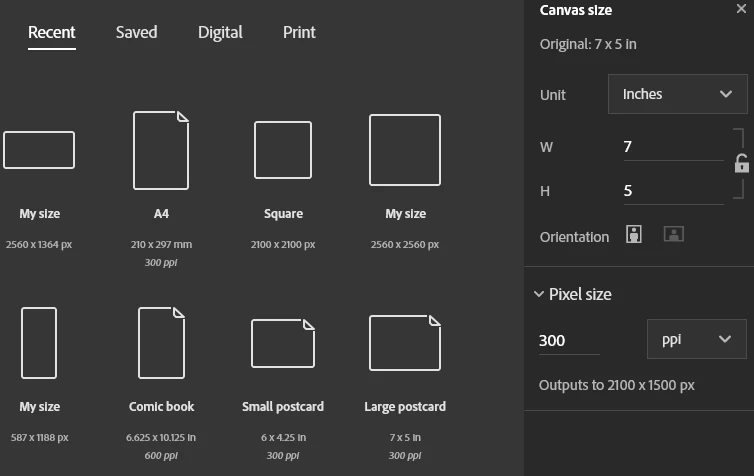
These settings are very important (see the right side of the screenshot)
Critical if you want to print your artwork.

Let me know if you need clarification to any of these. It can be overwhelming when you start it out, but take it slowly and it will be clear very soon!

返信数 2

Imaginerie
Community Expert
ImaginerieCommunity Expert解決!
Community Expert
December 4, 2022

The brush is atthat size irrespective of the zoom ratio you're in...

If your brush is 5 pixels, it will appear bigger when you zoom in, because your pixels will be shown bigger on the screen. 5 pixels will be still 5 pixels, but the size of the pixels will vary on your screen.
So, to really get a sense of what your brush size is like, you'll have to set that at 100%, and then work on the details by zooming in.

Another way to make sure the brush size looks good in relation to your whole artwork is to fit the artwork to your screen, you can do that by pinching the screen with two fingers.
The real size is when your screen is set at 100%, and make sure you got your file settings right too (Dimensions and resolution)

These settings are very important (see the right side of the screenshot)
Critical if you want to print your artwork.

Let me know if you need clarification to any of these. It can be overwhelming when you start it out, but take it slowly and it will be clear very soon!

Participant
December 4, 2022
Thank you so so so much for your reply, that was so helpful and so wonderful to get

Sent from my iPad
Imaginerie
Community Expert
Community Expert
December 4, 2022

You're most welcome!

Happy drawing!

Ged_Traynor
Community Expert
Community Expert
December 3, 2022

Moved to the Fresco forum from Using the Community