



解決済み
Figure Numbering Not Updating
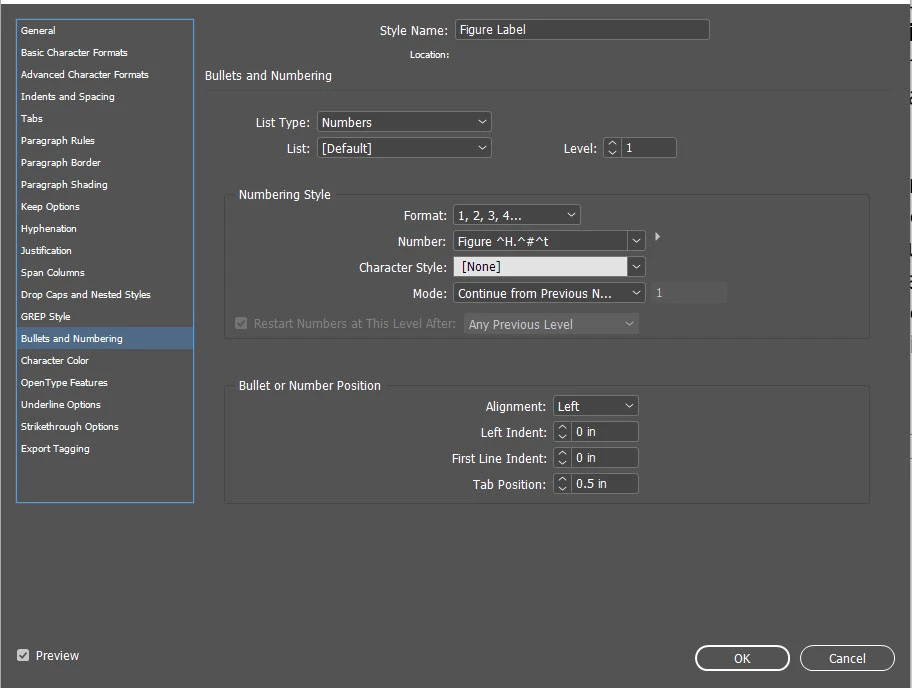
I have a long document with several chapters that contains graphics that need to be referenced. I need the caption to read somthing like this "Figure 2.1: Program Managment", where the first number is the chapter and the second number is the number for that graphic. I have a style setup for the caption that uses Numbers List Type. It worked fine when I inserted the caption on the first graphic, but on the second graphic, it did not update the number for the graphic. So instead of getting Figure 2.2 it shows Figure 2.1 again.
Below is a screen shot of my List Number settings. Can someone help me figure out what went wrong? I tried closing the document and opening it up again, but that didnt help.
Here is my system software info:
- Windows 10 Pro, Version 21H1
- Adobe Indesign 16.4 x64
 AdChoices