


Exit
  • Global community
    • Language:
      • Deutsch
      • English
      • Español
      • Français
      • Português
  • 日本語コミュニティ
  • 한국 커뮤니티
Locked
0

How to change text frame box color

New Here ,
Sep 03, 2021 Sep 03, 2021

Hi.

Usually my default frame text box color is blue, but now it's yellow for some reason, which makes it really difficult to see against white, and I can not for the life of me figure out how to change it back.


TOPICS
How to
1.8K
Translate
Report
Community guidelines
Be kind and respectful, give credit to the original source of content, and search for duplicates before posting. Learn more
community guidelines

correct answers 1 Correct answer

Community Expert , Sep 03, 2021 Sep 03, 2021

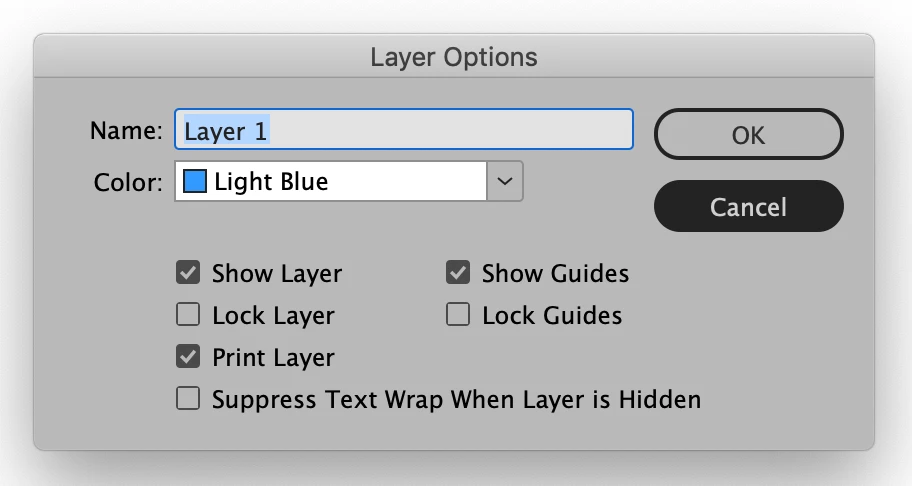
It sounds like what you are talking about is the color that frames have that depends on what layer they are on. If you double-click on the default layer you will get the Layer Options dialog box that has a pull-down menu for layer color. Choose that menu and pick a more pleaasing color to display your unstroked frames.

Screen Shot 2021-09-03 at 9.26.07 PM.png

Translate
New Here ,
Sep 03, 2021 Sep 03, 2021

actually it's for the rectangle frame tool and not the frame text box.

Translate
Report
Community guidelines
Be kind and respectful, give credit to the original source of content, and search for duplicates before posting. Learn more
community guidelines
Community Expert ,
Sep 03, 2021 Sep 03, 2021

It sounds like what you are talking about is the color that frames have that depends on what layer they are on. If you double-click on the default layer you will get the Layer Options dialog box that has a pull-down menu for layer color. Choose that menu and pick a more pleaasing color to display your unstroked frames.

Screen Shot 2021-09-03 at 9.26.07 PM.png

Translate
Report
Community guidelines
Be kind and respectful, give credit to the original source of content, and search for duplicates before posting. Learn more
community guidelines
New Here ,
Sep 03, 2021 Sep 03, 2021

yes that's it! thanks so much 🙂

Translate
Report
Community guidelines
Be kind and respectful, give credit to the original source of content, and search for duplicates before posting. Learn more
community guidelines
Community Expert ,
Sep 04, 2021 Sep 04, 2021

Happy to help.

Translate
Report
Community guidelines
Be kind and respectful, give credit to the original source of content, and search for duplicates before posting. Learn more
community guidelines
Explorer ,
Dec 13, 2025 Dec 13, 2025

Lately they could not make indesign any more complicated. I've have almost a mental breakdown with the way this programs works, and I'm paying for it yet!!!  I had everything aligned only to wake up the next morning and to find eveything shifted. Then they put in these yellow squares, trying to help but only making me have to go look up what they are doing and find it's a big bunch of crap for something that was easy to figure out in the first place. 

Translate
Report
Community guidelines
Be kind and respectful, give credit to the original source of content, and search for duplicates before posting. Learn more
community guidelines
Community Expert ,
Dec 13, 2025 Dec 13, 2025

If you're having an issue with InDesign please start a new post with full details. This one is more than four years old and was answered quickly. OTOH, if you only came here to rant, I do hope you feel better.


As this discussion was asked and answered, I'm going to lock it.

Translate
Report
Community guidelines
Be kind and respectful, give credit to the original source of content, and search for duplicates before posting. Learn more
community guidelines
Community Expert ,
Dec 13, 2025 Dec 13, 2025
LATEST

It's a complex program meant for professionals. You may want to look at Canva. 


David Creamer: Community Expert (ACI and ACE 1995-2023)
Translate
Report
Community guidelines
Be kind and respectful, give credit to the original source of content, and search for duplicates before posting. Learn more
community guidelines