Known Participant
December 15, 2020
解決済み

What is the "#" hidden character in InDesign? How to fix blank pages?

  • December 15, 2020
  • 返信数 3.
  • 8133 ビュー

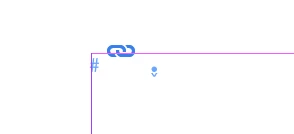
I successfully (sort of) used the InDesign Place function with a Word.docx for text and endnotes. But, it added 1,330 blank pages between the last page of text (p. 100) and the endotes. With the Type/Hidden Characters Shown, each page (except the endnote page) has a blue, hidden "#" mark showing  on the top left. What did I do? I also see on the first page of the text along with the # mark, there is a blue line along the top of the page horizontally, just under the page margin line. Also, on p. 101 after the last page of text, is the another hidden character, one with with a dot and and down button indicator.  Other than these hidden characters, the pages are blank. These are in the screen shots attached. This is the beginning of the 1,330 blank pages. So, I can manually delete the blank pages and be on my way, but if anyone can tell me what exactly I did here, I would like to avoid future problems. After this, I'm typing right into InCopy or InDesign. No more Word for me, even converted from Apple Pages. 
このトピックへの返信は締め切られました。
解決に役立った回答 rob day

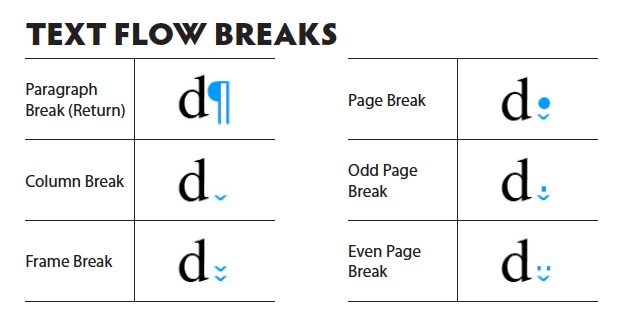
Looks like a Page Break invisible:


返信数 3

rob day
Community Expert
rob dayCommunity Expert解決!
Community Expert
December 15, 2020

Looks like a Page Break invisible:


Community Expert
December 15, 2020

I think you might have had master pages turned on with a Primary Text Frame.

https://creativepro.com/indesign-basics-primary-text-frames/


So your document automatically has text frames on each page - it's attached to the master page. So every new page gets this Primary Text Frame.


When you imported your file  to InDesign, it didn't go into the Primary Text Frame - but looks like it made an additional text frame over the one that was already there. 


You can just go to your Master Page and delete the text frames. 


https://helpx.adobe.com/ie/indesign/how-to/work-with-multi-page-documents.html


Community Expert
December 15, 2020

Here's a quick list of hidden characters

It's a figure space. These are hidden characters. So need to worry, they don't print. 


oftenon
Participant
September 29, 2024

My MSWord text imports (to ID) have intermittant instances of an inverted v that occur instead of a wordspace dot (not the above-cited index marker, just the blue ^ showing at character’s x-ht)... they occur and kind of ‘act’ like wordspaces but replacing with wordspaces is necessary for truly proper textflow and replacing them’s a pain! Any help?

rob day
Community Expert
Community Expert
September 29, 2024

Any help?


Hi @oftenon , There is the Non Breaking Space and the Non Breaking Space (Fixed Width). You can do a GREP Find & Change to replace them ~s for Non Breaking Space (Fixed Width), or ~S for Non Breaking Space :