


Participating Frequently
June 20, 2011
解決済み

Colors synced but InDesign colors not matching Photoshop files

  • June 20, 2011
  • 返信数 4.
  • 47991 ビュー

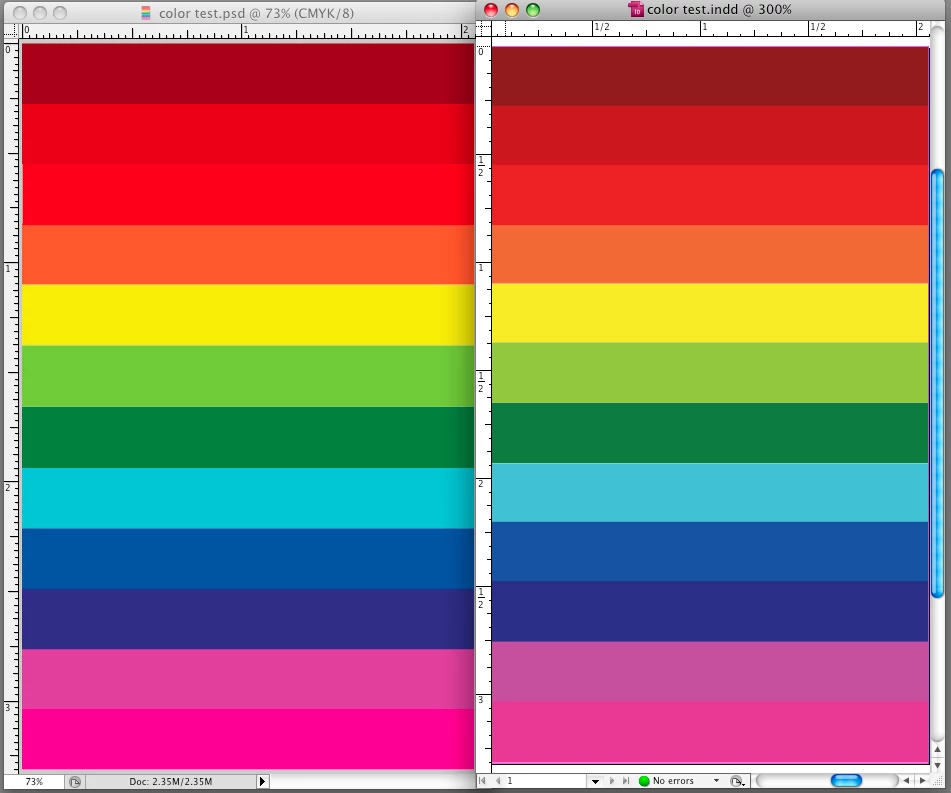
I'm hoping someone can please help me get my InDesign/Photoshop colors to match. I am  on Adobe CS5 and am noticing a big color change (especially with red hues) on my computer monitor between my Photoshop and InDesign files.

My colors are all synced to North America General Purpose 2  through Bridge but the color in my Indesign files never match my  Photoshop files on my computer screen. (I'm honestly not sure how they compare in print.)  The color profiles match in both Photoshop and InDesign and I've also tried changing my color profiles on both programs but that doesn't fix the issue either.  I've noticed my red/pink/purple hues seem to be off quite a bit - much more than the other colors. Any ideas on how I can fix it so my colors match from Photoshop to InDesign?  I'd really like to get the issue fixed because when I produce a PDF from the InDesign file the PDF matches InDesign but I want it to match the original Photoshop file.  If it helps, I'm on Mac OS 10.5.8 and running Creative Suite 5 (InDesign CS5 Version 7.0.4,  Photoshop CS5 Version 12.0.4 x64,  Adobe Acrobat 9 Pro version 9.4.5,  and Adobe Bridge CS5 Version 4.0.4.2).

Also, I probably should mention I have 2 computer monitors hooked up (one mac, one pc). When I compare the two files on the mac screen, the colors (especially the reds) are way off. When I compare them on the PC/Dell monitor the colors are off, but not nearly as much. (However, the color of the Dell monitor in general isn't good.. or true to print). I'm assuming the Mac monitor probably produces a greater range of color and that could be the reason for seeing a greater contrast in color on the Mac monitor vs. the Dell monitor but I'm not sure.


I have CS3 on another computer and the file colors match from  Photoshop to InDesign on my computer with Adobe CS3 so I know it's not a file issue. I even took screen shots of my  color settings on my computer with CS3 and made my color settings on my computer with CS5 all match, but the colors  still do not match up.  I also tried resetting my preferences for  InDesign, Photoshop and Bridge but it still doesn't match!

I've attached a screen shot that compares the same file in Photoshop vs. InDesign on a Mac monitor. Anyone have any ideas? I use reds a lot in print so I'd really like them to match!
    このトピックへの返信は締め切られました。
    解決に役立った回答 Peter Spier

    If it helps, here's some of my current monitor settings...

    Preset Modes

         Gamma - PC

         Color Setting Mode - Graphics

         Present Modes - Desktop

    Display Settings

         Wide Mode     Fill

         Dynamic Contrast - Off

         Display Info - Display Monitor Information

    Other Settings

         DDC/CI - Enable

         LCD Confitioning - Disable

    I already tried resetting my display settings to default and resetting my monitor back to factory settings, but neither worked.


    I don't think this is a setting onthe monitor, but rather something you need to adjust in the sytem prefs.

    返信数 4

    Mohit Goyal
    Community Manager
    Community Manager
    July 18, 2022

    Hi,


    Please take a look at the following article to resolve the color mismatch issues between Photoshop and InDesign: https://helpx.adobe.com/photoshop/using/photoshop-assets-in-indesign.html


    Hope it helps.

    Thanks,

    Mohit

    Community Expert
    June 21, 2011

    And What does the Separations Panel tell you the colour is.

    And what does the CMYK reading in Photoshop tell you it is.

    If you put both down in InDesign and make a PDF and choose no colour conversion - what does the Output Preview tell you the colours are in Acrobat Pro?

    Peter Spier
    Community Expert
    Community Expert
    June 21, 2011

    Eugene,

    In this particular case, I think viewing the numbers MIGHT be misleading, depending on the expectations. NA Gen Purpose 2 sets the CMYK policy to preserve numbers and ignore profiles (bad policy, in my opinion), and turns off any warnings. Given that numbers will be preserved, you would expect to see the same numbers listed in Photoshop and the ID seps, and possibly also in Acrobat, depending on the particular export settings, but if there is an actual profile mismatch those color numbers would have a different appearance. I'm not yet convinced there is a profile mismatch, so the difference is certainly perplexing.

    @KM9988,

    If you PRINT from Photoshop, and Print from ID, what do you see?

    rob day
    Community Expert
    Community Expert
    June 21, 2011

    For comparison.. this is how it looks on my PC monitor... I know the color in general is off from where it should be, but the PSD and ID files seem much closer to matching on the pc monitor


    Have you confirmed for us that the CMYK numbers match between ID's Separation Setup and PS's Info Panel?

    If you've never run any kind of calibration what are you using as a monitor profile in your Displays Pref—you should get separate preference panes for each monitor?

    Peter Spier
    Community Expert
    Community Expert
    June 20, 2011

    At this point, I don't see an obvious answer, but let's delve a bit deeper. Is the image in question RGB or CMYK? Is there any transparency involved, and if so, what transparency blend space is set in ID?

    Does it look different in Overprint Preview mode? Are you embedding the profiles in the Photoshop files?

    Do you have a colorimeter, such as an iOne, and is your monitor calibrated and profiled?

    KM9988作成者
    Participating Frequently
    June 20, 2011

    The files are CMYK.  There's no transparencies in these files. (I do use transparencies occassionally but I've also tried flattening the file and using a JPEG and the color is still off w/ a flattened file). It looks the same in Overprint Preview mode.

    Yes when I saved the PSD file I embedded the color profile - US Web Coated (SWOP) v. 2

    I do not have a colorimeter. I'm not sure if my mac monitor has been calibrated before as I recently inherited the computer from another graphic designer. The color has been pretty true from Photoshop to press so I've been a bit afraid to try to calibrate it and mess it up. Even if I did calibrate it, wouldn't it change the screen color overall and not the color in just one of the programs?

    If it helps to determine the issue, my Acrobat color is way off too (reds especially). I can save a file w/ a red background as a high resolution pdf from InDesign or Photoshop and end up with a PDF that looks reddish-brown in Acrobat... however if I open the PDF in Photoshop, the color looks correct.

    Peter Spier
    Community Expert
    Community Expert
    June 20, 2011

    You say the colors are synched, but it sure doesn't sound that way. It wouldn't hurt to verify.

    Also, when you view the separations preview in ID, do the numbers match the numbers in Photoshop, as Eugene asked?

    Community Expert
    June 20, 2011

    Those screen comparisons mean absolutely squat

    In InDesign, you need to go to Window>Output>Separations Preview (or Shift+F6)

    Then get a reading from there.

    If the values are the same in both apps then you're good to go.