


Jorgy411
Participant
November 30, 2016
質問

Is there a way to alternate Text Color in a table style for indesign cs6?
  • November 30, 2016
  • 返信数 5.
  • 2154 ビュー

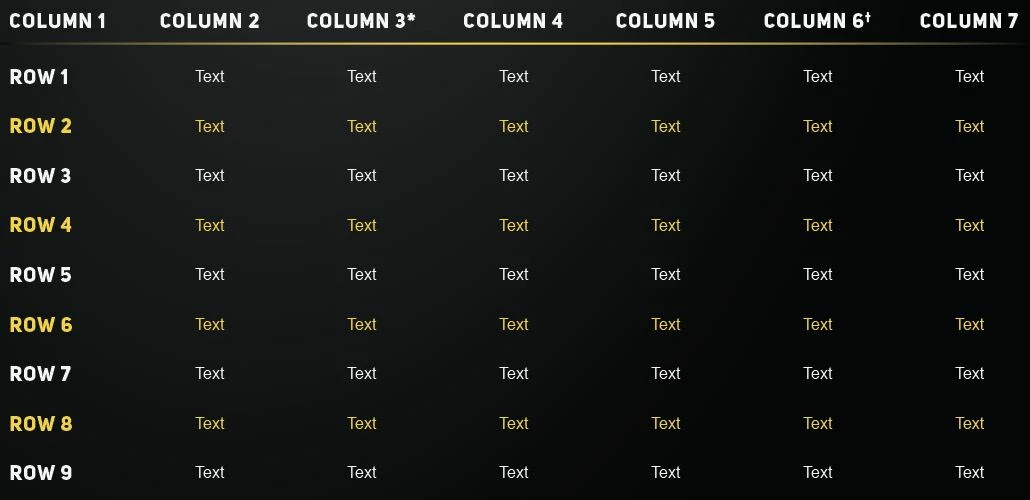
I made this table in illustrator as i was making some different layout designs... I was wonder if there was a way that I could alternate the text color in a table style? I will have about 200 tables in this catalog that i will be making, so i need to set something up so that I can quickly make a table and edit the tables if need be.

このトピックへの返信は締め切られました。

返信数 5

Geоrge
Legend
December 1, 2016

Woodwing SmartStyles can help. But this is not free plugin.

Remember, never say you can't do something in InDesign, it's always just a question of finding the right workaround to get the job done. © David Blatner
Scott Falkner
Community Expert
Community Expert
December 1, 2016

Use tabs, not tables. There is nothing there that requires a table. Use the Next Style attribute of your Paragraph Styles to alternate colours. You can then apply the Header (or whatever) style to the top row by selecting all the text and going to Apply "[Style]" then Next Style by right-clicking on the header style in the Paragraph Styles panel.

Obi-wan Kenobi
Legend
December 1, 2016

Hi,

Will the tables be already done when you'll begin the job?

If yes, just build them with only "White" cell/para styles and, with 1 click, do the "Yellow" changes.

Not sure you really need to apply new cell/para styles!

(^/)

rob day
Community Expert
Community Expert
November 30, 2016

Also for automating the alternating style application with object styles see #6 here:

Re: Copying TAB style

Jorgy411
Jorgy411作成者
Participant
November 30, 2016

Is this a plug-in? im not sure what im looking at here.

rob day
Community Expert
Community Expert
November 30, 2016

Is this a plug-in? im not sure what im looking at here.

The capture in my link is of the InDesign Object Style Options, which is available from the Object Styles flyout menu. ID lets you style text frames as objects, and the feature I'm showing lets you alternate paragraph styles within the text frame.

It should be possible to convert an existing table like the one you are showing to text run the alternating p styles via an Object style then convert back to a table.

Legend
November 30, 2016

If you set up paragraph styles for the white and yellow text, you can use Apply Style, then Next Style to style the text before turning it into a table.

Jorgy411
Jorgy411作成者
Participant
November 30, 2016

So i wouldn't be setting this up in the table styles window?

Legend
November 30, 2016

No, because it has to happen before creating the table. The styles are applied to the plain text, and then it is converted to a table.