

P: Applying Auto Tone to a batch of photos loses subsequent develop settings
When you apply Auto Tone to a large batch of photos, LR does not consistently update all the photos, and subsequent batch changes to the photos’ develop settings can get lost. This happens when using any of the mechanisms for batch changes: Photo > Develop Settings > Paste Settings, Auto Sync, Quick Develop > Saved Preset, or via the SDK.
This problem has existed for many years (see all the reports merged below), at least since LR 5, and probably at least since LR 4.
Apparently, when you apply Auto Tone to a batch of photos, internally LR just sets a flag on each photo, deferring the actual computation of the Auto Tone until later. It won’t actually compute the Auto Tone develop settings until the photo’s thumbnail becomes visible in Library or you edit the photo. But any other develop settings you’ve applied to the photo in the meantime will get silently overwritten by the deferred Auto Tone.
To reproduce the problem:
1. In Develop, define a develop preset “Test Dark” with only Basic Tone: Exposure checked, with Exposure = -5.00.
2. In Library grid view, select at least a couple hundred photos.
3. Do Quick Develop > Reset All. Scroll through all the thumbnails to make sure the reset completes.
4. Do Quick Develop > Auto Tone (with all the thumbnails still selected).
5. Wait a minute or more (you don’t have to wait, but this shows the bug is not timing dependent).
6. Do Quick Develop > Saved Preset > Test Dark to apply the preset to all the photos.
7. Scroll through the thumbnails and wait for the three white dots in the upper-right corner of each to go away, indicating that the the deferred Auto Tone is finally being applied. Notice that only some of them are correctly rendered as auto-toned followed by Test Dark (i.e. they are near black).
In general, if a thumbnail was off-screen at step 6 when the preset Test Dark was applied, then the Auto Tone will eventually take effect, but the exposure setting of Test Dark will be lost. Further, the develop history will be inconsistent, showing Test Dark as being applied after the Auto Tone, but the exposure slider showing the Auto Tone setting, not the Test Dark settings of -5.00: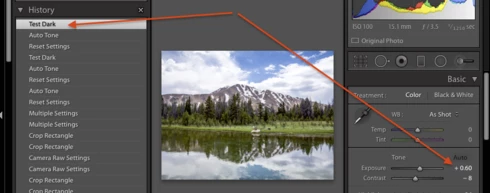
Workarounds:
Three workarounds:
- In LR 7.3.1 and later, apply Auto to the batch of photos using a preset, e.g. the built-in preset Classic - General > Auto Settings.
- After applying the batch Auto Tone, scroll through Library grid view and wait until the Auto Tone is actually applied before applying another preset or batch develop setting.
- With all the photos in the batch selected, do Library > Previews > Build Standard-Sized Previews and wait for the progress bar to indicate completion.
A related problem:
A similar problem occurs when synchronized Lens Profile Corrections to many photos, and the workaround is the same. See https://feedback.photoshop.com/photoshop_family/topics/lightroom-sdk-photo-getdevelopsettings-return...


 AdChoices