

Schmid Michael
Participant
April 30, 2018
Answered

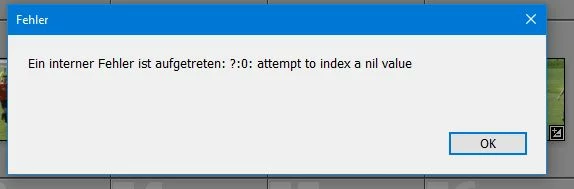
Ein interner Fehler ist aufgetreten: ?:0: attempt to index a nil value
  • April 30, 2018
  • 4 replies
  • 8023 views

Ich bekomme diese Fehlermeldung (auf Mac und PC) -- meistens wenn ich ein Foto aus der Bib. lösche....

Hab schon 10 mal neu installiert etc.

ideen?

This topic has been closed for replies.
Correct answer GoldingD

one possibility is a issue with a plug-in.

This annoying problem has occurred on my computer, in my case a plug-in was the issue. The plug-in Logitech Options, it supports advanced features in my Logitech keyboard. As, I do nit use these extra features, I disabked and removed the plug-in, and the problem stoped.

The plug-in manager might not show an error.

And other non Adobe plug-ins might cause this. Or it might be something else.

4 replies

GoldingD
GoldingDCorrect answer
Legend
December 27, 2018

one possibility is a issue with a plug-in.

This annoying problem has occurred on my computer, in my case a plug-in was the issue. The plug-in Logitech Options, it supports advanced features in my Logitech keyboard. As, I do nit use these extra features, I disabked and removed the plug-in, and the problem stoped.

The plug-in manager might not show an error.

And other non Adobe plug-ins might cause this. Or it might be something else.

Participant
December 28, 2018

Thanks for the hint. I'm using Logitech Options but not to work with specific features just for Lightroom. I've deactivated the plug-in and going to check if the error message will remain or is "away". I'll let you know.

Participant
January 13, 2019

Just to inform you, since I deactivated the Logitech add on in Lightroom I never had the error message anymore. Thanks to davidg36166309 for the hint. For me the "problem" is solved with it.

Participant
December 27, 2018

Hallo, gleiche Fehlermeldung sehr häufig bei mir: "Ein interner Fehler ist aufgetreten: ?:0: attempt to index a nil value". Seit vielen ca. LR 2015, in den Folgeversionen ist dies auch der Fall. Aktuell unter Windows 10 (1803) mit LR Classic CC 8.1 Build 1200465. Tritt nicht immer aber sehr häufig auf. Neuinstallation von Windows und LR hatte ich vor 2 Jahren schonmal durch, hat an diesem Problem nix geändert. Auch der Reset der Preferences hat bisher keinen Erfolg gezeigt.

Mir ist auch nicht klar, ob die FM irgendwelche Auswirkungen auf das Löschen von Dateien hat oder eben einfach nur lästig ist. Zumindest überprüfe ich danach immer, ob die gelöschte(n) Datei(en) aus dem LR Katalog genommen wurden UND auf der Festplatte gelöscht wurden. Beides ist bisher immer der Fall gewesen.

AlwinEchle
Participant
July 25, 2018

Habe an meinem Win10-PC seit Umstellung von LR6 auf LR Classic CC das gleiche Problem. Der o.g. Fehler tritt auch meist beim Löschen von Bildern auf.

Desweiteren besteht ein Problem direkt nach dem Start, soblad ich irgendeine Aktion ausführen will, dabei jedoch ohne Fehlermeldung, die Anwendung reagiert einfach nicht mehr. Ob diese beiden Fehler einen Zusammenhang haben - keine Ahnung.

MfG

Alwin Echle

F. McLion
Community Expert
Community Expert
July 26, 2018

Versuch mal die Voreinstellungen zurück zu setzen:

Resetting Preferences in Lightroom CC/6

Wenn es nicht hilft, deinstallieren und neu installieren.

--- Got your issue resolved? Please label the response as 'Correct Answer' to help your fellow community members find a solution to similar problems. ---
johnrellis
Legend
May 1, 2018

Google translation: An internal error has occurred:?: 0: attempt to index a nil value. I get this error message (on Mac and PC) - mostly when I take a photo from the bib. delete .... Have already 10 times reinstalled etc. ideas?

A number of people have reported this. Please add details of your issue to this bug report: Lightroom Classic: "An internal error has occurred: ?:0: attempt to index a nil value" | Photoshop Family Customer Commu… Be sure to include the exact version of LR you're running (do Help > System Info) and which version of Mac or Windows.  Also, click Me Too and Follow in the upper-right corner. This will make it a little more likely Adobe will prioritize a fix, and you'll be notified when the bug's status changes.

Google translation: Eine Reihe von Menschen haben dies gemeldet. Bitte fügen Sie Details zu Ihrem Problem zu diesem Fehlerbericht hinzu: Lightroom Classic: "Ein interner Fehler ist aufgetreten:?: 0: Versuch, einen Nullwert zu indizieren" | Photoshop Family Customer Commu ... Stellen Sie sicher, dass Sie die genaue Version von LR, die Sie gerade ausführen (Hilfe> System Info) und welche Version von Mac oder Windows enthalten. Klicken Sie auch auf "Ich" und "Folgen" in der oberen rechten Ecke. Dies wird es ein wenig wahrscheinlicher machen, dass Adobe einen Fix priorisiert, und Sie werden benachrichtigt, wenn sich der Status des Fehlers ändert.