


vossinc
Known Participant
October 10, 2024
質問

Exported JPGs from Lightroom (both classic and new) look dull

  • October 10, 2024
  • 返信数 2.
  • 1142 ビュー

Hi friends, 

I've gone through all forums looking for an answer and I can't find any solution, so I apologize if I am being reduntant by asking this question again.

I spent hours editing images in Lightroom thinking I could just export JPGs but the exported images are coming out flat and dull. Basically the bright whites are not being saved. 
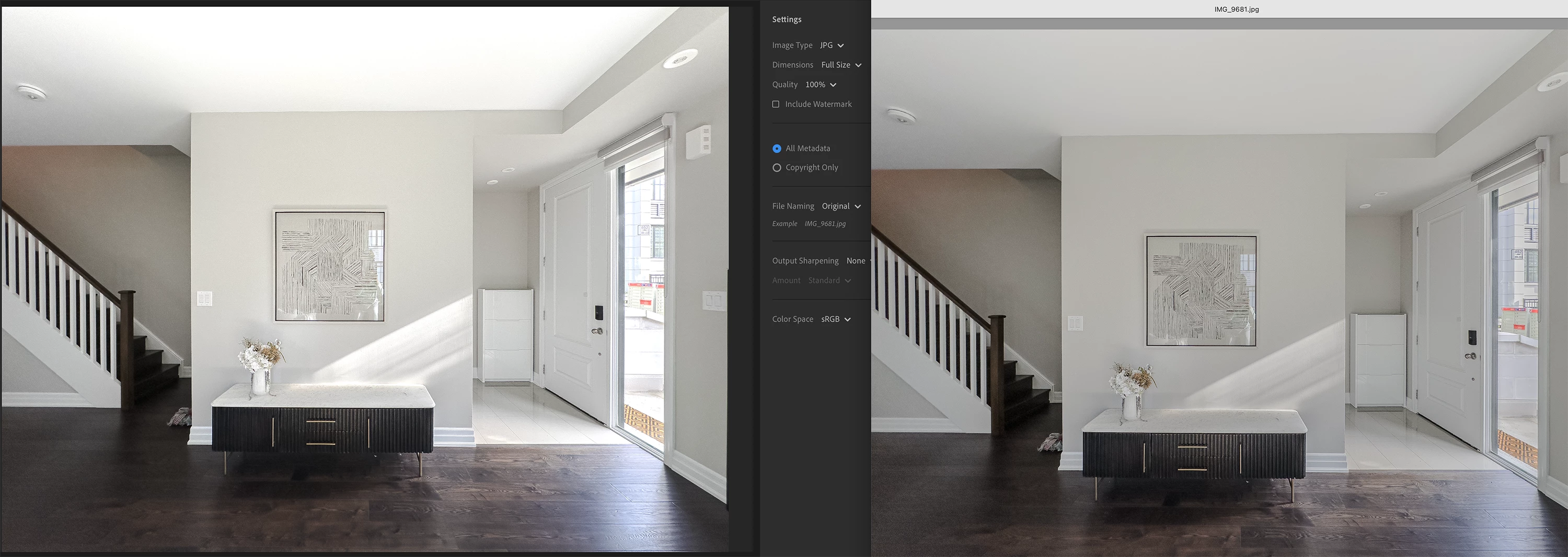


• I am exporting in sRGB. Also tried other profiles like Display P3, Adobe RGB, Prophoto RGB

• My monitor is set to the right settings. I am a graphic designer and use my machine daily for creative work.

• I tried toggling off User Graphic Processor. It makes things look flat in Lightroom (just like the exported JPGs) but not sure what to do with this information. 

• I have cleared my Lightroom cache

• I tried opening in Photoshop either from Lightroom or by opening the DNG and its still looking flat. 


I am in urgent need of these photos so my only solution at the moment is to screenshot the edited images from Lightroom. This is a terrible workaround. 


Please help!

このトピックへの返信は締め切られました。

返信数 2

JohanElzenga
Community Expert
Community Expert
October 10, 2024

Are you editing with HDR enabled? Most viewers do not support this, and exporting in JPEG does not work because JPEG does not support it.


-- Johan W. Elzenga
vossinc
vossinc作成者
Known Participant
October 10, 2024

Hi Johan, thanks for your speedy reply.

Yes I had used HDR for most of the photos. If this is the culprit, may I ask what is the point of having this option in Lightroom if I am unable to actally use the image when I export it? 

And now that I have spent hours using HDR, what is the quickest way to solve this issue aside from screenshoting every photo from Lightroom?

JohanElzenga
Community Expert
Community Expert
October 11, 2024

I spoke to soon.

Tried other photos and the conversion is off. The whites, are blown out in the TIF. I would include a side by side comparison but the screenshots (JPG and TIF format) get blown out as well. 

Is there something I missed during the TIF export from Lightroom? 

For now, I'm opening TIF in Photoshop and reducing the White Output Level by about 55 points. Seems to do the trick but tedious. 


You need to understand what HDR editing does. This type of editing uses the 'headroom' that modern displays have, to push whites into 'brighter than paper white' areas. As a result, when you export an image that has been edited in HDR, you will be faced with two dilemmas. First, how is the exported image going to be used? If you want to print it, then do not use HDR because there is no paper in the world that is brighter than paper white. If you want the image to be viewed on screen only, then you can use HDR, but only if the image will be viewed on a screen that supports HDR and in an app that supports HDR. If any of those two criteria is uncertain, then again do not use HDR. So bottom line: do not use HDR unless you know exactly why you are doing that and fully control the viewing conditions.


-- Johan W. Elzenga
vossinc
vossinc作成者
Known Participant
October 10, 2024

Hi friends, 

Cross posting from Lightroom Classic community.
I've gone through all forums looking for an answer and I can't find any solution, so I apologize if I am being reduntant by asking this question again.

I spent hours editing images in Lightroom thinking I could just export JPGs but the exported images are coming out flat and dull. Basically the bright whites are not being saved. 


• I am exporting in sRGB. Also tried other profiles like Display P3, Adobe RGB, Prophoto RGB

• My monitor is set to the right settings. I am a graphic designer and use my machine daily for creative work.

• I tried toggling off User Graphic Processor. It makes things look flat in Lightroom (just like the exported JPGs) but not sure what to do with this information. 

• I have cleared my Lightroom cache

• I tried opening in Photoshop either from Lightroom or by opening the DNG and its still looking flat. 


I am in urgent need of these photos so my only solution at the moment is to screenshot the edited images from Lightroom. This is a terrible workaround. 


Please help!

vossinc
vossinc作成者
Known Participant
October 11, 2024

Solution found here!

Participating Frequently
October 11, 2024

It's great that you have found the solution in your community forum from our experts. Since both posts are the same, I am merging this thread with the existing thread. 


Thanks, 


Shivani