


Known Participant
December 12, 2024
Answered

How to change the names of multiple layers?

  • December 12, 2024
  • 3 replies
  • 3256 views

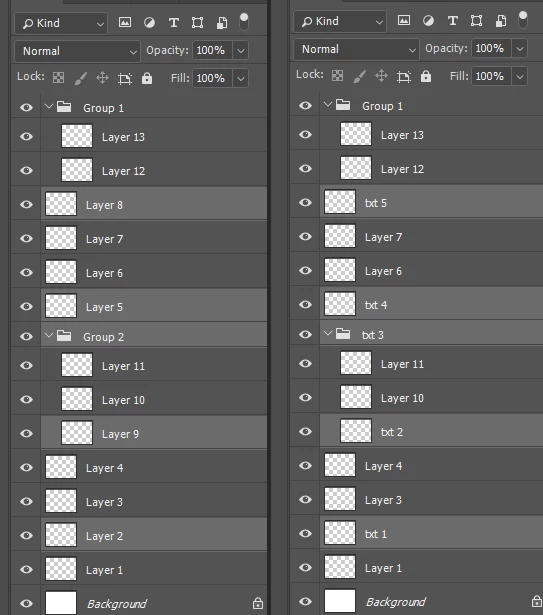
How can I change the names of the currently selected layers? For example, if there are many layer names and I have selected only a portion of them, how can I rename the selected layers? Thank you, everyone.
This topic has been closed for replies.

3 replies

Stephen Marsh
Community Expert
Community Expert
December 12, 2024

@w30290083o9nn 


A recent topic with code examples for processing selected layers:


https://community.adobe.com/t5/photoshop-ecosystem-discussions/is-there-selected-imge-layers-to-text-layers-script/m-p/15012832


There are other examples in the forum if you search.

Participant
December 12, 2024

To change the names of multiple layers, start by selecting the layers you want to rename. Many graphic software tools, like Photoshop or Illustrator, allow you to batch rename layers through their layer panel options. Alternatively, you can use scripts or plugins if supported by your software for faster renaming. Rename each layer with unique identifiers or follow a consistent naming convention. This makes organizing and navigating your project much easier!

Stephen Marsh
Community Expert
Community Expert
December 12, 2024

Do you always want the prefix to be "txt " with the sequence number to begin on the lowest layer or group, starting at 1 and incrementing for each further layer selected? Do you want to type in a variable prefix name and not just "txt"?


What happens if there are more than 9 layers selected? Should the 10th layer be numbered as "10" and then "11" etc?


Would it be better to have 3-digit zero padding, such as "txt 0001" ... "txt 0010" ... "txt 0099" ... "text 0100" etc.


Where are you stuck with your code? Do you already have code to rename and increment? Or do you have nothing?

Known Participant
December 12, 2024

That's fine. You can add numbers sequentially afterwards, such as TXT plus a number. Thank you.