


- Home
- Photoshop ecosystem
- Discussions
- Re: Photoshop - Wacom - Latest Update Bug
- Re: Photoshop - Wacom - Latest Update Bug

Copy link to clipboard
Copied
So for me the program is unusable now.
Whenever I use any tool, instead of the tool doing what it should be doing it acts like the hand tool and moves around the canvas.
Things work fine when using a mouse, but without the ability to use the pressure sensitivity of my tablet I cannot accomplish my work.
This needs to be fixed now.
For now I'm going to have to use clip studio to do my work until the issue is resolved.


 1 Correct answer


Amanda
There should be no need for any workaround now that Microsoft have issued a further update to fix the issued caused in their earlier release. See here for details:
Cannot paint with stylus when zoomed in on image | Windows 10
Dave


Explore related tutorials & articles
 166
Replies
166
166
Replies
166


Copy link to clipboard
Copied
Hi Dave, I'm stuck at this step too...I have a Cintiq 22HD and I don't have the mapping tab at all. Where mapping should be just says Calibrate on my properties....any ideas?

Copy link to clipboard
Copied
I personally didn't need that step for it to work as I didn't have the option to click on it. So skip it and see if all the rest works out.
Copy link to clipboard
Copied
Thanks! You’re right?! Worked just fine!

Copy link to clipboard
Copied
I used your *.txt fix and it worked! I installed the April 30th update today. I deleted the *.txt file and checked use Windows ink again in the Wacom setup. Windows remedied the mess they caused for digital photographers and artists. The pen no longer moves things around when zoomed in. I do want to thank you for that fix as it got me through the past couple of weeks.
Mike

Copy link to clipboard
Copied
Hi,
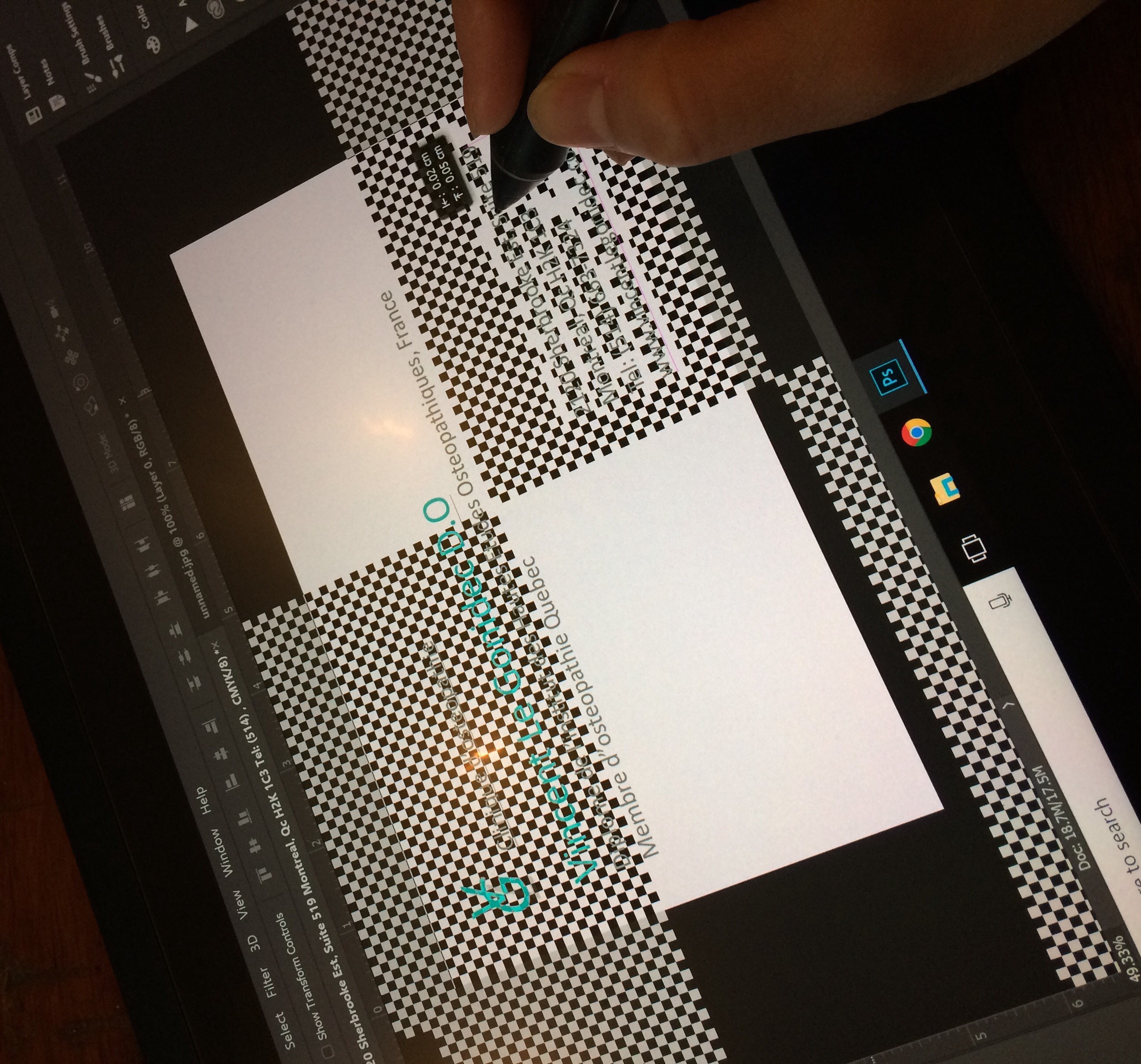
I have also a problem with Photoshop on Wacom... everytime I want to use the Laso tool or move a layer on screen with my pen the screen becomes like a checker pattern. Is this problem related to the same error. Please see the pic below and let me know
Thank you
P.S I have already called Wacom and they said it's not a problem related to Wacom tablet

Copy link to clipboard
Copied
I've tried this method and along with the updates countless of times, and still no changes. Are there any other ways?
Copy link to clipboard
Copied
OMG
I LOVE YOU!!!

Copy link to clipboard
Copied
Thank you. Problem solved.

Copy link to clipboard
Copied
Many thanks!

Copy link to clipboard
Copied
davescm wrote
Do the following:1. Use notepad to create a text file and type in :
UseSystemStylus 0
2. Save the file as PSUserConfig.txt in the following location
C: > Users > Username > AppData > Roaming > Adobe > Adobe Photoshop CC 2018 > Adobe Photoshop CC 2018 Settings3. Go to the Wacom tablet properties and for Photoshop under Mapping uncheck "Use Windows Ink"
4. Restart Photoshop (if it was open when you did this)
This worked for me, Thanks!

Copy link to clipboard
Copied
Worked a charm. Thanks Dave.

Copy link to clipboard
Copied
ola, wacom CTL 480, não abre prorpiedades da mesa grafica, e no wacom desktop ela nao aparece como conectada. Win10

Copy link to clipboard
Copied
Thank you so much Dave!!!!!!

Copy link to clipboard
Copied
Once following these steps.
The pen pressure then does not work after un checking the "Use Windows Ink" box.
Any help please?
Copy link to clipboard
Copied
Turning off Windows Ink resolves the canvas issue. To get back the pen pressure, you must create the PSUserConfig.txt file exactly as described earlier then restart Photoshop.
Dave

Copy link to clipboard
Copied
I have Photoshop CC 2017, and I don't see this folder about photoshop setting, how do I fix this error?
Copy link to clipboard
Copied
Amanda
There should be no need for any workaround now that Microsoft have issued a further update to fix the issued caused in their earlier release. See here for details:
Cannot paint with stylus when zoomed in on image | Windows 10
Dave
Copy link to clipboard
Copied
I have the same Problem but I`m using a Yiynova Tablet and nothing works...

Copy link to clipboard
Copied
Hi
Have you downloaded this update from Microsoft
Cannot paint with stylus when zoomed in on image | Windows 10
Copy link to clipboard
Copied
This does not help with the latest update that hit my computer today. I tried all previous ways including these downloads, none have worked.

Copy link to clipboard
Copied
Hello, I have the same problem, I did create a PSUserConfig.txt with the following lines.
# Use WinTab
UseSystemStylus 0
and saved it on my
C: > Users > Username > AppData > Roaming > Adobe > Adobe Photoshop CC 2018 > Adobe Photoshop CC 2018 Settings
and then restarted photoshop but nothing works... I also tried disabling the (KB4093112) update but it doesn't allow me to uninstall it.

Copy link to clipboard
Copied
I'm also having the problem persist after unchecking windows Ink and creating the PSUserConfig.txt file.
Copy link to clipboard
Copied
I uninstalled the last Adobe Flash Player update, that worked for me on the Gaomon PD1560 Tablet.

Copy link to clipboard
Copied
Yep! Me too

Copy link to clipboard
Copied
I had the same problem, I restarted Photoshop and nothing happened so I tried restarting my laptop and it worked, you should try that.


Get ready! An upgraded Adobe Community experience is coming in January.
Learn more
 AdChoices