


Kbirch
Participant
October 15, 2018
解決済み

Scaling Images with shift no longer works after update (20.0)

  • October 15, 2018
  • 返信数 75.
  • 264984 ビュー

After updating to CC 2019, I am not longer able to scale images evenly simply by holding shift.

I went to keyboard shortcuts and found a "scale" shortcut that was unassigned, so i assigned it to "S" as it simply wouldn't let me assign shift:
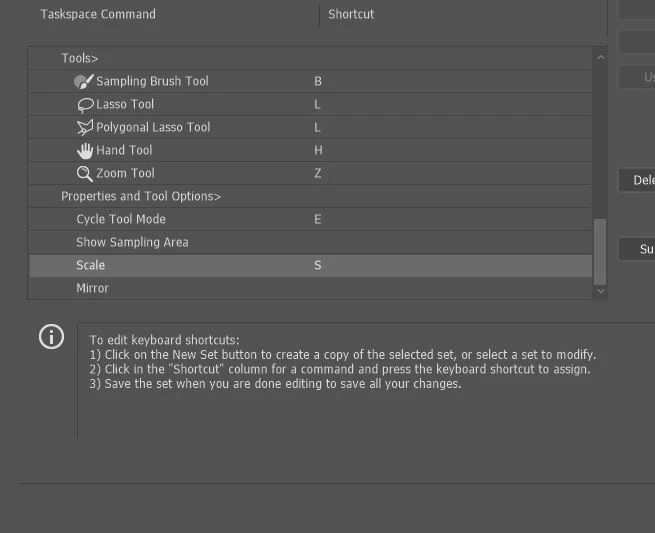
Now it seems to only want to scale evenly and won't let me scale however I want simply by dragging the corner of the image. Sometimes it doesn't go evenly when I transform with Ctrl+T and scales evenly after I press S, but wont let me go back to scaling unevenly.

Any Ideas?

解決に役立った回答 John Waller

It's a new feature. The old behaviour has been reversed. Default = proportional (constrain). Shift for non-proportional. Few people see any logic in this change.

Plenty of forum posts on this

Scaling Images with shift no longer works after update (20.0)

CC20 transform tool: Shift doesn't keep Aspect ratio

The new behaviour can be disabled.

To revert to the legacy transform behavior, do the following:

  1. Use Notepad (Windows) or a text editor on Mac OS to create a plain text file (.txt).
  2. Type the text below in the text file:

    TransformProportionalScale 0

  3. Save the file as "PSUserConfig.txt" to your Photoshop settings folder:
    • Windows: [Installation Drive]:\Users\[User Name]\AppData\Roaming\Adobe\Adobe Photoshop CC 2019\Adobe Photoshop CC 2019 Settings\
    • macOS: //Users/[User Name]/Library/Preferences/Adobe Photoshop CC 2019 Settings/

返信数 75

Participating Frequently
October 17, 2018

If it wasn't broke, why did they fix it?!

xsherry
Participating Frequently
October 16, 2018

The SCALE feature does NOT work!  It is locked in proportion and does not allow flexibility.  HELP!

Participant
February 28, 2019

7 pages... not too shabby.

Same "general" ridiculousness happening on the Premiere front, luckily there is Davinci Resolve (and not a moment to soon!)... but admittedly with Photoshop I feel pretty stuck. Let's hope mother of invention and all that jazz comes into play.

The overwhelming reaction I always have when this always happens is a silently screaming voice in my head that just keeps repeating "Who asked for this?".

Adobe has proven time and time again they are definitely one of those companies that should stay the course, never knee jerk and listen very very closely to their power users or at least those who prefer to edit photos on something other than a phone... as opposed to a company that should be steering anything or having "how would the influencers prefer to scale things?" meetings.

This reminds me of the gory events that played out at Levis and Gibson actually.

Oh well in the meantime I will just code a config file for my windows directory because that's normal - *Falls On Floor*

Known Participant
March 1, 2019

You're welcome!  We'll see. Maybe it'll be good. Two simple but huge things Adobe could do to mitigate the storage problem:

1. Integrate a Web browser that allows users to download images (like a normal desktop browser does).

2. Let users connect to shared drives over the local network.

I suspect they won't, of course, because they're pushing CC.


Good point, Mobius. We have walled gardens within walled gardens here.

Adobe wants to push their own cloud storage service by making products incompatible with all the others. Good idea? No. Adobe knows perfectly well the value of open standards. They have created and promulgated lots of them, from PDF to XMP.

If I wanted to spend 13 hours uploading a raw shoot to the cloud before editing it down to half a gig's worth, for what I'm paying Adobe, I would expect support for whatever cloud service I happen to use. So, Adobe makes themselves vulnerable and hands the competitors an easy win. Competitors can simply build integrations with as many cloud services as they choose for a tiny fraction of the overhead of running their own service.

Then Adobe builds what appears to be a toy-like application for one specific expensive, not terribly versatile tablet. That may be folly, but nobody would mind except they damaged the "real" desktop version of the app in the process. (Thus this thread.) That would be the version used by real workers who don't have electric skateboards leaning in the corners of their video set offices. (And, might I add, the app that built the house of Adobe. )

Never mind all the other tablets in the world and never mind that competitors to that one tablet can and do sell tablets that can run normal desktop operating systems and normal, already developed, desktop apps. Handing yet another easy win to both Adobe's and Apple's competitors.

They're acting like they panicked and dropped the rope. Let's hope they calm themselves and pick it back up again.

(And, by the way - about that video - who uses the eraser tool instead of the pen tool to sillo a sword?! Just sayin'.)

Anna Lander
Inspiring
October 16, 2018

Hi,

did anyone face this trouble? When I use a Free Transform (Ctrl+T or by Edit menu), holding the Shift button doesn't keep aspect ratio. I have to make sure that Lock Aspect Ratio in the Control Panel is On, itit takes some more attention than I'm ready to pay for this operation )

Muqqarib Hassan
Inspiring
October 16, 2018

Hi, Go to Edit>Preferences>Performance and enable Legacy Composting then reboot your photoshop.

John Waller
Community Expert
Community Expert
October 16, 2018

That's for compositing issues, not issues using the Transform tool.

PS 2019 – Color Blend Mode Buggy

Participating Frequently
October 16, 2018

This is so STUPID and ANNOYING that i don't understand who could get that idea.

EVERY iteration of Adobe programs brings more and more STUPID ideas that make work harder and less intuitive than before.

Not only this is less intuitive, but the tool itself doesn't scale object from center as it used to be with shift.

Known Participant
October 15, 2018

Proportional scaling (without holding Shift) is now a default. Holding Shift while scaling now behaves in precisely the opposite manner, despite decades of precedent and the fact that every other application uses Shift-drag for proportional scaling.

Why? Who knows. This is easily one of the most unnecessary and counterintuitive changes Adobe has ever made.

Details and instructions for how to disable it are at the link below.

New and enhanced features | Latest release of Photoshop CC

Kbirch
Kbirch作成者
Participant
October 15, 2018

Thanks so much. I followed the instructions and got it fixed. Still seems silly its not a simple check box somewhere

The "AppData" folder was a hidden folder so I had to make is show up by going to "View" and checking "Hidden Items"