


Participant
January 18, 2022
解決済み

Starting to drag outside the canvas "selects" instead of dragging

  • January 18, 2022
  • 返信数 1.
  • 376 ビュー

This has always worked before. I have a layer selected. With the Move tool I begin my click outside the Canvas and drag. I expect it to move the contents of the selected layer, but instead a marquee is drawn and I end up selecting multiple layers. I must have changed a Preference but I don't see anything there that would affect this behavior. 
このトピックへの返信は締め切られました。
解決に役立った回答 Ged_Traynor

Hi

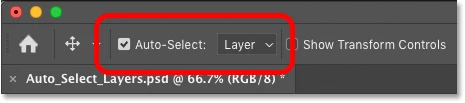
Can you post a screenshot of the Photoshop interface, do you have Auto Select checked on the options bar by any chance, if so uncheck it

返信数 1

Ged_Traynor
Community Expert
Ged_TraynorCommunity Expert解決!
Community Expert
January 18, 2022

Hi

Can you post a screenshot of the Photoshop interface, do you have Auto Select checked on the options bar by any chance, if so uncheck it

Participant
January 18, 2022

Duh, thanks. I just re-installed Creative Cloud. I missed that setting. Thank you!

Chris

Ged_Traynor
Community Expert
Community Expert
January 18, 2022

You're welcome 🙂