


Known Participant
April 14, 2019
解決済み

Unable to save 2.4 G Tiff Photoshop CC

  • April 14, 2019
  • 返信数 2.
  • 2579 ビュー

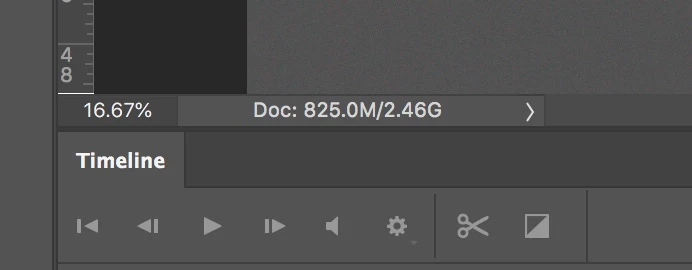
I am working on a series of relatively the same size images, I want the highest resolution possible. Photoshop starts throwing a warning after saving three or four without issue. The problem is getting an error cannot save tiff larger than 4.0 GB. This is showing 2.46 not 4.0.
このトピックへの返信は締め切られました。
解決に役立った回答 davescm

Hi

That number at the bottom corner is the memory size in RAM. It is calculated from each layer pixel size multiplied by 3 for RGB 8 bit and 6 for RGB 16 bit.   However any smart objects are only counted as a single pixel layer at the main doc resolution. The contents of a smart object can be much bigger and have to be saved in the file to disk, resulting in a file size on disk higher than that number in the corner.

Dave

返信数 2

davescm
Community Expert
davescmCommunity Expert解決!
Community Expert
April 14, 2019

Hi

That number at the bottom corner is the memory size in RAM. It is calculated from each layer pixel size multiplied by 3 for RGB 8 bit and 6 for RGB 16 bit.   However any smart objects are only counted as a single pixel layer at the main doc resolution. The contents of a smart object can be much bigger and have to be saved in the file to disk, resulting in a file size on disk higher than that number in the corner.

Dave

joshuaclifford123
Participating Frequently
August 13, 2019

what if a file is displaying as 370M/2.4G with no smart objects and I'm still getting the warning saying I'm exceeding 4G in a TIFF file. I have 8 layers total: base layer (raster), geometric fixes (using parts of the layer below, still raster), an overlay layer (raster), softlight layer (raster), normal layer (raster), curves layer (with layer mask), gradient map layer (with a layer style), and high pass layer.

Do any of these layers effect the displayed file size?

Legend
August 13, 2019

Probably. As we’ve said, those figures can’t be used to prove anything about file size because they aren’t file size. What size PSB does it make, and what TIFF compression do you choose? What is the pixel size?

rayek.elfin
Legend
April 14, 2019

Tiff has an upper limit of 4Gb. If you need to save larger files, use PSB.

A newer version of the tiff format (BigTiff) exists, but it is (as far as I am aware) not supported in Photoshop or most other image editing software.

*edit* I wouldn't trust those values too much. According to this thread other issues might be the cause:

Unable to save file as PSD - PS says the file is over 2GB when it's not