


Participant
June 19, 2025
解決済み

Add a "Recent Colors" panel for faster workflow

  • June 19, 2025
  • 返信数 3.
  • 273 ビュー

Hi Adobe team,


I’d love to suggest a small but very useful feature for Photoshop: a “Recent Colors” panel – similar to how we have recent fonts.


The idea is to automatically display the last 5–10 colors used in the project (both fill and stroke), so users can easily reselect them without manually saving to swatches. This would significantly speed up the workflow, especially for designers and illustrators who reuse specific tones throughout a composition.


Bonus: if the recent colors could sync per document, or even across projects via Creative Cloud, it would make color consistency much easier.


Would love to hear what others think. Thanks!
解決に役立った回答 Ged_Traynor

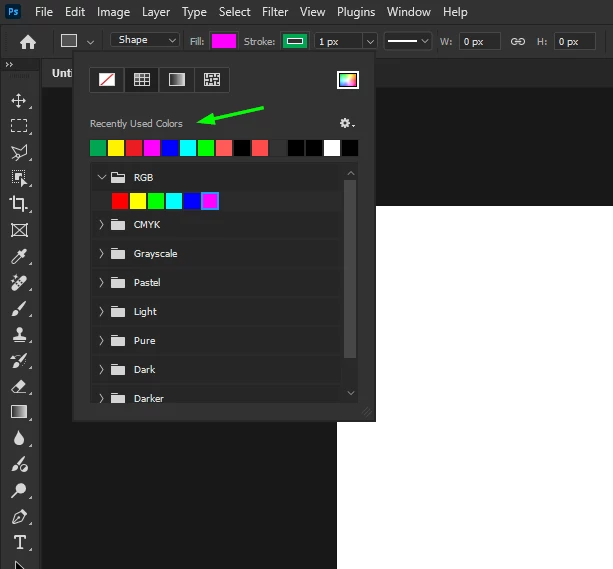
@EdTechLiam both the stroke and fill have a recently used colors panel

返信数 3

Participating Frequently
July 21, 2025
Participating Frequently
July 21, 2025

I agree @EdTechLiam, Granted, @34750679 provides a good example, where "Recent Colors" appears in the Shape Panel; they also replicate it in the Swatches panel. Graphic designers may use those tools, but concept artists, game texture artists and photographers generally don't, and we don't like to have lots of extra panels open just to support certain tool functions. So, I think as you suggested, in its own panel to make it more pervasive and support many different user cases, or duplicated/added to the some of the other tool windows, such as Color, and the Color Picker. (maybe also in the brushes panel but that might be overdoing it :-D)


I came to the community pages today to propose this, so I'll cross-link your post with mine! Fingers crossed for some upvotes!

Ged_Traynor
Community Expert
Ged_TraynorCommunity Expert解決!
Community Expert
June 19, 2025

@EdTechLiam both the stroke and fill have a recently used colors panel