


Known Participant
June 24, 2024
解決済み

Missing Essential Graphics Panel in Adobe Premiere Pro Beta

  • June 24, 2024
  • 返信数 1.
  • 25810 ビュー

Hi Adobe Team,

I hope you’re well!

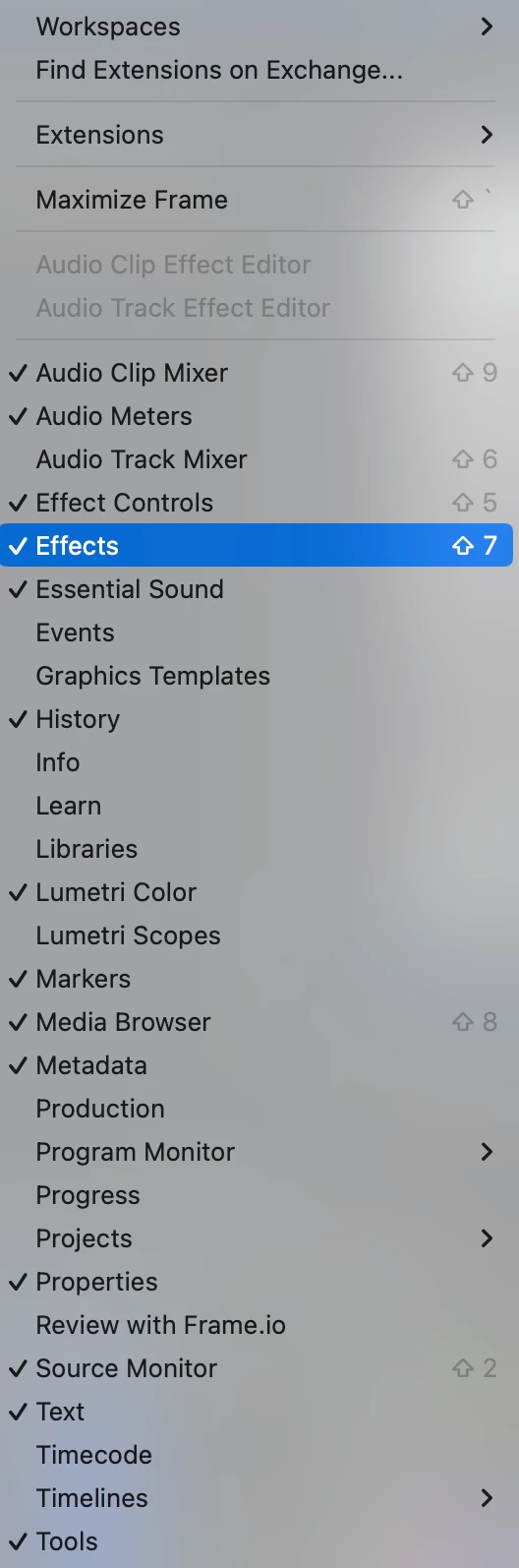
I’ve noticed that in the Adobe Premiere Pro Beta version, the Essential Graphics panel has been missing for some time. I rely on this panel for creating shapes and various graphic elements, and I’m wondering if it has been relocated or removed in the new Beta. In the standard version of Premiere Pro, the panel is accessible without any issues.


I initially thought this might be a temporary glitch that would be resolved with updates. However, despite updating every morning, the Essential Graphics panel has not reappeared.

Could you please let me know if the panel is located somewhere else in the Beta, or if there is a fix for this issue? Any pointers would be much appreciated.


Thanks, 
 

解決に役立った回答 Trent Happel

Sorry for any confusion. The Edit portion of the Essential Graphics has been moved to the new Properties panel. The Browse portion has moved to the new Graphics Templates panel.


You can find more infomation on the Properties panel at https://community.adobe.com/t5/premiere-pro-beta-discussions/now-in-beta-properties-panel-for-premiere-pro/m-p/14680465#M9466

返信数 1

Trent HappelCommunity Manager解決!
Community Manager
June 24, 2024

Sorry for any confusion. The Edit portion of the Essential Graphics has been moved to the new Properties panel. The Browse portion has moved to the new Graphics Templates panel.


You can find more infomation on the Properties panel at https://community.adobe.com/t5/premiere-pro-beta-discussions/now-in-beta-properties-panel-for-premiere-pro/m-p/14680465#M9466

Participant
November 10, 2024

Hey there! 


So i need the essential graphics tab to edit the subtitle style and create style presets for my subtitles. I've gone through countles threads  talking about the missing essential graphics tab and nothing is helping me to get to the visual properties tab of my subtitle text.
It doesn't come up on the properties, it's not anywhere in the subtitle/transcription tab. The only option thats still there is upgrading them to graphics and editing them that way which is counter intuitive. How do i locate the subtitle text style properties?

Participant
November 14, 2024

Same problem here. I have created captions, but now I can't change their style. The properties panel in the Captions and Graphics workspace is empty. What now?