


NangaParbat
Known Participant
January 26, 2018
解決済み

15 seconds delay between pressing "play-button" and real start of video

  • January 26, 2018
  • 返信数 5.
  • 9795 ビュー

Hello,

since some weeks I have massive performance problems with Premiere CC 2017. And there is the strong suspicion that it has something to do with the audio hardware / audio settings or the audio drivers.

Some of the problems I have already described here in the forum:

Premiere blocks "adaptive noise reduction" for some 5.1-clips - What is the reason?

What is going on with my audio level? Mysterious swelling of audio

Premiere CC2017 is after up- and downgrade extremely slowly - No more work possible

None of the problems have been solved. The first thread listed was also discussed with the german Adobe support. They asked me to upload an sample project, what I did. This was 3 weeks ago and Adobe promised to give feedback via mail. But nothing happened. The staff member here in the english forum Kevin-Monahan kindly asked the german support team once more about the current status, but again: No reaction, which slowly streches my patience.

My film project is running out of time and it is impossible any more to work with Premiere, especially because of the worst problem I want to discuss in this current thread here. And hope that someone can help with an idea:

Between clicking the play-button and the moment where Premiere really starts to play the video is a delay of 15-20 seconds. Afterwards the video plays stuttery.

I know that it is not due to a slowly PC. Because for month I had great performance in the same project, with the same footage and the same PC with the following technical data:

Now comes the "soultion": If ALL audio devices are deactivated in the device-manager, the delay of the play-button is gone and the old good performance is back.
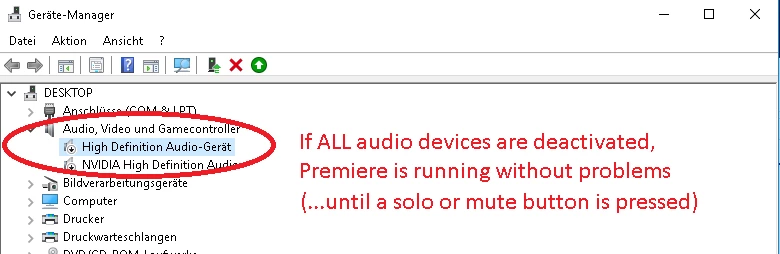
But only till the moment one of the mute/solo-buttons of the audio tracks is pressed (Of course no audio can be heard at all because the computer has all audio devices deactivated). If a mute or solo button is pressed once, the 15 s delay of the audio button comes again.

By the way, it did also not help to reset the computer (Win10 PC reset without loosing personal data) and re-install Premiere CC 17. (Premiere CC 18 is no option. I tried that also, but it ended in total crash of the project)

I have to mention, that I had temporarily a third party audio device for microphone recordings plugged in (Tapco audio interface). So as I earlier said, I think that there is any heavy audio problem. Does anyone has an idea how to come to a solution?

Thanks a lot!

    解決に役立った回答 directorduncan100

    Do you have any audio effects on your clips? I was having the same issue. 15 - 20 second delay after pressing the "play button" before the video started. I narrowed it down to the multiband compressor audio effect I was using. As soon as I removed that from my clips, everything was back to normal. 

    Here's a quick way to test it.

    Select All Audio in Timeline > Right Click > Remove Attributes > deselect the ones you want to remove. 


    Hope this helps. 

    返信数 5

    Known Participant
    March 26, 2023

    I'll add my experience. Since I didn't have any effects added in the audio tracks, I had to find another solution. What helped me was to simply "disable" the tracks, but not through the Mute function for whole layer, but within individual clips.

    directorduncan100
    Participant
    September 30, 2019

    Do you have any audio effects on your clips? I was having the same issue. 15 - 20 second delay after pressing the "play button" before the video started. I narrowed it down to the multiband compressor audio effect I was using. As soon as I removed that from my clips, everything was back to normal. 

    Here's a quick way to test it.

    Select All Audio in Timeline > Right Click > Remove Attributes > deselect the ones you want to remove. 


    Hope this helps. 

    Command X
    Participant
    November 3, 2022

    4 years of replies and it's still is broke!  I've tried them all and this was the fix for me.  Thanks.

    Participant
    November 3, 2022

    Excellent. I don't usually post in forums, but this gave me such a headache. Happy to pass along the info.

    NangaParbat
    NangaParbat作成者
    Known Participant
    February 1, 2018

    Hello jeffb94256237,

    thanks for your reply. I tried to roll back the audio and video drivers to the previous version but that did not change anything. Maybe you could be right that it could be also related to the NVIDIA GPU. I had to install the driver newly some weeks ago because the mercury engine was not recognised by Premiere.

    I ordered now a new PCI-Express sound card for my PC and see if that helps. If not, I will have no other choice than buying a complete new PC. I am struggling with this problems since weeks... 

    Jeff Bugbee
    Community Expert
    Community Expert
    February 1, 2018

    Can you screenshot your Audio Hardware and Playback menus like below?

    NangaParbat
    NangaParbat作成者
    Known Participant
    February 1, 2018

    Sure, here are the screenshots (Its unfortunately in german language but I hope it helps anyway):

    Jeff Bugbee
    Community Expert
    Community Expert
    January 29, 2018

    Have you tried updating (or rolling back) your audio device drivers? Sometimes Windows auto-installs drivers that can mess things up. I notice you have NVIDIA listed in there. Have you recently update Video drivers? On my PC, when I update my video card drivers, it ALSO resets all my audio settings, re-enables disabled Playback devices, etc, when I did nothing with audio.

    Some other things to try in Premiere:

    In Preferences, check your Audio Hardware settings. See if anything looks out of the ordinary.


    In Preferences - Playback, try disabling Mercury Transmit and check the Audio Device.

    NangaParbat
    NangaParbat作成者
    Known Participant
    January 29, 2018

    This video visualizes the problem: