



TenTin
Inspiring
September 21, 2022
解決済み

Decimal number in "Bitrate Settings"?

  • September 21, 2022
  • 返信数 3.
  • 1934 ビュー

Hi,
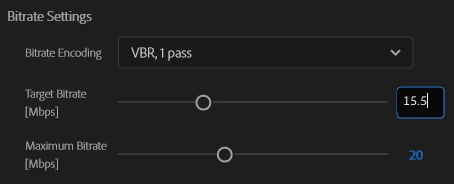
Why Pr can't add decimal numbers by entering "number >dot>number" in the Bitrate Settings box (I mean just by typing the numbers and dot in the box)? But you can add it by dragging the slider (we have to get the exact number by the up/down arrow key). That's frustrating!
このトピックへの返信は締め切られました。
解決に役立った回答 Stan Jones

It is working correctly in the PR Export mode settings on Win 10 running PR Release 24.0.0.


I tested H.264 and Bluray DVD.


Stan


返信数 3

Participant
October 27, 2023

Is there any update on this? Is there a way to enter a decimal bitrate in Premiere V23 or V24?

Stan Jones
Community Expert
Stan JonesCommunity Expert解決!
Community Expert
October 27, 2023

It is working correctly in the PR Export mode settings on Win 10 running PR Release 24.0.0.


I tested H.264 and Bluray DVD.


Stan


Stan Jones
Community Expert
Community Expert
September 21, 2022

Ann, also Windows, but not working for me. I can type the numbers, but the numbers change to no decimal - rounds to nearest integer. It works correctly in Media Encoder.


If selecting with the slider, the decimal sticks.


Stan


Ann Bens
Community Expert
Community Expert
September 21, 2022

Seem the be working fine here on windows.

TenTin
TenTin作成者
Inspiring
September 21, 2022

I am on "Win 11" stable version (latest update), Pr "v22.6.2". By entering the numbers (plus dot) and pressing the "Enter" key, Pr rounds the number to a whole number! I mean, if I enter "10.5" in the box and press "Enter", Pr rounds the number to "11"! Just by dragging the slider I am able to add decimals, and control the exact number I want by arrow keys!

Stan Jones
Community Expert
Community Expert
September 21, 2022

That is what I see. The workaround is to send to Media Encoder.


I am Win 10. Also 22.6.2.


Stan