



A7madshs
Participant
April 15, 2020
Answered

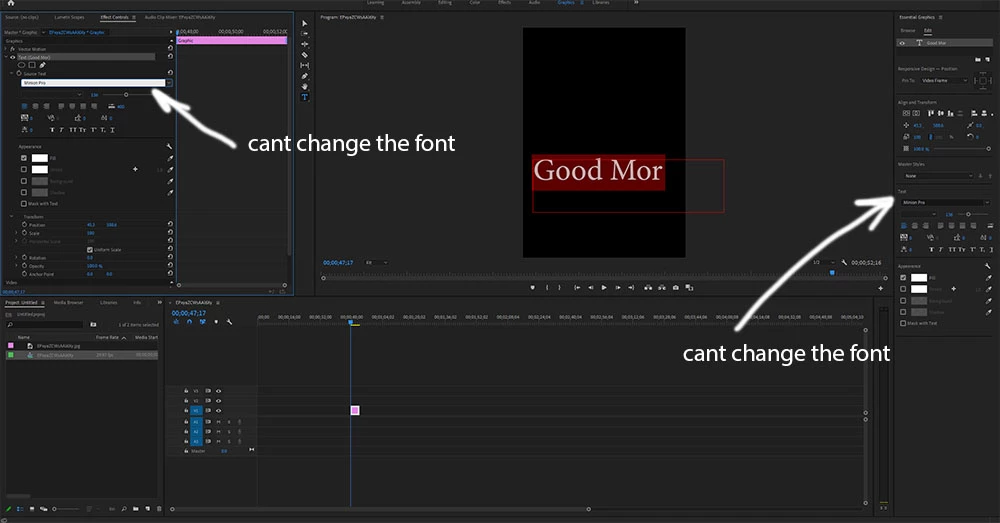
I cant change the font for any text

  • April 15, 2020
  • 7 replies
  • 58284 views

Hi ,


I have anissue with adobe premiere 2020 with not allowing me change the text for simple text. I thought the issue from the file I am working witih, but unfortunatily I tried that with new project and the issue still exist.

it is not reponding to me while I want to change the font ftom the list

My os is windows 10.


here is a image for the issue.
Correct answer ألدو

Please open Premiere Pro from Creative Cloud Desktop, then all your activated fonts will be available again

7 replies

ألدو
ألدوCorrect answer
Participant
January 28, 2022

Please open Premiere Pro from Creative Cloud Desktop, then all your activated fonts will be available again

Participant
April 19, 2022

Only this solution worked for me, not the highlighted answer.
Thanks so much for your help.

Therese5DA6
Participant
August 30, 2021

This solution worked right away! Didn't have to restart project, just go to Edit - Preferances - Graphics - and change missing font replacement to Arial Regular. 

Thank you!!! This really bothered me until now:)

Participating Frequently
June 3, 2021

Yes this worked. Thanks!

Participant
April 12, 2021

Oh my goodness, I don't even know why that worked but thank you so much!! 

That was so frustrating, now back to editing! 🙂

Participant
April 3, 2021

Hello,


i just updated my Pr and when i add a new text i have some problems with witing,  when i write in English or Arabic it shows sembols, i didnt find the solution, any help guys???


Stan Jones
Community Expert
Community Expert
April 3, 2021

Hozayfa,


I responded to your post re Caption. You are in the new Caption workspace, and it may behave differently.


The default replacement font may affect this, but it did not for one user in the new captions.


Stan


Mo Moolla
Legend
April 15, 2020

It could be one of several problems:

1. Your preferences need a reset

2. A font you have installed might be corrupt

3. You may need to uninstall and reinstall PP


If you have any other Adobe application e.g. After Effects, PS, ID etc you can try to change fonts and see what happens.


If its fine then I would recommend an uninstall of PP and a fresh install


Let us know how it goes


Mo

A7madshs
A7madshsAuthor
Participant
April 16, 2020

Hi Mo,


I reset the preferences with premiere but the issue not solved yet.


All the font are working in other applications such as word ,Excel and power point without any issue.

I tried with AE and photoshop , they are working fine without any problems.(attached images).


Actually,I have faced this issue since 2 year when Itried AP2018 then 2019 and now with 2020.

Really I am so confused about this issue in my windows computer whereass in my mac no issue.


Regards,

Ahmed

Participant
August 4, 2020

Ever any solution I have the same problem?

R Neil Haugen
Legend
April 15, 2020

Just to make sure ... first you click in and select-all the text in the box, then change the font ... right?


Neil

Everyone's mileage always varies ...
A7madshs
A7madshsAuthor
Participant
April 15, 2020

Yes exactly , that is what I have done.