


Known Participant
June 27, 2025
Answered

I dont understand how to get prproj files into my Graphics templates?

  • June 27, 2025
  • 10 replies
  • 1546 views

So I downloaded Youtube Subscribe templates from my account at Artlist and when I open those folders there are usually first 3 folders (Fonts, Help, Premiere Pro) and if I open the Premiere fodler there are a .prproj file and also a folder called "Assets".

I want to import them somehow into Premiere so I can have them in my Grapihics templates window so I can use them in all my projects, but I cant seem to understand how to do it correctly.

I tried dragging the entire folder into the project bin but then I only get tons of weird files that I cant drag-drop onto the timeline.
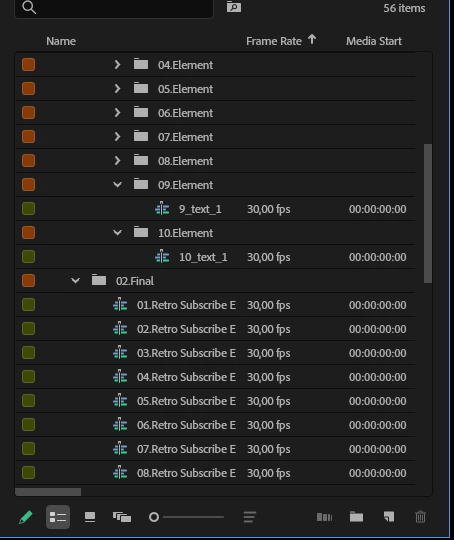
 

I also tried to import them via the "Install motion graphics" button and also the "Add aditional folder" buttons in the Graphics templates window and that doeasnt seem to work either?! Im confused......


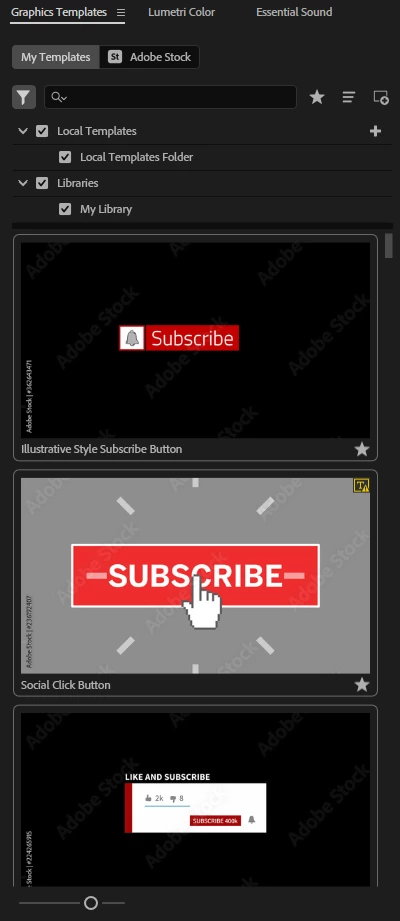
I want all my templates to be shown like this:
 

Correct answer Stan Jones

@matsc12270844,


This is not my area. But I don't think you have "mogrts," with a .mogrt extension that can be imported to the Motion graphics template library. This appears to be an actual project made as a "template," and you have to do a lot of work to edit. But it can then be used in your projects as you are describing.


I see this video on the artlist site:

https://www.youtube.com/watch?v=98yvNZuJd_Y


It says nothing about putting this in the library.


Stan


10 replies

JonesVid
Community Expert
Community Expert
June 29, 2025

Sorry .... finger trouble today on typing web address.

The correct link for Videohive.net Premiere Templates/MOGRT is https://videohive.net/category/premiere-pro-templates


Thanks to @Peru Bob for alerting me to this.

Peru Bob
Community Expert
Community Expert
June 29, 2025

@JonesVid 

Your link doesn't go to VideoHive.

It goes to https://www.video.net/lander

JonesVid
Community Expert
Community Expert
June 29, 2025

Productions is certainly something worth looking at for easy re-use of material/existing projects across new projects.

I'm only working alone (not in collaboration mode) but its useful for linking media without repeating everything in each project you create. This is ideal across creating multiple projects that share media and keeping your projects much simpler.


If you are looking for other 'pure MOGRT templates' that you can import into your library take a look at www.videohive.net - part of Envato Market. Select the Premiere Pro tab to browse. You can buy a template as a one off. Its just another source you could look at.  You might find something useful.

I always go for templates that have a reasonable amount of sales and good support reviews. 

I have used some MOGRT templates for things like project openers/slideshows etc where you simply populate media and adjust settings. In some cases things like Fonts are fixed in Premiere but these can often be edited in After Effects relatively easily even if you are a novice.


MyerPj
Community Expert
Community Expert
June 28, 2025

<< I'm entry level when it comes to editing>>

Maybe when you progress on a bit, you'll understand better.

In the meantime it would be good to know that you can have multiple projects open at the same time. So, you can setup your transitions and Artlist items in a project one time, then load it anytime you need something from there, and just drag and drop it into your working project or timeline.


An even better place to use would be Premiere Pro "Productions", a different approach to the similar issue. 

Here's a couple of links:

https://blog.frame.io/2024/09/30/ultimate-guide-to-premiere-pro-productions/

https://helpx.adobe.com/premiere-pro/using/production-panel.html


Community Expert
June 28, 2025

This is a Premiere Pro Template not a mogrt.

you will have to follow the creator's tutorial in the help file

in order to be able to customize it. and yes you will have

to go for each sequence and replace with your own assets.

This is called Template Customization.

Known Participant
June 28, 2025

So I can never save them as mogrts in my Ghaphics library then? I just dont understand, this is just one pack with call to action templates, lets say I also wanna use Artlist video and maybe sound transition packs etc etc, then I have to drag something like 5-6 Packs with multiple subfolders into each and every video project I make?! Instead of just having the pre-loaded into the library section.


For me this makes zero sense.

MyerPj
Community Expert
Community Expert
June 27, 2025

These are Sequences, they go only in a project:


MyerPj
Community Expert
Community Expert
June 27, 2025

Are these below the files you want to see in Graphics Templates?

The "0? Retro Subscribe E...." etc.

Those are all sequences, you drag them from the project folder over the top of where you want it, usually like a transition.


Known Participant
June 27, 2025

Yeah, I got some progression. I have found a way to get them both as a own sequence next to my project sequence:


And I also got it to work to then drag the template over my video project:

So thats pretty good but I dont wanna have to drag all the folders into every one of my future video projects and find the right looking template and then drag that over. I would really like to import them all so I just can see, find and use them in my Graphics panel library over here:

Feels like there must be a way to do that?!


Stan Jones
Community Expert
Stan JonesCommunity ExpertCorrect answer
Community Expert
June 28, 2025

@matsc12270844,


This is not my area. But I don't think you have "mogrts," with a .mogrt extension that can be imported to the Motion graphics template library. This appears to be an actual project made as a "template," and you have to do a lot of work to edit. But it can then be used in your projects as you are describing.


I see this video on the artlist site:

https://www.youtube.com/watch?v=98yvNZuJd_Y


It says nothing about putting this in the library.


Stan


Peru Bob
Community Expert
Community Expert
June 27, 2025

Can you open the project file and post screenshots of the Project Panel with all folders expanded and a screenshot of the sequence?

Known Participant
June 27, 2025

Its just endless "Roadsign" files that I cant drag over to the timeline.

Before I drag the folders into Premiere its mostly a bunch of short mp4 video files and 1 .prproj file.


And I want to be able to save them up in this panel:


MyerPj
Community Expert
Community Expert
June 27, 2025

Are these below the files you want to see in Graphics Templates?


Known Participant
June 27, 2025

Not really. They are only short mp4 videos of one part of the template. for example just a click hand moving clinging on invisible boxes. So its a small part of the template itself. Maybe 5-6 of them makes up the entire template. But I want them saved like one file in my Graphics template library like the other "Subscribe" templtes I showed in the screenshot above.

Peru Bob
Community Expert
Community Expert
June 27, 2025

Does the Help folder show you how to install them?

Known Participant
June 27, 2025

Unforttunatly not. Help folder is just a short video of someone dragging the files to the project window and I already tried that.

Peru Bob
Community Expert
Community Expert
June 27, 2025

I think that in the Assets folder, you will have to install each Mogrt individually.

Can you post a screenshot of what Windows Explorer shows when you open the Assets folder?

Known Participant
June 27, 2025

Help folder video:


You are supposed to be able to install them so you can see them in youre Graphics panel.