


lp599
Participant
May 18, 2018
解決済み

Missing Options for "profile" and "level" In My Export Settings

  • May 18, 2018
  • 返信数 1.
  • 539 ビュー

Hi, in new to premiere so sorry if the answer is super simple.

I'm running the newest version on the creative cloud and but basically I am supposed to have this:
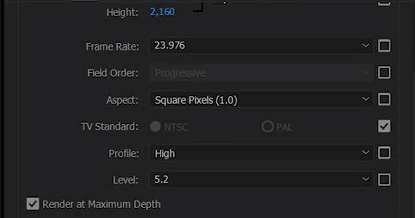
but I have this :
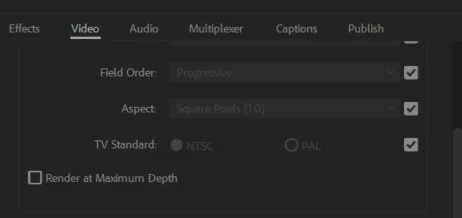
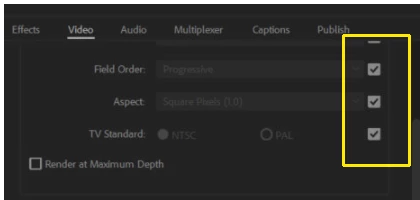
Im missing the options for "profile" and "level" , does anyone know how to get them back.
    このトピックへの返信は締め切られました。
    解決に役立った回答 Meg The Dog

    You need to uncheck the "Match this property to source video" boxes for the parameters you want to control"

    MtD

    返信数 1

    Meg The Dog解決!
    Inspiring
    May 18, 2018

    You need to uncheck the "Match this property to source video" boxes for the parameters you want to control"

    MtD

    lp599
    lp599作成者
    Participant
    May 18, 2018

    thanks a million ! I did what you said and they showed up under a new tab called "encoding settings"