


Participating Frequently
October 23, 2013
解決済み

Premiere Pro CC Crashing At The Splash Screen - OSX Mavericks

  • October 23, 2013
  • 返信数 12.
  • 40065 ビュー

Hello,

I'm having difficulty using Premiere Pro CC as it won't allow me to get past the splash screen. I've just updated to OSX Mavericks and apparently Premiere is compatible with Mavericks. However it appears to be crashing at every instance that I load it up, it flashes the splash screen and it crashes, giving me an error report.

I am a new member to these forums, so I apologise if I am asking in the wrong area.

I have the crash report here from Apple.

Message was edited by: Kevin Monahan. Crash log in attached doc. Please don't copy/paste crash logs in forum posts, attach them as separate documents. Thank you.
このトピックへの返信は締め切られました。
解決に役立った回答 jason wingrove

Ok despite almost daily updates from CC having no luck i seem to have SOLVED my crash on startup issue for now

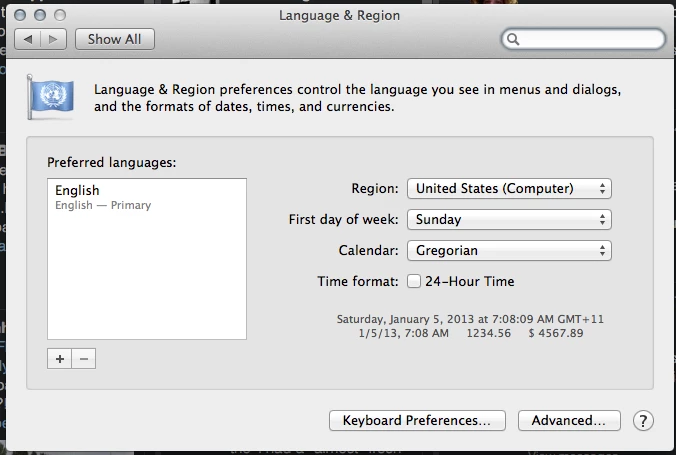
For me at least the fix is to change the system region to ‘United States Computer’ And Pref Language to ‘English'

返信数 12

michaelw2168007
Participant
June 20, 2015

Hello lately I've been trying to install the trial version of adobe premire pro cc and I keep getting a windows message that does not allow me to install the program. I need help from one of you I tried many things nothing worked.

May 9, 2014

I have been searching for a fix for this for awhile and I found the answer!! Hallelujah!!  So...go into your user library > application support > adobe and label the folder "old.adobe." Then go to user library > preferences > adobe and label that folder "old.adobe."  Then go to your documents > adobe and bring up the info...change all the permissions to read and write and in the settings drop down choose "apply to enclosed items."  Then select your documents folder, bring up the info, change the read and write settings again and choose the apply to enclosed items and WALLA!!! You're programs should work again!  Worked like a charm for me!!

Participating Frequently
March 30, 2015

NO WAYYY!

I have no words to say how much I'm thankful for you!

Participating Frequently
December 20, 2013

I've done everything mentioned here (changed language to English (and even tried US English), set my region to United States (Computer) (and even tried United States), unistalling, reinstalling, etc.) to no avail. I'm coming up on 9 hours doing this, and I need to find a solution.

I'm on a brand new iMac. Just brought all of my stuff over, updated CC through the downloader and now PP and AE won't open. Both fordifferent reason. PP just keeps crashing on the splash page, and AE says that it can't modify a folder.

What should I do? What do you need from me?

Inspiring
December 20, 2013

Last week an adobe tech support member helped me through this issue.  Here's what we did and it has solved my issue from the post above.

go to User/documents/adobe/premierepro/7.0


inside this folder are two folders called 'Profile-Creative cloud-"  and 'Profile-username'

- Re-name both of these folders, they contain your prefs and stuff.  Don't trash them.  add _OLD to the end or something.

-reboot computer and relaunch Premiere.  It will create new versions of these folders with new prefs files.  You can then cherry pick the old folders and add back some of your settings and prefs if you must.  But my advice is to rebuild all that crap. 

This solved my problem.  I hope it helps with yours.

JP

Participating Frequently
December 21, 2013

Thanks JP, but it's not working. I only have one folder there anyway... Why do you have two? Am I missing some Creative Cloud piece?

Participant
October 28, 2013

Ok despite almost daily updates from CC having no luck i seem to have SOLVED my crash on startup issue for now

For me at least the fix is to change the system region to ‘United States Computer’ And Pref Language to ‘English'

Participating Frequently
October 28, 2013

This has worked for me too. Has to be just plain English (Not American, or Canadian, etc), and it seems you need to use United States (Computer).

Crazy!

Participating Frequently
October 28, 2013

Thank you!

This... plain English (Not American, or Canadian, etc), and it seems you need to use United States (Computer)... works.

Participant
October 26, 2013

Hi Charles,

1. Yes from the updater.

2. Yes the same language settings (British English).

3. I'm using 7.0.1

4. Yes Pr CC worked on the same machine just before the update.

The same issue with Pr extended to Prelude.

After Effects won't work with OS X 10.9 - saying you can't use it with this version of OS X.

As far as I have checked all non-video production related apps seems to be working fine without the need to change the language settings - such as Lr, Au, etc

Changing the language settings to (US) English fixed the issue with both Pr and Pl.

Thanks for your help. When do you think a bug fix will be made available to allow us to revert back to our original language settings?

Chris

Charles VW
Inspiring
October 25, 2013

Hi all, thanks for the screenshots.  Some more questions

  1. How did you install Mavericks?  I'm assuming from the updater
  2. What were your language settings before you updated? I'm assuming the same, although the dialogs were different in 10.7/10.8
  3. What version of Premiere Pro CC are you using (7.0 or 7.0.1)?
  4. Did Premiere Pro CC work on the same machine, just before the Mavericks update?
Participating Frequently
October 25, 2013

Hi Charles,

1. Yes from the updater.

2. Yes the same language settings.

3. I'm using 7.01.

4. Yes Premiere Pro CC worked on the same machine just before the update.

Participating Frequently
October 25, 2013

Same problem here. Strangely, I was able to get Premiere Pro CC to open up by going through After Effects, using Dynamic Link to do a new premiere pro sequence of anything, and then watching closely and having to time my click. After about 4 attempts I have Premiere Pro CC open. I've done this a few times, and it doesn't always work (?), so now I'm afraid to close it.

Participating Frequently
October 25, 2013

How do I add the attachment for the Crash Logs etc?

Participating Frequently
October 25, 2013

Participant
October 25, 2013

Same here, Late 09 MacPro, even with latest pushed update still crashes on launch

NOT

HAPPY

Participating Frequently
October 23, 2013

Same issue here on Mavericks. 13A598. Developer. GM 1

However CC Client just pushed a 7.01 update and it is still failing. i.e. crashing on startup (splash graphic only). I have a second machine with a fresh GM2 install of Mavericks that I am waiting to try. Will post result as soon as that is up.

Participating Frequently
October 24, 2013

Same issue 7.01 still crashes on the splash screen. imac i7 2009.

Mark Mapes
Participating Frequently
October 24, 2013

Thanks for the reports, all, and sorry to hear that you're having this problem. The crash report that SWDoctor posted points to a problem identifying something about the system language settings. Two things from all of you would really help us nail this down, both to come up with a fix and to recommend a workaround until that fix is released.

  1. Post the log file "Premiere Pro Log.txt."
    PPRO does not write this log by default. To prime the pump, go to ~/Library/Preferences/Adobe/Premiere Pro/7.0/logs and create a file by the name of "Premiere Pro Log.txt". It doesn't matter what, if anything is in that initial file because PPRO will write a new one on launch. So just launch the app, and then please post the new log file.
  2. Post screenshots of the main Language&Region dialog from System Preferences. Also click "Advanced" and grab a screenshot of the General tab.

Several of our QEs spent hours yesterday attempting to reproduce this issue to no avail. So we suspect that there's something different about the language settings on the systems where Premiere is crashing.

Thanks for your assistance in helping us nail this down.

Sandeep Singh
Participating Frequently
October 23, 2013

Hi SWDoctor,

Thanks for choosing Adobe forums

Please try to uninstall and reinstall Premiere Pro CC.

and then try to launch.

Thanks

Sandeep

jasonvp
Inspiring
October 23, 2013

Sandeep Singh wrote:

Please try to uninstall and reinstall Premiere Pro CC.

and then try to launch.

And IF that works, I'd recommend folks on Macs do a complete re-install with Mavericks.  That means formatting your HD and reinstalling from scratch.  Apple's OS upgrades are fairly bullet-proof, but they're not 100% so.  Something will always jump up and bite you in the backside when you least expect it.

Going between dot-revisions (10.X.2 to 10.X.3) isn't a problem.  Those are easy patches.  But going whole versions (10.8 to 10.9) is where you'll want to format and re-install.

SWDoctor作成者
Participating Frequently
October 23, 2013

It hasn't worked for both scenarios. I have reinstalled OSX Mavericks as well as Premiere but to no avail.

October 23, 2013

I have the same problem - 2013 MacBook Air 11"  10% of the time it will actually launch, but then crashes shortly after.