



SocialValley
Known Participant
August 7, 2020
解決済み

How do I know a specific location of a nested and cut video in the primary timeline

  • August 7, 2020
  • 返信数 2.
  • 632 ビュー

Scenario: 

I have a couple of cutted videos, they are all nested..

I have an instruction from my manager to cut a specific part (For example: from 5:22 minutes to 6:22)

I added a lot of extra media such as intro video and other stuff, so 5:22 isn't the same for me anymore.. 

I have to go into the nested video and check what is the original 5:22 - 6:22 part


The question:

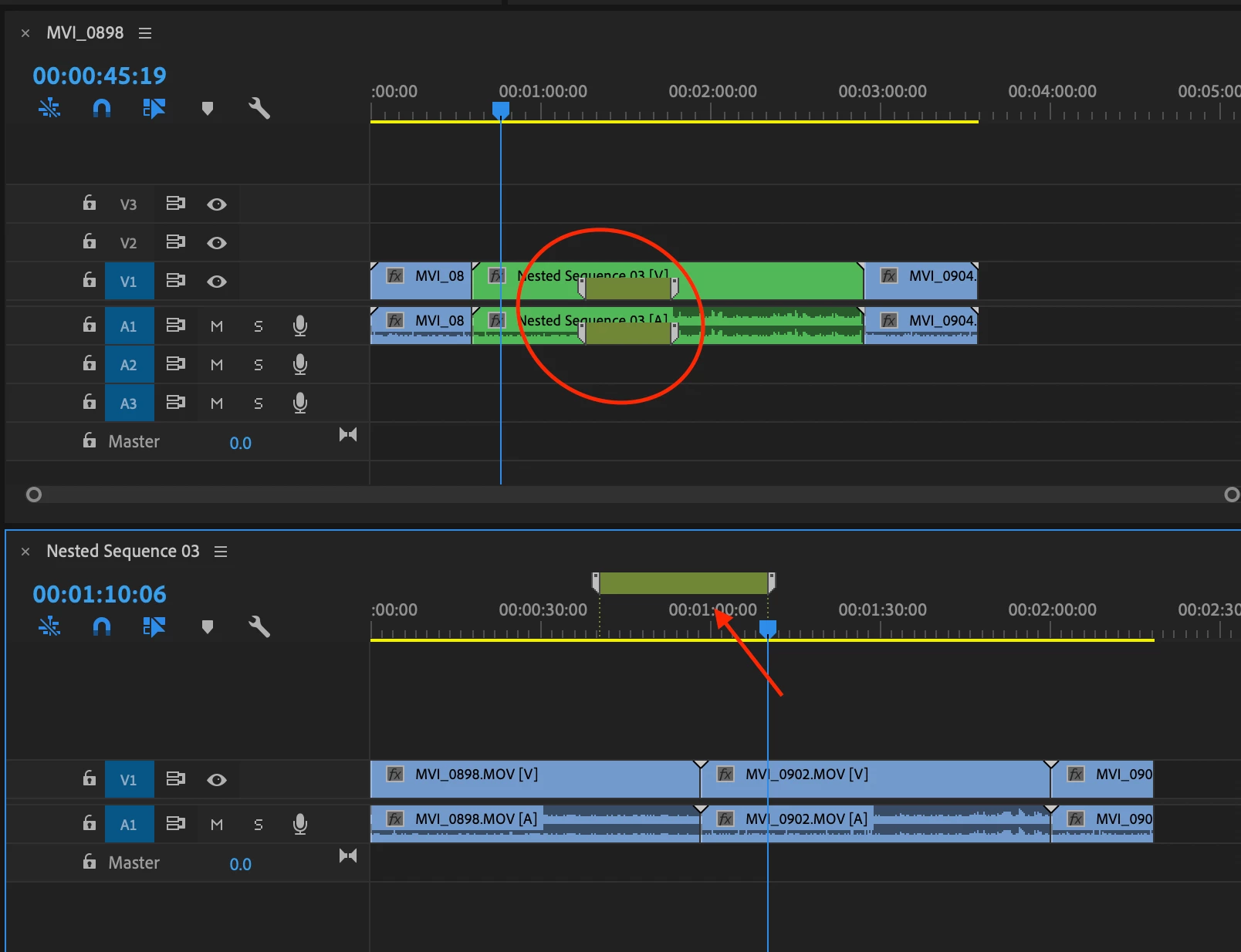
How can I go to that nested video and mark 5:22 - 6:22 part and see where it is exactly on the whole timeline project?
このトピックへの返信は締め切られました。
解決に役立った回答 Mike Dziennik

If you add a 'sequence marker' with a duration (double click on it an adjust the duration control) on your nested timeline, it wil appear as a 'clip marker' on the parent timeline. Make sure you have "Show Clip Markers" enabled in the wrench menu.

返信数 2

Mike Dziennik
Community Expert
Mike DziennikCommunity Expert解決!
Community Expert
August 7, 2020

If you add a 'sequence marker' with a duration (double click on it an adjust the duration control) on your nested timeline, it wil appear as a 'clip marker' on the parent timeline. Make sure you have "Show Clip Markers" enabled in the wrench menu.

SocialValley
SocialValley作成者
Known Participant
August 8, 2020

Thanks, that did it for me!

R Neil Haugen
Legend
August 7, 2020

Do you mean 5:22 of the nested sequence, or 5:22 of the current sequence with the various nests added?


Neil

Everyone's mileage always varies ...