

Participant
November 10, 2025
解決済み

diff page numbers for ToC and actual content in PDF

  • November 10, 2025
  • 返信数 4.
  • 229 ビュー
How to add diff page numbers for ToC and actual content in PDF in Robohelp?

    解決に役立った回答 Peter Grainge

    Solution found with thanks to my Adobe contact. 🙂


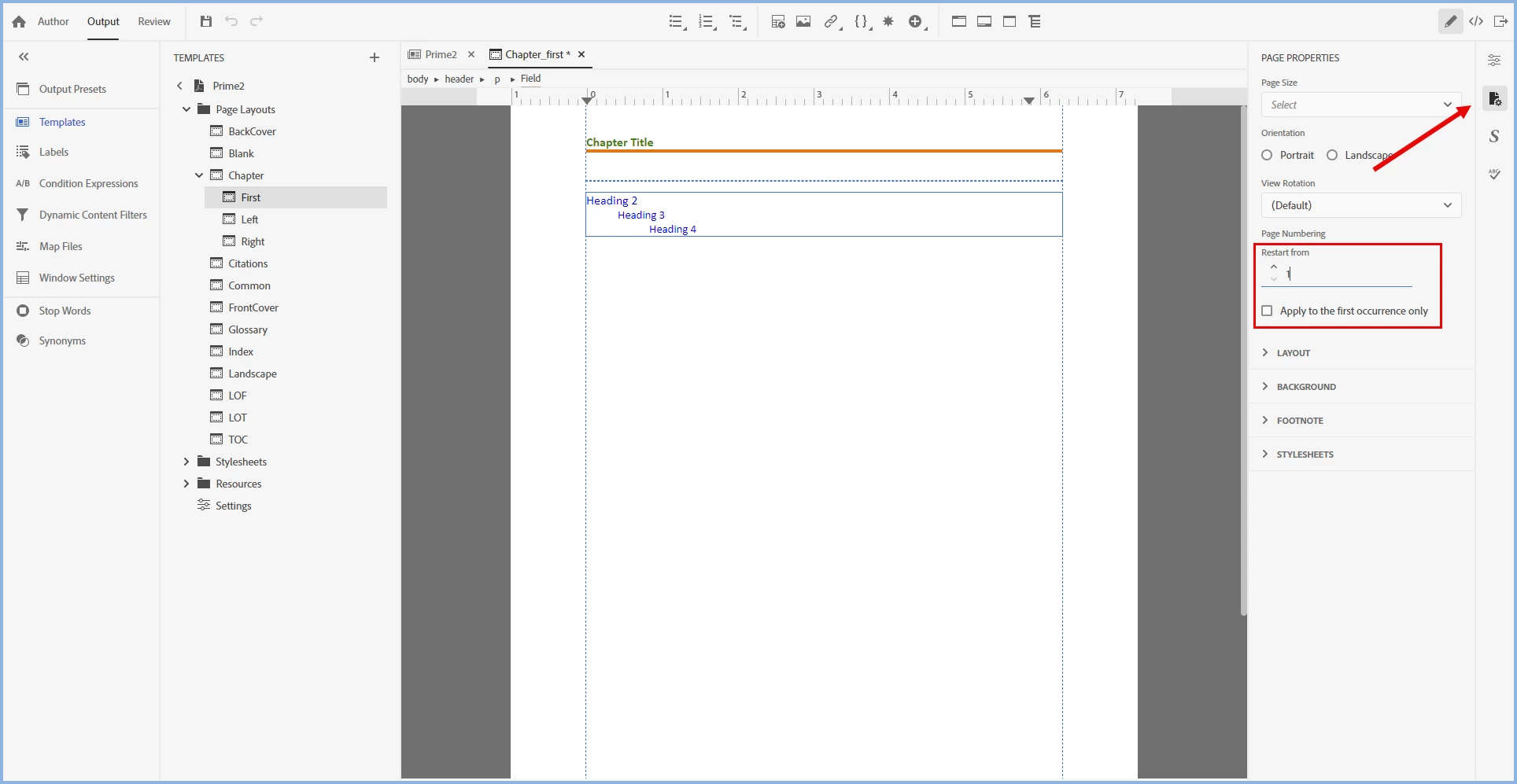
    1. Open the template and go to Chapter > First Page.
    2. Click the Page Properties icon.
    3. Reset the numbering to start at 1.
    4. Unless you want each chapter to have its own number, select the Apply to First Instance check box.

    If you have added the Total Pages to the template, that will also work correctly.
     

    ________________________________________________________

    My site www.grainge.org includes many free Authoring and RoboHelp resources that may be of help.


    返信数 4

    Peter Grainge
    Community Expert
    Peter GraingeCommunity Expert解決!
    Community Expert
    November 11, 2025

    Solution found with thanks to my Adobe contact. 🙂


    1. Open the template and go to Chapter > First Page.
    2. Click the Page Properties icon.
    3. Reset the numbering to start at 1.
    4. Unless you want each chapter to have its own number, select the Apply to First Instance check box.

    If you have added the Total Pages to the template, that will also work correctly.


    ________________________________________________________

    My site www.grainge.org includes many free Authoring and RoboHelp resources that may be of help.


    Use the menu (bottom right) to mark the Best Answer or Highlight particularly useful replies. Found the answer elsewhere? Share it here.
    teja_1997作成者
    Participant
    November 11, 2025

    Thanks for the detailed explanation

    Peter Grainge
    Community Expert
    Community Expert
    November 10, 2025

    I have tried everything I can think of with no luck. As I have said, I have asked an Adobe contact and I think if anyone knows, they will.


    However, if you prefer, you can go to Adobe Support. See https://helpx.adobe.com/contact/enterprise-support.other.html#robohelp for your Adobe Support options. The email link tcssup@adobe.com is recommended as it reaches a team dedicated to Technical Communication Suite products including RoboHelp.

    ________________________________________________________

    My site www.grainge.org includes many free Authoring and RoboHelp resources that may be of help.


    Use the menu (bottom right) to mark the Best Answer or Highlight particularly useful replies. Found the answer elsewhere? Share it here.
    teja_1997作成者
    Participant
    November 11, 2025

    Sure thank you!

    Peter Grainge
    Community Expert
    Community Expert
    November 10, 2025

    I think someone asked the same question a week or so back and the conclusion was it can't be done. Take a look and post back.


    I'll check again but likely not until tomorrow.

    ________________________________________________________

    My site www.grainge.org includes many free Authoring and RoboHelp resources that may be of help.


    Use the menu (bottom right) to mark the Best Answer or Highlight particularly useful replies. Found the answer elsewhere? Share it here.
    teja_1997作成者
    Participant
    November 10, 2025

    I tried but I am not able to do it. Is it not possible only in Robohelp? Can we do it in other tools like Madcap Flare?

    Jeff_Coatsworth
    Community Expert
    Community Expert
    November 10, 2025

    Try contacting the RH folks or use the Tracker (https://tracker.adobe.com/) to log a wishlist request.

    Peter Grainge
    Community Expert
    Community Expert
    November 10, 2025

    You haven't said which version of RoboHelp you are using. Please always start a thread with this information. Go to Help > About to get the full version number.


    Why would you want different page numbers in the TOC? Maybe that's not quite what you mean?

    ________________________________________________________

    My site www.grainge.org includes many free Authoring and RoboHelp resources that may be of help.


    Use the menu (bottom right) to mark the Best Answer or Highlight particularly useful replies. Found the answer elsewhere? Share it here.
    teja_1997作成者
    Participant
    November 10, 2025

    Thanks for the reply!
    I am using Version 2022.6.34. 

    In my PDF document, Chapter 1 is starting from Page 3, while Cover Page and ToC are in page 1 & 2. I need Chapter 1 to start from page 1. I want to assign roman numbering for ToC pages. (We can do this in MS Word through section break) But, I am not aware of how to do it in Robohelp. Please help me do it. Thanks!